PER76 Digital Watch Face
Persona Watch Face- USK ab 0 JahrenAltersfreigabe
- PersonalisierungKategorie
- 23.10.2026Aktualisiert
- 3,09 €Preis
Verlinkt auf den offiziellen Google Play-Eintrag von com.watchfacestudio.per76. Zuletzt geprüft am 13.11.2026.
Über diese App
Automatische Übersetzung von Google. Originalsprache: Englisch (Vereinigte Staaten).
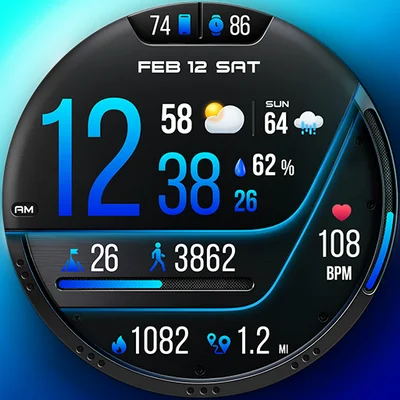
PER76 Digitales Zifferblatt: datenreiche Benutzeroberfläche und reibungslose Leistung
Das digitale Zifferblatt PER76 ist ein modernes Zifferblatt für Wear OS.
Klares Design, datenreiche Benutzeroberfläche und flüssige Performance für den täglichen Gebrauch.
Entwickelt für Nutzer, die Wert auf gute Lesbarkeit, funktionale Daten und individuelle Anpassungsmöglichkeiten ohne visuelle Ablenkung legen.
Hauptfunktionen
• Digitale Uhrzeit (12/24 Std.)
• Wetter & Vorhersage
• Schritte, Tagesziel & Distanz
• Herzfrequenz
• Kalorien & Stockwerke
• Akkustand von Smartphone & Uhr
• UV-Index, Regenwahrscheinlichkeit
• Mondphase, Sonnenaufgang & Sonnenuntergang
• Zeitzone & Barometer
• Nächster Kalendereintrag
• Always-On-Display (AOD)
Anpassungsoptionen
• 10 Hintergründe
• 20 Farben
• 5 anpassbare Komplikationen
• 10 einstellbare AOD-Helligkeitsstufen
❓ Probleme mit Wetterinformationen
Dies hängt in der Regel damit zusammen, wie die Uhr die Wetterdaten abruft.
Bitte befolgen Sie diese Schritte:
1. Installieren Sie „Simple Weather“ auf Ihrem Smartphone und Ihrer Smartwatch.
https://play.google.com/store/apps/details?id=com.thewizrd.simpleweather
2. Stellen Sie das Aktualisierungsintervall auf 1 Stunde ein.
3. Warten Sie einige Minuten, bis die Daten synchronisiert sind. Sollte das Problem weiterhin bestehen, kontaktieren Sie mich bitte per E-Mail.
Akkustand Ihres Smartphones
Sie benötigen die Begleit-App „Phone Battery Complication“ auf Ihrem Smartphone und Ihrer Smartwatch:
https://play.google.com/store/apps/details?id=com.weartools.phonebattcomp
Weitere Komplikationen wie Akkuanzeige, Kalorienverbrauch oder Etagenanzahl finden Sie in der Installationsanleitung:
https://persona-wf.com/installation/
Einfache Anpassung
Halten Sie das Zifferblatt gedrückt.
Tippen Sie auf „Anpassen“.
Legen Sie Farben, Komplikationen und Daten fest.
Always-On-Display
Optimiertes Always-On-Display mit einstellbarer Helligkeit.
Die Farben bleiben mit dem Hauptbildschirm konsistent.
Unterstützte Geräte
Kompatibel mit allen Wear OS-Geräten (API-Level 35+), einschließlich:
SAMSUNG: Galaxy Watch Ultra 2 – Ultra, Watch 9 – 8 – 7 – 6 – 5 – 4 (Classic & FE)
GOOGLE: Pixel Watch 5 – 4 – 3 – 2 – 1
ONEPLUS / OPPO: OnePlus Watch 4 – 3 – 2R – 2, OPPO Watch X3 – X2 – X
XIAOMI: Xiaomi Watch 5 – 2 Pro – 2
FITBIT: Fitbit Ace LTE
Support:
support@persona-wf.com
Weitere Zifferblätter:
https://persona-wf.com
Design: Ayla Gokmen
PERSONA-Zifferblatt
Originaltext anzeigen
PER76 Digital Watch Face is a modern digital watch face designed for Wear OS.
Clean layout, data-rich interface and smooth performance for everyday use.
Designed for users who want clear readability, functional data and customization without visual clutter.
Key Features
• Digital time 12/24h
• Weather & forecast
• Steps, daily goal & distance
• Heart rate
• Calories & floors
• Phone & watch battery
• UV index, rain probability
• Moon phase, sunrise & sunset
• Time zone & barometer
• Next calendar event
• Always-On Display AOD
Customization Options
• 10 backgrounds
• 20 colors
• 5 customizable complications
• Adjustable 10 AOD dim levels
❓ Troubleshooting Weather Information
This is usually related to how the watch fetches weather data.
Please follow these steps:
1- Install “Simple Weather” on both phone and watch
https://play.google.com/store/apps/details?id=com.thewizrd.simpleweather
2- Set its update interval to 1 hour
3- Wait a few minutes for data to sync
If it continues, please email me.
Phone Battery Level
You’ll need to install a companion app on both your phone and watch:
Phone Battery Complication
https://play.google.com/store/apps/details?id=com.weartools.phonebattcomp
For additional complications, such as phone battery, calories or floors, check the setup guide:
https://persona-wf.com/installation/
Easy Customization
Touch and hold the watch face.
Tap “Customize”.
Set colors, complications, and data.
Always-On Display
Optimized AOD with adjustable dim levels.
Colors remain consistent with the main screen.
Supported Devices
Compatible with all Wear OS devices (API Level 35+), including:
SAMSUNG: Galaxy Watch Ultra 2 - Ultra, Watch 9 - 8 - 7 - 6 - 5 - 4 (Classic & FE)
GOOGLE: Pixel Watch 5 - 4 - 3 - 2 - 1
ONEPLUS / OPPO: OnePlus Watch 4 - 3 - 2R - 2, OPPO Watch X3 - X2 - X
XIAOMI: Xiaomi Watch 5 - 2 Pro - 2
FITBIT: Fitbit Ace LTE
Support:
support@persona-wf.com
More watch faces:
https://persona-wf.com
Designed by Ayla Gokmen
PERSONA Watch Face
Datensicherheit
Was Persona Watch Face bei Google Play zu den Daten angibt, die diese App erfasst und weitergibt.
- Keine Daten werden mit Drittunternehmen oder -organisationen geteiltWeitere Informationen dazu, wie Entwickler Angaben zur Weitergabe von Daten machen
- Keine Daten erhobenWeitere Informationen dazu, wie Entwickler Angaben zur Datenerhebung machen
Neue Funktionen
23.10.2026
• Major UI overhaul with enhanced readability and vibrant color schemes
• Expanded color options and custom slot enhancements
• Redesigned Always-On Display for maximum visibility and style
• Updated with the latest Watch Face Format (WFF) for smoother animations
• Critical system updates for better compatibility and performance
Kontakt zum Entwickler
- Websitepersona-wf.com
- E-Mailsupport@persona-wf.com
- Datenschutzerklärungiubenda.com
- AdresseALACAATLI MAH. SİNPAŞ KMEV. NO:E1 BLK 15/1 06810 MERKEZ ÇANKAYA/Ankara Türkiye
Informationen
- Angeboten von
- Persona Watch Face
- Kategorie
- Personalisierung
- Aktualisiert
- 23.10.2026
- Veröffentlicht
- 12.03.2026
- Altersfreigabe
- USK ab 0 Jahren
- Preis
- 3,09 €
- Paketname
- com.watchfacestudio.per76