PER76 Digital Watch Face
Persona Watch Face- PEGI 3Yaş sınırı
- KişiselleştirmeKategori
- 23.10.2026Güncellendi
- ₺159,99Fiyat
com.watchfacestudio.per76 için resmi Google Play sayfasına bağlanır. Son kontrol: 13.11.2026.
Bu uygulama hakkında
Google tarafından otomatik çeviri. Orijinal dil: İngilizce (Amerika Birleşik Devletleri).
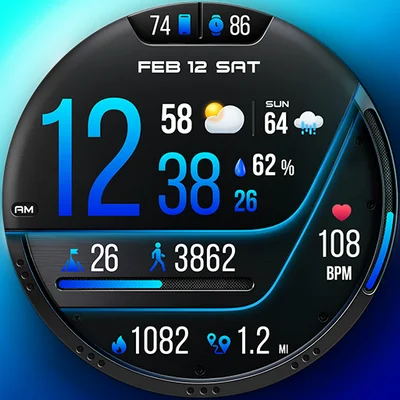
PER76 Dijital Saat Kadranı, veri açısından zengin arayüzü ve sorunsuz performansıyla öne çıkıyor.
PER76 Dijital Saat Kadranı, Wear OS için tasarlanmış modern bir dijital saat kadranıdır.
Temiz düzen, veri açısından zengin arayüz ve günlük kullanım için sorunsuz performans.
Görsel karmaşa olmadan net okunabilirlik, işlevsel veri ve özelleştirme isteyen kullanıcılar için tasarlanmıştır.
Temel Özellikler
• Dijital saat 12/24 saat
• Hava durumu ve tahmin
• Adımlar, günlük hedef ve mesafe
• Kalp atış hızı
• Kalori ve katlar
• Telefon ve saat pili
• UV indeksi, yağmur olasılığı
• Ay evresi, gün doğumu ve gün batımı
• Saat dilimi ve barometre
• Sonraki takvim etkinliği
• Sürekli Açık Ekran (AOD)
Özelleştirme Seçenekleri
• 10 arka plan
• 20 renk
• 5 özelleştirilebilir komplikasyon
• Ayarlanabilir 10 AOD karartma seviyesi
❓ Hava Durumu Bilgilerinde Sorun Giderme
Bu genellikle saatin hava durumu verilerini nasıl aldığıyla ilgilidir.
Lütfen şu adımları izleyin:
1- Hem telefonunuza hem de saatinize “Simple Weather” uygulamasını yükleyin
https://play.google.com/store/apps/details?id=com.thewizrd.simpleweather
2- Güncelleme aralığını 1 saate ayarlayın
3- Verilerin senkronize olması için birkaç dakika bekleyin
Sorun devam ederse lütfen bana e-posta gönderin.
Telefon Pil Seviyesi
Hem telefonunuza hem de saatinize bir yardımcı uygulama yüklemeniz gerekecek:
Telefon Pil Komplikasyonu
https://play.google.com/store/apps/details?id=com.weartools.phonebattcomp
Telefon pili, kalori veya kat sayısı gibi ek komplikasyonlar için kurulum kılavuzuna bakın:
https://persona-wf.com/installation/
Kolay Özelleştirme
Saat kadranına dokunup basılı tutun.
“Özelleştir”e dokunun.
Renkleri, komplikasyonları ve verileri ayarlayın.
Sürekli Açık Ekran
Ayarlanabilir karartma seviyelerine sahip optimize edilmiş AOD.
Renkler ana ekranla tutarlı kalır.
Desteklenen Cihazlar
Tüm Wear OS cihazlarıyla (API Seviyesi 35+) uyumludur, bunlar arasında şunlar bulunur:
SAMSUNG: Galaxy Watch Ultra 2 - Ultra, Watch 9 - 8 - 7 - 6 - 5 - 4 (Classic & FE)
GOOGLE: Pixel Watch 5 - 4 - 3 - 2 - 1
ONEPLUS / OPPO: OnePlus Watch 4 - 3 - 2R - 2, OPPO Watch X3 - X2 - X
XIAOMI: Xiaomi Watch 5 - 2 Pro - 2
FITBIT: Fitbit Ace LTE
Destek:
support@persona-wf.com
Daha fazla saat kadranı:
https://persona-wf.com
Ayla Gokmen tarafından tasarlanmıştır
PERSONA Saat Kadranı
Orijinal metni göster
PER76 Digital Watch Face is a modern digital watch face designed for Wear OS.
Clean layout, data-rich interface and smooth performance for everyday use.
Designed for users who want clear readability, functional data and customization without visual clutter.
Key Features
• Digital time 12/24h
• Weather & forecast
• Steps, daily goal & distance
• Heart rate
• Calories & floors
• Phone & watch battery
• UV index, rain probability
• Moon phase, sunrise & sunset
• Time zone & barometer
• Next calendar event
• Always-On Display AOD
Customization Options
• 10 backgrounds
• 20 colors
• 5 customizable complications
• Adjustable 10 AOD dim levels
❓ Troubleshooting Weather Information
This is usually related to how the watch fetches weather data.
Please follow these steps:
1- Install “Simple Weather” on both phone and watch
https://play.google.com/store/apps/details?id=com.thewizrd.simpleweather
2- Set its update interval to 1 hour
3- Wait a few minutes for data to sync
If it continues, please email me.
Phone Battery Level
You’ll need to install a companion app on both your phone and watch:
Phone Battery Complication
https://play.google.com/store/apps/details?id=com.weartools.phonebattcomp
For additional complications, such as phone battery, calories or floors, check the setup guide:
https://persona-wf.com/installation/
Easy Customization
Touch and hold the watch face.
Tap “Customize”.
Set colors, complications, and data.
Always-On Display
Optimized AOD with adjustable dim levels.
Colors remain consistent with the main screen.
Supported Devices
Compatible with all Wear OS devices (API Level 35+), including:
SAMSUNG: Galaxy Watch Ultra 2 - Ultra, Watch 9 - 8 - 7 - 6 - 5 - 4 (Classic & FE)
GOOGLE: Pixel Watch 5 - 4 - 3 - 2 - 1
ONEPLUS / OPPO: OnePlus Watch 4 - 3 - 2R - 2, OPPO Watch X3 - X2 - X
XIAOMI: Xiaomi Watch 5 - 2 Pro - 2
FITBIT: Fitbit Ace LTE
Support:
support@persona-wf.com
More watch faces:
https://persona-wf.com
Designed by Ayla Gokmen
PERSONA Watch Face
Veri güvenliği
Bu uygulamanın topladığı ve paylaştığı veriler hakkında Persona Watch Face tarafından Google Play üzerinde yapılan beyan.
- Üçüncü taraflarla veri paylaşımı yokGeliştiricilerin, veri paylaşımını nasıl beyan ettikleri hakkında daha fazla bilgi edinin
- Veri toplanamadıGeliştiricilerin, veri toplamayı nasıl beyan ettikleri hakkında daha fazla bilgi edinin
Yenilikler
23.10.2026
• Major UI overhaul with enhanced readability and vibrant color schemes
• Expanded color options and custom slot enhancements
• Redesigned Always-On Display for maximum visibility and style
• Updated with the latest Watch Face Format (WFF) for smoother animations
• Critical system updates for better compatibility and performance
Geliştirici iletişim bilgileri
- Web sitesipersona-wf.com
- E-postasupport@persona-wf.com
- Gizlilik politikasıiubenda.com
- AdresALACAATLI MAH. SİNPAŞ KMEV. NO:E1 BLK 15/1 06810 MERKEZ ÇANKAYA/Ankara Türkiye
Bilgiler
- Sunan
- Persona Watch Face
- Kategori
- Kişiselleştirme
- Güncellendi
- 23.10.2026
- Yayın tarihi
- 12.03.2026
- Yaş sınırı
- PEGI 3
- Fiyat
- ₺159,99
- Paket adı
- com.watchfacestudio.per76