PER76 Digital Watch Face
Persona Watch Face- 3 歳以上対象年齢
- カスタマイズカテゴリ
- 2026/10/23更新日
- ¥520価格
com.watchfacestudio.per76のGoogle Play公式ページにリンクしています。最終確認:2026/11/13。
このアプリについて
Googleによる英語 (アメリカ合衆国)からの自動翻訳です。
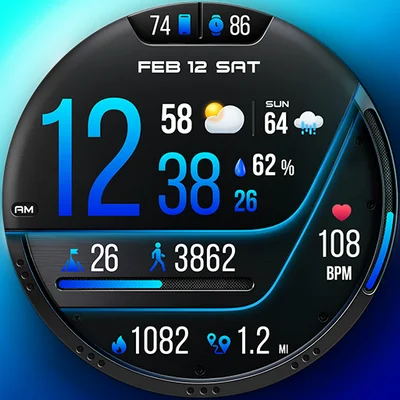
PER76デジタルウォッチフェイスは、データ豊富なインターフェースとスムーズなパフォーマンスを備えています。
PER76デジタルウォッチフェイスは、Wear OS向けに設計されたモダンなデジタルウォッチフェイスです。
すっきりとしたレイアウト、豊富なデータ表示、そしてスムーズな動作で、日常使いに最適です。
視認性の高さ、機能的なデータ表示、そして視覚的な煩雑さを排除したカスタマイズ性を求めるユーザーのために設計されています。
主な機能
• 12/24時間表示のデジタル時刻
• 天気予報
• 歩数、目標歩数、移動距離
• 心拍数
• 消費カロリー、階段昇降数
• スマートフォンとウォッチのバッテリー残量
• 紫外線指数、降雨確率
• 月相、日の出・日の入り
• タイムゾーン、気圧計
• 次のカレンダーイベント
• 常時表示ディスプレイ(AOD)
カスタマイズオプション
• 10種類の背景
• 20色のカラー
• 5種類のカスタマイズ可能なコンプリケーション
• 10段階のAOD輝度調整
❓ 天気情報のトラブルシューティング
これは通常、ウォッチが天気データを取得する方法に関連しています。
以下の手順に従ってください。
1. スマートフォンとスマートウォッチの両方に「Simple Weather」をインストールしてください。
https://play.google.com/store/apps/details?id=com.thewizrd.simpleweather
2. 更新間隔を1時間に設定してください。
3. データが同期されるまで数分お待ちください。
それでも同期が進まない場合は、メールでご連絡ください。
スマートフォンのバッテリー残量
スマートフォンとスマートウォッチの両方に、以下のコンパニオンアプリをインストールする必要があります。
スマートフォンのバッテリー残量表示
https://play.google.com/store/apps/details?id=com.weartools.phonebattcomp
スマートフォンのバッテリー残量、消費カロリー、階段昇降数などのその他のコンプリケーションについては、セットアップガイドをご覧ください。
https://persona-wf.com/installation/
簡単なカスタマイズ
ウォッチフェイスを長押しします。
「カスタマイズ」をタップします。
色、コンプリケーション、データを設定します。
常時表示ディスプレイ
明るさ調整可能な最適化された常時表示ディスプレイ。
メイン画面の色と一貫性を保ちます。
対応デバイス
Wear OS搭載デバイス(APIレベル35以上)すべてに対応しています。対応機種:
SAMSUNG:Galaxy Watch Ultra 2 - Ultra、Watch 9 - 8 - 7 - 6 - 5 - 4(Classic & FE)
GOOGLE:Pixel Watch 5 - 4 - 3 - 2 - 1
ONEPLUS / OPPO:OnePlus Watch 4 - 3 - 2R - 2、OPPO Watch X3 - X2 - X
XIAOMI:Xiaomi Watch 5 - 2 Pro - 2
FITBIT:Fitbit Ace LTE
サポート:
support@persona-wf.com
その他のウォッチフェイス:
https://persona-wf.com
デザイン:Ayla Gokmen
PERSONA ウォッチフェイス
原文を表示
PER76 Digital Watch Face is a modern digital watch face designed for Wear OS.
Clean layout, data-rich interface and smooth performance for everyday use.
Designed for users who want clear readability, functional data and customization without visual clutter.
Key Features
• Digital time 12/24h
• Weather & forecast
• Steps, daily goal & distance
• Heart rate
• Calories & floors
• Phone & watch battery
• UV index, rain probability
• Moon phase, sunrise & sunset
• Time zone & barometer
• Next calendar event
• Always-On Display AOD
Customization Options
• 10 backgrounds
• 20 colors
• 5 customizable complications
• Adjustable 10 AOD dim levels
❓ Troubleshooting Weather Information
This is usually related to how the watch fetches weather data.
Please follow these steps:
1- Install “Simple Weather” on both phone and watch
https://play.google.com/store/apps/details?id=com.thewizrd.simpleweather
2- Set its update interval to 1 hour
3- Wait a few minutes for data to sync
If it continues, please email me.
Phone Battery Level
You’ll need to install a companion app on both your phone and watch:
Phone Battery Complication
https://play.google.com/store/apps/details?id=com.weartools.phonebattcomp
For additional complications, such as phone battery, calories or floors, check the setup guide:
https://persona-wf.com/installation/
Easy Customization
Touch and hold the watch face.
Tap “Customize”.
Set colors, complications, and data.
Always-On Display
Optimized AOD with adjustable dim levels.
Colors remain consistent with the main screen.
Supported Devices
Compatible with all Wear OS devices (API Level 35+), including:
SAMSUNG: Galaxy Watch Ultra 2 - Ultra, Watch 9 - 8 - 7 - 6 - 5 - 4 (Classic & FE)
GOOGLE: Pixel Watch 5 - 4 - 3 - 2 - 1
ONEPLUS / OPPO: OnePlus Watch 4 - 3 - 2R - 2, OPPO Watch X3 - X2 - X
XIAOMI: Xiaomi Watch 5 - 2 Pro - 2
FITBIT: Fitbit Ace LTE
Support:
support@persona-wf.com
More watch faces:
https://persona-wf.com
Designed by Ayla Gokmen
PERSONA Watch Face
データ セーフティ
このアプリが収集・共有するデータについて、Persona Watch FaceがGoogle Playで申告している内容です。
- 第三者と共有されるデータはありません詳しくは、デベロッパーが共有を申告する方法についての説明をご覧ください
- データは収集されません詳しくは、デベロッパーが収集を申告する方法についての説明をご覧ください
新機能
2026/10/23
• Major UI overhaul with enhanced readability and vibrant color schemes
• Expanded color options and custom slot enhancements
• Redesigned Always-On Display for maximum visibility and style
• Updated with the latest Watch Face Format (WFF) for smoother animations
• Critical system updates for better compatibility and performance
開発元の連絡先
- ウェブサイトpersona-wf.com
- メールsupport@persona-wf.com
- プライバシーポリシーiubenda.com
- 住所ALACAATLI MAH. SİNPAŞ KMEV. NO:E1 BLK 15/1 06810 MERKEZ ÇANKAYA/Ankara Türkiye
情報
- 提供元
- Persona Watch Face
- カテゴリ
- カスタマイズ
- 更新日
- 2026/10/23
- リリース
- 2026/3/12
- 対象年齢
- 3 歳以上
- 価格
- ¥520
- パッケージ名
- com.watchfacestudio.per76