
- Altersfreigabe4+
- KategorieProduktivität
- EntwicklerAlterante
- SprachenEnglisch+ 2 weitere
- Größe11,6 MB
Verlinkt auf die offizielle App Store-Seite
Download.org hostet keine Datei von Alterante. Die Schaltfläche öffnet die App-Seite bei App Store, wo Alterante die App veröffentlicht. Eintrag zuletzt geprüft am 15.11.2026.
Screenshots
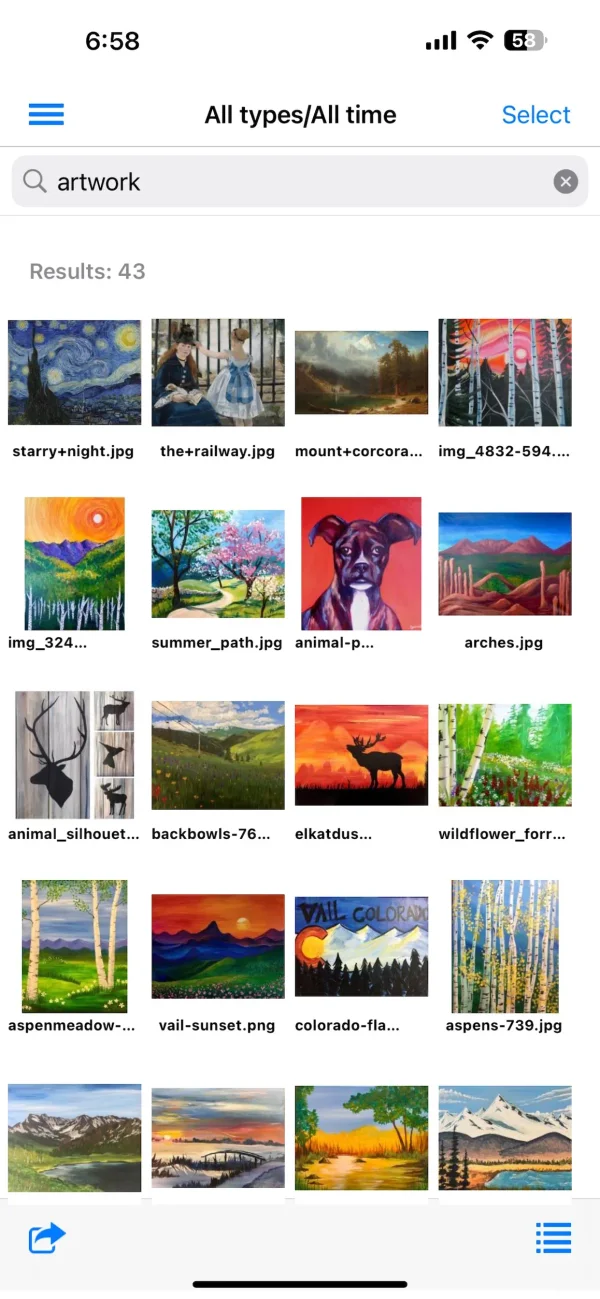
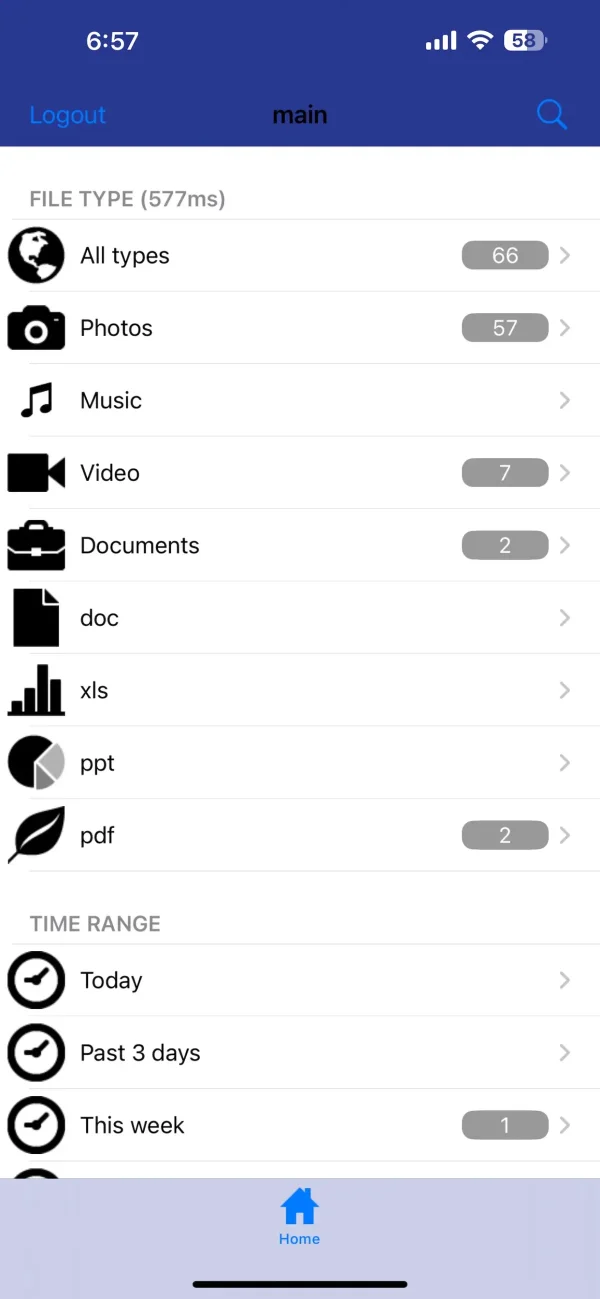
Info
Der Entwickler hat diesen Text nicht in Ihrer Sprache bereitgestellt.
Overview
--------
Alterante allows you to set up your own private personal cloud on your Mac/PC and access all your files from your phone or tablet. Alterante automatically discovers, organizes, and protects all your files across all your computers, and makes them instantly accessible from any device using this mobile app or using any modern web browser.
Mobile features
-------------
- All your files from all your computers become instantly accessible on your iPad/iPhone.
- Easy to find any file, using keyword search and recommendations made by Alterante.
- All your files are automatically organized by filetype & date range . For example, you can quickly find all the XLS documents you created this week on multiple computers.
- View photos, watch videos, open any Office/PDF document right on your mobile device.
- With a single click, share any photo or document via email, or post them on Facebook/Twitter.
- Launch a video, play a song, or watch a photo on your computer, using this app as your remote control. Works great as a remote control for your living room media server computer!
- Save files locally to your mobile device for offline access (e.g. Photos will be stored in Photo Gallery).
- Add your own searchable custom tags to any group of files for quick access.
- Access all your files from any remote location.
Quick Setup instructions
---------------------
1. Install Alterante Mobile app on your iPad/iPhone
2. Download and Install Alterante your computer (installing on more computers is better, so you can access all the files on all computers)
Download instructions available at:
https://www.alterante.com/download.htm?id=1
3. Launch mobile app, click Choose Server, select your PC and login with user/password created in PC/Mac setup (Step 2).
4. All files should be visible on your mobile app.
Neue Funktionen
Version 1.0.33 · 01.10.2025
Fixed: Issue connecting to remote server when on 4G/5G network.
App-Datenschutz
Was Alterante im App Store zum Umgang dieser App mit Daten angibt.
-
Keine Daten erfasst
Der Entwickler erfasst keine Daten von dieser App.
Die Datenschutzpraktiken können variieren, zum Beispiel je nach den von Ihnen verwendeten Funktionen oder Ihrem Alter.
Informationen
- Anbieter
- Alterante LLC
- Kategorie
- Produktivität
- Version
- 1.0.33
- Aktualisiert
- 01.10.2025
- Veröffentlicht
- 31.12.2013
- Größe
- 11,6 MB
- Erfordert
- iOS 13.0 oder neuer
- Altersfreigabe
- 4+
- Preis
- Kostenlos
- In-App-Käufe
- Ja
- Sprachen
- Englisch, Vereinf. Chinesisch, Spanisch
- Copyright
- © 2013-2025 Alterante Inc
Das könnte Ihnen auch gefallen
-
 LifePilot AI: Smart AgendaProduktivität
-
 FlatNoteProduktivität
-
 PDF Field GuideProduktivität
-
 enerTIC ScannerProduktivität
-
 One Touch NoteProduktivität
-
 RAISE ConnectProduktivität
-
 3stateProduktivität
-
 QuickSelectProduktivität
-
 Note Fold - Notizen OrdnenOrdner & Rich-Text-Notizen
-
 CarryLinksLesezeichen-Manager