
- Age rating4+
- CategoryProductivity
- DeveloperAlterante
- LanguagesEnglish+ 2 more
- Size11.6 MB
Links to the official App Store page
Download.org hosts no file of Alterante. The button opens its official App Store page, published by Alterante. Listing last checked on Nov 15, 2026.
Screenshots
About
Overview
--------
Alterante allows you to set up your own private personal cloud on your Mac/PC and access all your files from your phone or tablet. Alterante automatically discovers, organizes, and protects all your files across all your computers, and makes them instantly accessible from any device using this mobile app or using any modern web browser.
Mobile features
-------------
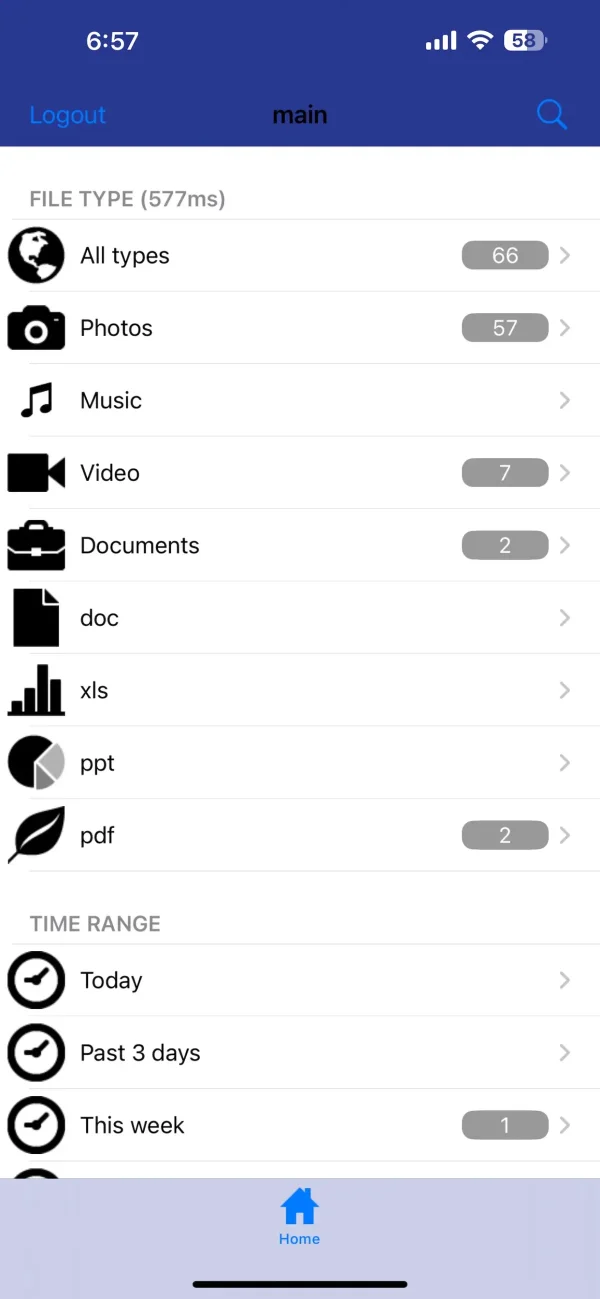
- All your files from all your computers become instantly accessible on your iPad/iPhone.
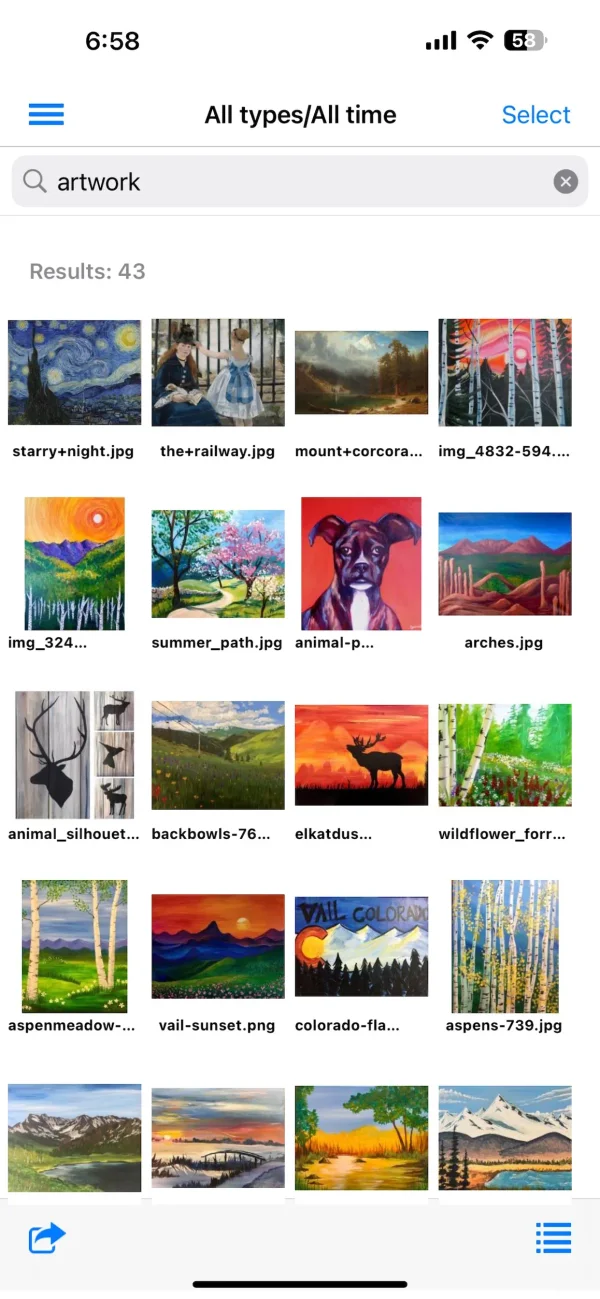
- Easy to find any file, using keyword search and recommendations made by Alterante.
- All your files are automatically organized by filetype & date range . For example, you can quickly find all the XLS documents you created this week on multiple computers.
- View photos, watch videos, open any Office/PDF document right on your mobile device.
- With a single click, share any photo or document via email, or post them on Facebook/Twitter.
- Launch a video, play a song, or watch a photo on your computer, using this app as your remote control. Works great as a remote control for your living room media server computer!
- Save files locally to your mobile device for offline access (e.g. Photos will be stored in Photo Gallery).
- Add your own searchable custom tags to any group of files for quick access.
- Access all your files from any remote location.
Quick Setup instructions
---------------------
1. Install Alterante Mobile app on your iPad/iPhone
2. Download and Install Alterante your computer (installing on more computers is better, so you can access all the files on all computers)
Download instructions available at:
https://www.alterante.com/download.htm?id=1
3. Launch mobile app, click Choose Server, select your PC and login with user/password created in PC/Mac setup (Step 2).
4. All files should be visible on your mobile app.
What’s new
Version 1.0.33 · Oct 1, 2025
Fixed: Issue connecting to remote server when on 4G/5G network.
App privacy
What Alterante declares on the App Store about how this app handles data.
-
Data not collected
The developer does not collect any data from this app.
Privacy practices may vary, for example with the features you use or your age.
Information
- Seller
- Alterante LLC
- Category
- Productivity
- Version
- 1.0.33
- Updated
- Oct 1, 2025
- Released
- Dec 31, 2013
- Size
- 11.6 MB
- Requires
- iOS 13.0 or later
- Age rating
- 4+
- Price
- Free
- In-app purchases
- Yes
- Languages
- English, Simplified Chinese, Spanish
- Copyright
- © 2013-2025 Alterante Inc
You might also like
-
 LifePilot AI: Smart AgendaProductivity
-
 FlatNoteMarkdown notes. No account.
-
 PDF Field GuideRecall Information Quickly!
-
 enerTIC ScannerProductivity
-
 One Touch NoteVery Simple Memo Tool
-
 RAISE ConnectProductivity
-
 3stateResident Experience Management
-
 QuickSelectProductivity
-
 Note Fold: Structured NotesNested Folders & Rich Notes
-
 CarryLinksThe Complete Bookmark Manager