
Beamer Notes
Beamer Slide with Notes & ink
Entwickelt für iPhone, iPad, Mac
Kostenlos · In-App-Käufe
- Altersfreigabe4+
- KategorieProduktivität
- EntwicklerWei Chen
- SprachenEnglisch+ 2 weitere
- Größe18,0 MB
Verlinkt auf die offizielle App Store-Seite
Download.org hostet keine Datei von Beamer Notes. Die Schaltfläche öffnet die App-Seite bei App Store, wo Wei Chen die App veröffentlicht. Eintrag zuletzt geprüft am 24.11.2026.
Screenshots

Info
Der Entwickler hat diesen Text nicht in Ihrer Sprache bereitgestellt.
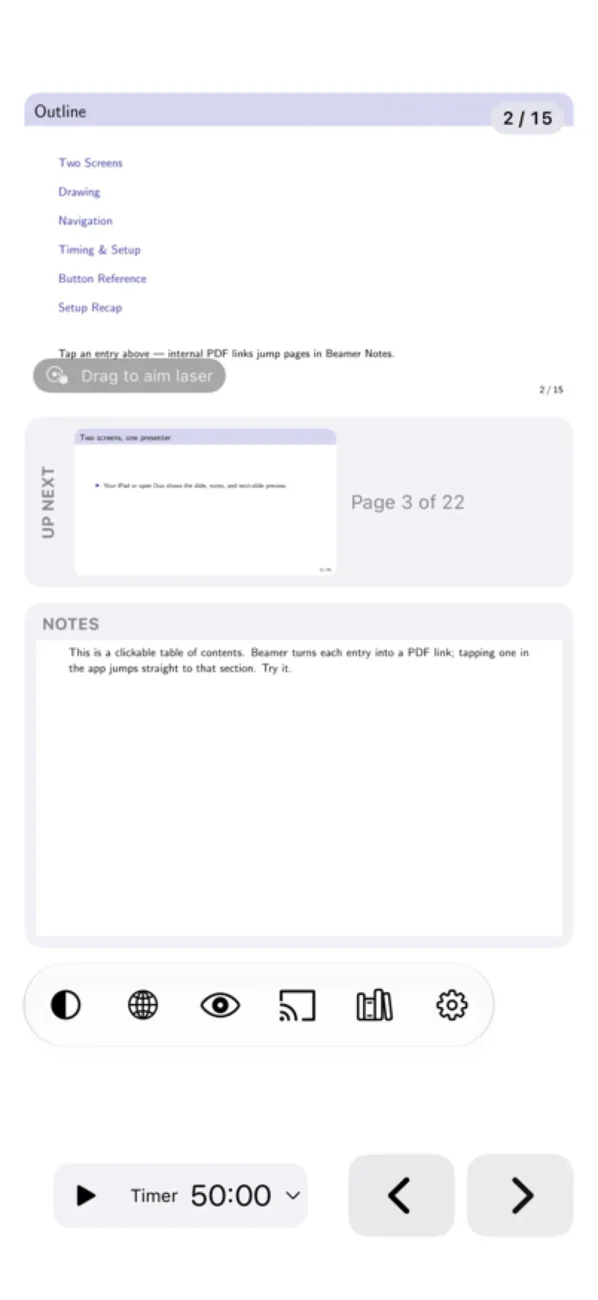
Beamer Notes puts your slides, private speaker notes, and teaching tools in one workspace. Present a Beamer PDF, open an interactive HTML lesson, or teach from a whiteboard while your audience sees only the lesson.
SLIDES AND PRIVATE NOTES
• Open Beamer PDFs with separate slide and notes areas, or import standard PDFs. Choose the source layout manually if needed.
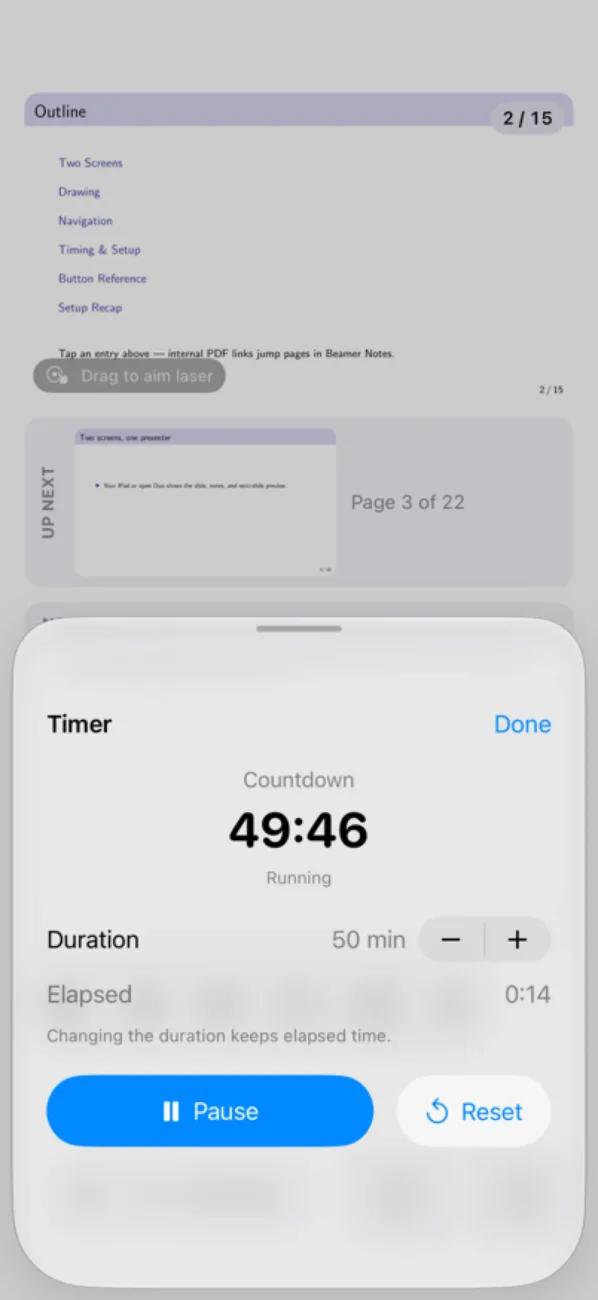
• See the current slide, next-slide preview, thumbnails, and a private countdown. Put notes beside or below the slide, or use Notes Only or Slide Only where available.
• Jump to a frame from the PDF overview. In PDF and paginated HTML, the Next preview indicates when you reach the last page.
DRAW AND TEACH ON IPAD
• Write with Apple Pencil using pens, highlighters, erasers, the lasso, and ruler. Undo individual strokes or restore ink after clearing it.
• Tidy hand-drawn shapes with adjustable shape correction. Add photos and text, or use the laser pointer to guide attention.
• Create named multipage whiteboards with white or black backgrounds. Reopen them with saved ink, or export a separate PDF copy.
INTERACTIVE HTML
• Open compatible HTML from Library, load a live web link, or download the initial HTML file to Library. For offline use, import one self-contained HTML file.
• Move sliders and use buttons with touch. On iPad, add Apple Pencil annotations. Compatible HTML shows private notes, page thumbnails, and a next-page preview.
• Try the bilingual Supply and Demand example. Adjust the charts to explore equilibrium, production possibilities, and opportunity cost.
PROJECT AND RECORD
• Use a wired display or AirPlay for a separate audience view on iPad or open iPhone Duo. Chromecast supports PDFs and whiteboards on those devices.
• Blank the audience screen when needed, or record the audience view with optional microphone audio. Keep your notes, timer, and controls private.
• On Mac, opening a PDF, HTML lesson, or whiteboard opens a separate Audience window. Reopen it with the TV button. Drag it to an extended display or share it through AirPlay while keeping notes on the Mac.
• On Mac, click PDF links and operate HTML buttons and sliders with a mouse or trackpad. Turn pages with the keyboard or a compatible Bluetooth presenter.
LIBRARY, TUTORIALS, AND IPHONE
• Organize PDFs, HTML files, and whiteboards in folders. Library files can sync through iCloud Drive. Ink, photos, and text stay on the device where you added them.
• Open the free 16:9 and 4:3 tutorials in Library for Mac projection, controls, and recording. When the app offers to update your tutorials, it keeps the earlier PDFs and annotations in Tutorial Backups.
• If a tutorial or the HTML example is missing, restore it when prompted or from Settings. On iPad and unfolded iPhone Duo, choose Download from a file’s Library menu to save a copy to Files.
• Use iPhone to control pages, the timer, and blackout on a nearby Mac or iPad. Fully open iPhone Duo to use its presenter workspace. Close it to use the remote.
Free access includes 3 distinct non-tutorial PDFs and 3 whiteboards of up to 2 pages each. Reopening a counted file uses no extra credit. A one-time Full Version purchase removes the PDF and whiteboard limits and unlocks presenting your own HTML files and live links on iPad.
Neue Funktionen
Version 2.3.1 · 21.11.2026
• Restore missing 16:9 and 4:3 PDF tutorials and the Supply and Demand HTML example when you open Beamer Notes. You can turn off the reminder and restore them from Settings at any time.
• On iPad and unfolded iPhone Duo, choose Download from a document’s Library menu to save a PDF or HTML copy to Files.
• Find More Settings below Purchases when using the free version. Tap it to jump to the general settings.
App-Datenschutz
Was Wei Chen im App Store zum Umgang dieser App mit Daten angibt.
-
Keine Daten erfasst
Der Entwickler erfasst keine Daten von dieser App.
Die Datenschutzpraktiken können variieren, zum Beispiel je nach den von Ihnen verwendeten Funktionen oder Ihrem Alter.
Informationen
- Anbieter
- Wei Chen
- Kategorie
- Produktivität
- Version
- 2.3.1
- Aktualisiert
- 21.11.2026
- Veröffentlicht
- 16.09.2026
- Größe
- 18,0 MB
- Erfordert
- iOS 18.0 oder neuer
- Altersfreigabe
- 4+
- Preis
- Kostenlos
- In-App-Käufe
- Ja
- Sprachen
- Englisch, Vereinf. Chinesisch, Tradit. Chinesisch
- Copyright
- © 2026 Wei James Chen
Das könnte Ihnen auch gefallen
-
 Priyo NotesProduktivität
-
 LumaGuide: AI Goal TrackerProduktivität
-
 LocalNotebookProduktivität
-
 On Time: Meeting AlarmsProduktivität
-
 CustosNotesProduktivität
-
 Tiny-WinsProduktivität
-
 Notes at HandProduktivität
-
 Routine Path: Habit TrackerProduktivität
-
 QuikNotes: Notizen & NotizbuchNotizen Journal Sprachnotizen
-
 Super Reminder AppProduktivität