CaptureNote - Screenshot Notes
Scan, Summarize & Recall
Entwickelt für iPhone
Kostenlos · In-App-Käufe
- Altersfreigabe4+
- KategorieBildung
- Entwickler思迪 李
- SprachenEnglisch+ 2 weitere
- Größe6,6 MB
Verlinkt auf die offizielle App Store-Seite
Download.org hostet keine Datei von CaptureNote - Screenshot Notes. Die Schaltfläche öffnet die App-Seite bei App Store, wo 思迪 李 die App veröffentlicht. Eintrag zuletzt geprüft am 12.11.2026.
Screenshots
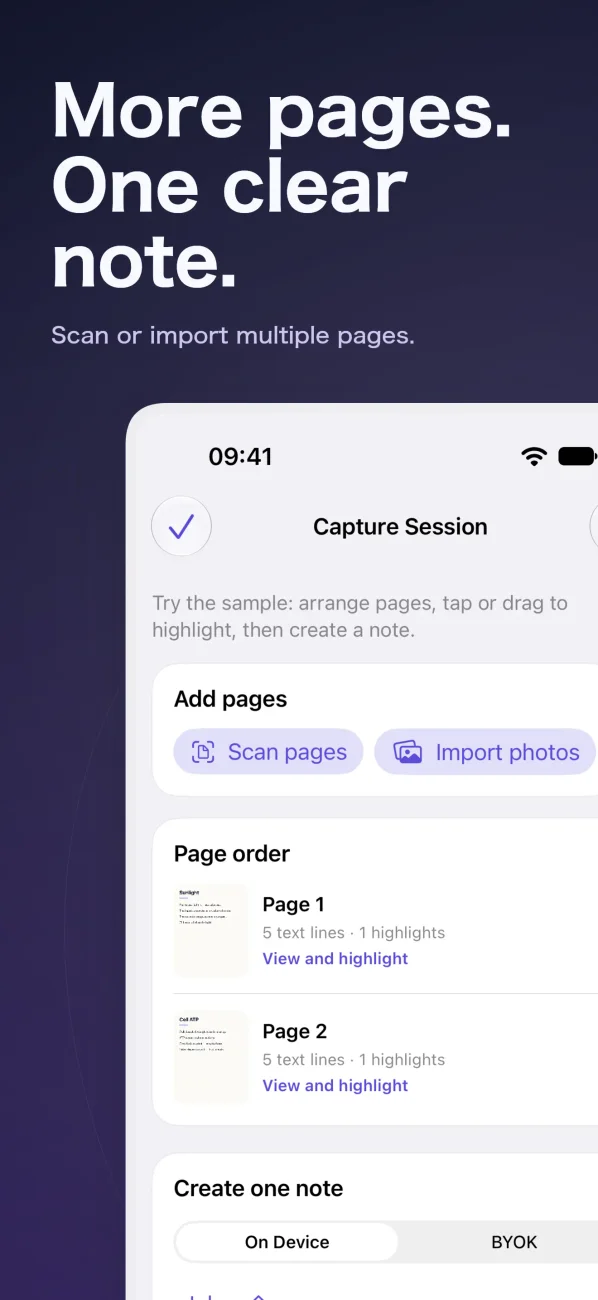

Info
Der Entwickler hat diesen Text nicht in Ihrer Sprache bereitgestellt.
Turn textbook pages, lecture slides, and screenshots into notes you actually remember.
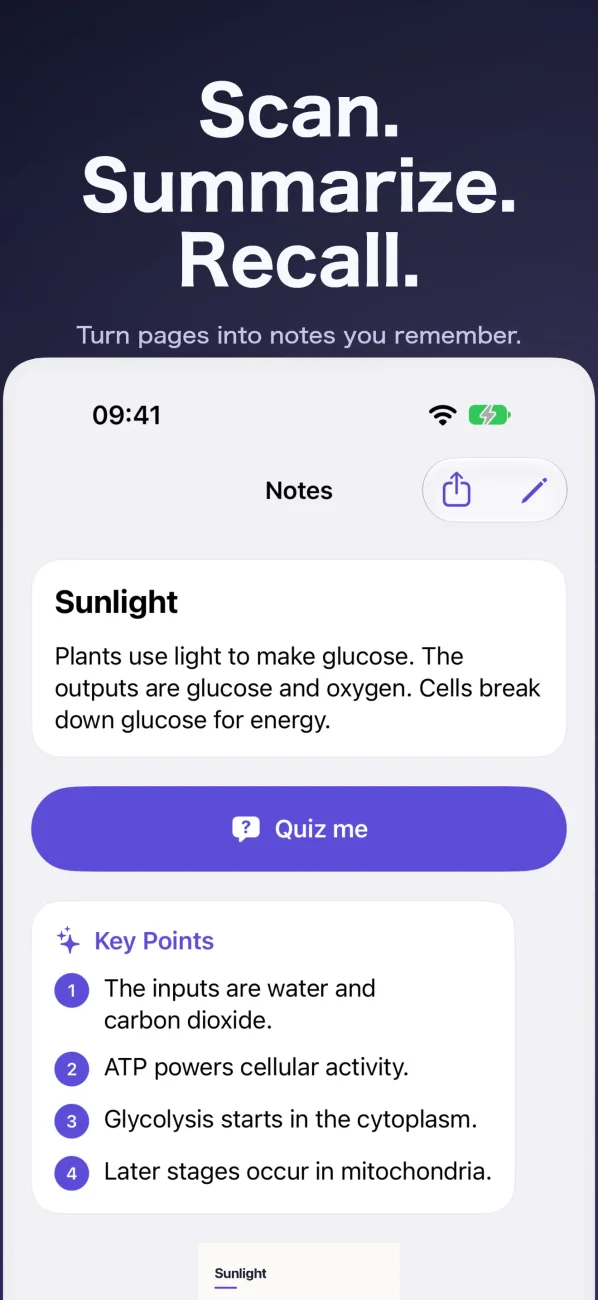
CaptureNote reads the text in your images, writes a summary with key points, then quizzes you at the right time so it sticks. OCR, the local summary fallback, review scheduling, and reminders all work on your device, with no account.
HOW IT WORKS
• Scan or import pages: capture several pages at once, then reorder, crop, rotate, and highlight what matters.
• Get a clear note: a title, summary, and key points from the Apple on-device model on supported iPhones. When it isn’t available, CaptureNote builds the summary from sentences in your own text and tells you which one you got.
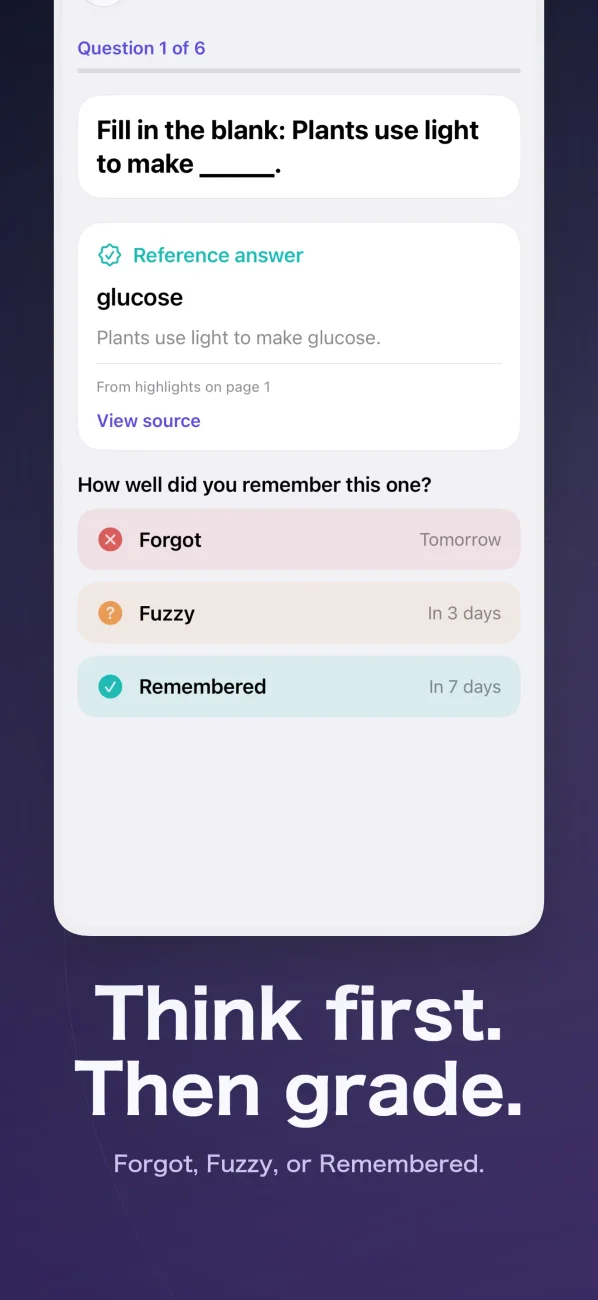
• Quiz yourself: reveal the answer, then grade yourself — Forgot, Fuzzy, or Remembered. Questions come from your notes, including fill-in-the-blank cards that need no AI.
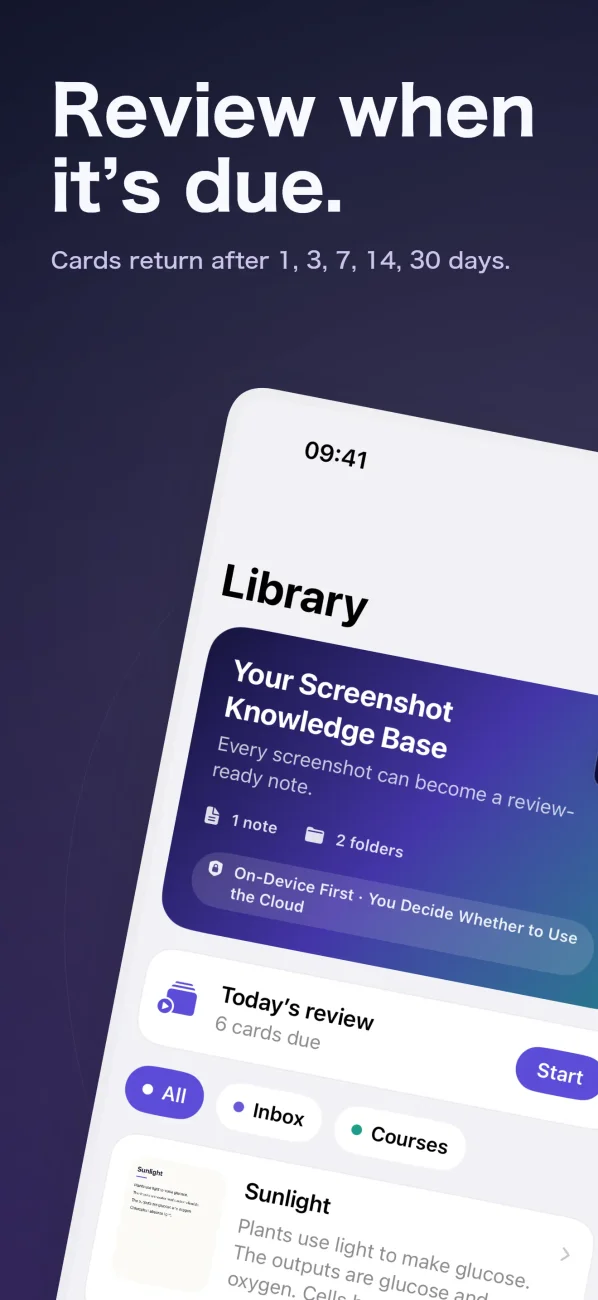
• Review on a schedule: cards return after 1, 3, 7, 14, and 30 days. The Library shows what is due today, and a round is at most 10 cards, about two minutes.
• Optional reminders: a local notification, only on days when cards are due.
• Export to Markdown: share any note as a .md file with its summary, key points, and your highlights.
MORE
• Shortcuts: add Summarize Screenshot or Recognize Screenshot Text after Take Screenshot.
• Folders and search: organize, edit, move, share, or delete notes.
• Keep the context: the source image, full text, summary, and key points stay together.
• Bring your own key: connect an OpenAI-compatible API and model. Only OCR text is sent; provider fees are separate.
• Local first: OCR and local processing happen on device. Content is never uploaded without your explicit consent.
Ideal for lecture slides, textbook screenshots, web research, reading highlights, and exam prep.
CaptureNote is free to download. Basic OCR, editing, folders, search, Markdown export, and reviewing your notes are free, and 5 complete smart summaries are included. Unlimited smart summaries and summary Shortcuts require a one-time Lifetime Pro in-app purchase.
Neue Funktionen
Version 1.4.0 · 08.11.2026
Notes you remember, not just save.
• Review loop: reveal each answer, grade yourself (Forgot, Fuzzy, Remembered), and cards come back after 1, 3, 7, 14, and 30 days.
• Cards due today appear in the Library, plus optional on-device reminders on days when cards are due.
• Fill-in-the-blank questions are now made on your device without AI.
• Better summaries when the Apple model isn’t available: pages are rebuilt into paragraphs in reading order before key sentences are chosen, and long notes are summarized in parts.
• Clear notices tell you whether a note came from the Apple model, a part-by-part summary, or the local fallback.
• Export any note as a Markdown file with your highlights.
• If your library ever can’t open, CaptureNote now backs it up and offers recovery instead of crashing.
App-Datenschutz
Was 思迪 李 im App Store zum Umgang dieser App mit Daten angibt.
-
Mit Ihnen verknüpfte Daten
Können erfasst und mit Ihrer Identität verknüpft werden.
- Käufe
- Standort
- Benutzerinhalte
- Kennungen
- Nutzungsdaten
-
Nicht mit Ihnen verknüpfte Daten
Können erfasst werden, sind aber nicht mit Ihrer Identität verknüpft.
- Diagnose
Die Datenschutzpraktiken können variieren, zum Beispiel je nach den von Ihnen verwendeten Funktionen oder Ihrem Alter.
Informationen
- Anbieter
- 思迪 李
- Kategorie
- Bildung
- Version
- 1.4.0
- Aktualisiert
- 08.11.2026
- Veröffentlicht
- 22.07.2026
- Größe
- 6,6 MB
- Erfordert
- iOS 18.0 oder neuer
- Altersfreigabe
- 4+
- Preis
- Kostenlos
- In-App-Käufe
- Ja
- Sprachen
- Englisch, Vereinf. Chinesisch, Tradit. Chinesisch
- Copyright
- © 2026 Sidi Li
Das könnte Ihnen auch gefallen
-
 Cognilo: Brain Training GamesBildung
-
 StudySnap: AI Tutor HomeworkBildung
-
 PagePrism: Doc SummariesBildung
-
 ScanStudy AIBildung
-
 Hanzi Reader: Chinesisch & HSKPinyin lernen mit Karteikarten
-
 Cardly - AI Flashcard MakerBildung
-
 Note OCR: KI-Notiz mit OCRKI-OCR & Notizen
-
 Listen to SadhuBildung
-
 Memorify - Vokabeln LernenKarteikarten für IELTS & TOEFL
-
 Englisch Sprechen: TalkiMit KI Gespräche üben