
iPRINT - Text Printing
Print / PDF / Viewer / Editor
Entwickelt für iPhone, iPad, iPod touch
2,99 €
- Altersfreigabe4+
- KategorieProduktivität
- EntwicklerLIGHT,WAY.
- SprachenEnglisch+ 1 weitere
- Größe7,7 MB
Verlinkt auf die offizielle App Store-Seite
Download.org hostet keine Datei von iPRINT - Text Printing. Die Schaltfläche öffnet die App-Seite bei App Store, wo LIGHT,WAY. die App veröffentlicht. Eintrag zuletzt geprüft am 12.11.2026.
Screenshots



Info
Der Entwickler hat diesen Text nicht in Ihrer Sprache bereitgestellt.
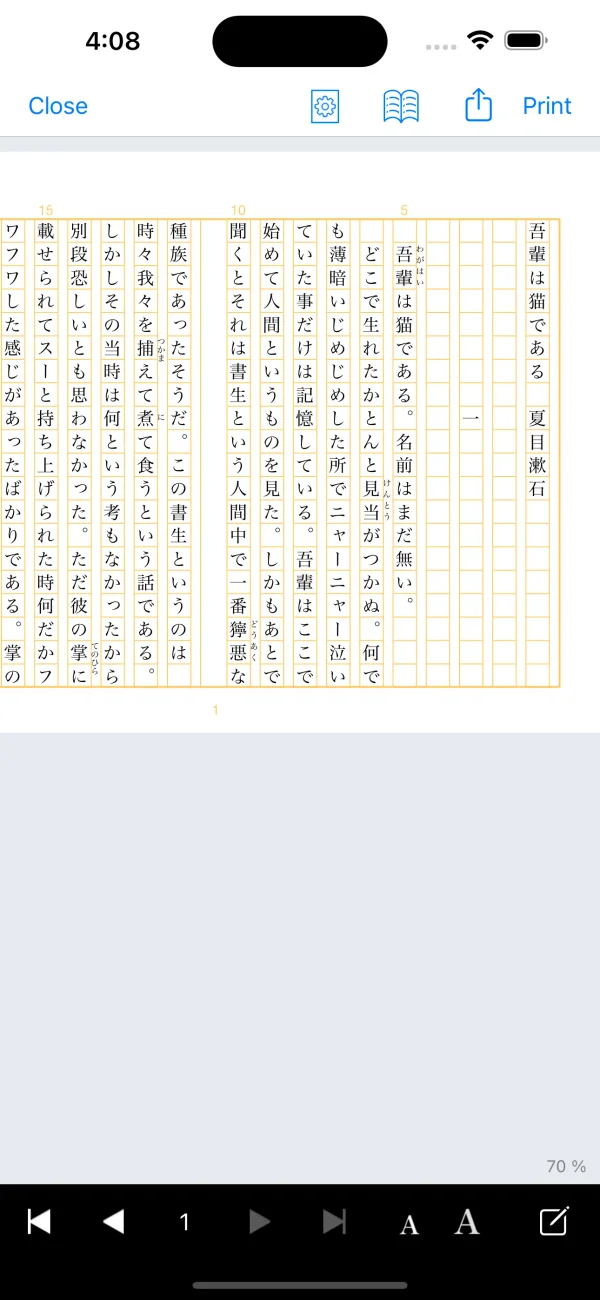
iPRINT is the text printing / PDF output / viewer / editor application for iPhone / iPad. iPRINT customized iText Pad, which has been popular as iOS advanced text editor, for printing on printer paper. iPRINT have specialized iText Pad's functions, such as vertical writing and the original paper layout "Aozora Bunko" style ruby display, for displaying printed images on printer paper. On the iPhone / iPad screen, you can print on a printer paper with one touch, while checking the print image of vertically written original paper etc, easy operation enables you to print various layouts.
For printing on a printer, easy printing using AirPrint of iOS printing function. And high-quality PDF file of printing image, you can use advanced printing by printer manufacturer's printing application. Even if you do not have a printer, it is also compatible with Convenience-Print that can be printed at convenience stores nationwide (Japanese only).
Also, iPRINT can be used not only as text printing, but also as a viewer that allows you to browse e-books with print images, or as text editor to enter text while checking sentences with print images.
We sincerely hope iPRINT will serve you well, being a good friend for your iPhone, iPod touch, and iPad. With iPRINT, enjoy printing flexibly anytime, anywhere!
iPRINT Features
* Text printing / PDF output / viewer / editor application.
* It supports printing of japanese manuscript paper.
* It supports vertical writing.
* It corresponds to ruby printing.
* You can customize the paper to be printed by settings.
* A variety of print layouts can be selected.
* Output high-quality PDF file.
* Easy printing using AirPrint of iOS printing function is supported.
* Cooperate with printer-specific application of printer manufacturer.
* It corresponds to Convenience-Print which can be printed at convenience store.
* You can view the text of the e-book with the print image.
* Text can be entered while checking sentences with print image.
* You can open a text file of another application.
* Up to 500 text files can be saved.
* The display size can be increased to 500%.
* It corresponds to the operation when the iPhone is set horizontally.
* The number of characters can be counted.
* "iWriters" can be used for text input of iPRINT.
Neue Funktionen
Version 1.1 · 25.03.2024
1. Enhanced [Settings] and added a new item Page Numbers in Option.
Page Numbers Position - Center, Left, Right, Left/Right, and Right/Left
Page Numbers Format, Enter Start Page Number
2. Fixed the bugs and improved stability.
App-Datenschutz
Was LIGHT,WAY. im App Store zum Umgang dieser App mit Daten angibt.
-
Keine Daten erfasst
Der Entwickler erfasst keine Daten von dieser App.
Die Datenschutzpraktiken können variieren, zum Beispiel je nach den von Ihnen verwendeten Funktionen oder Ihrem Alter.
Informationen
- Anbieter
- Michiaki Yamashita
- Kategorie
- Produktivität
- Version
- 1.1
- Aktualisiert
- 25.03.2024
- Veröffentlicht
- 27.07.2018
- Größe
- 7,7 MB
- Erfordert
- iOS 9.0 oder neuer
- Altersfreigabe
- 4+
- Preis
- 2,99 €
- Sprachen
- Englisch, Japanisch
- Copyright
- © 2024 LIGHT,WAY.
Das könnte Ihnen auch gefallen
-
 測量 座標計算Produktivität
-
 HachiCalendar2 ProAI Calendar
-
 ShapeInfo PlusGeometrischer Formrechner
-
 Password Manager - Easy Pass2Produktivität
-
 LogCalendar - Time TrackerProduktivität
-
 直角三角形電卓 - TriangelProduktivität
-
 HoujiProduktivität
-
 Kurumaki CalendarProduktivität
-
 Bear Focus Timer: Work & StudyProduktivität
-
 Auto Refresh+ for SafariProduktivität