Ruler - Scale Ruler
Various scales can be set!
Entwickelt für iPhone, iPad, iPod touch
Kostenlos · In-App-Käufe
- Altersfreigabe4+
- KategorieProduktivität
- Entwicklermitsunori oishi
- SprachenEnglisch+ 1 weitere
- Größe4,1 MB
Verlinkt auf die offizielle App Store-Seite
Download.org hostet keine Datei von Ruler - Scale Ruler. Die Schaltfläche öffnet die App-Seite bei App Store, wo mitsunori oishi die App veröffentlicht. Eintrag zuletzt geprüft am 15.11.2026.
Screenshots

Info
Der Entwickler hat diesen Text nicht in Ihrer Sprache bereitgestellt.
Scale Ruler is the simple application to display the scale of various measurement units.
※ Warning:
- The accuracy of the scales cannot be guaranteed.
- Calibration and PPI values will be reset when the model changes.
- Set the PPI value only when the model is undecided.
- When you change the PPI value, perform calibration after the change.
■How to use:
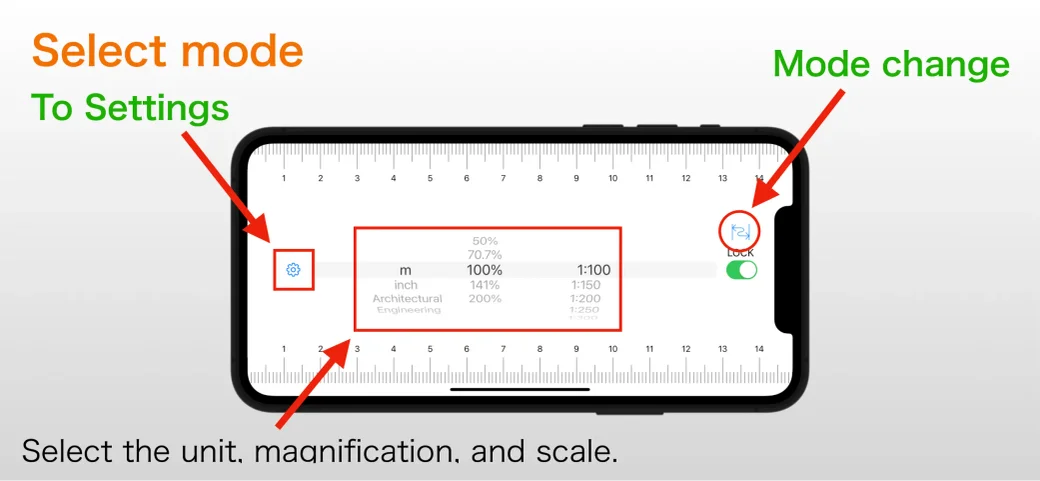
■Select mode
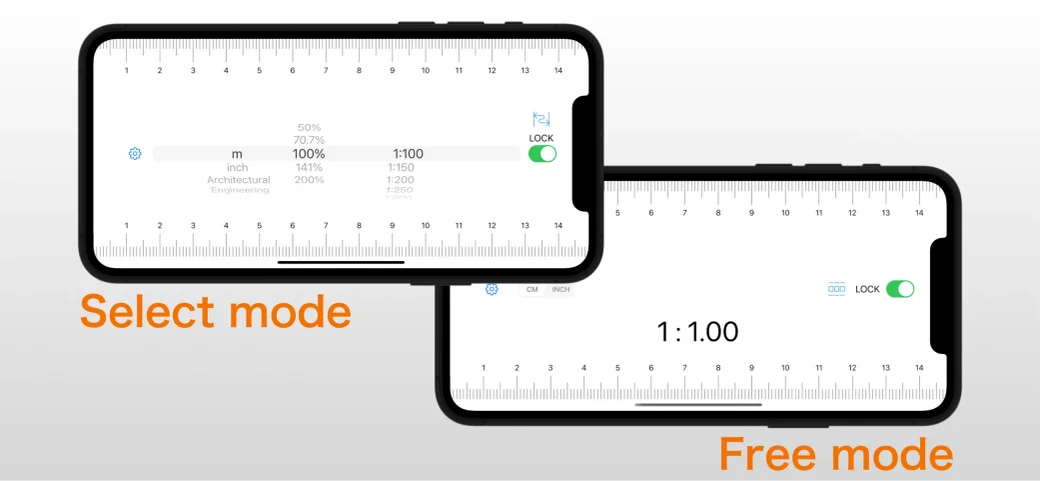
In UNLOCKED state, after choosing measurement unit, magnification ratio and reduced scale, the scale is displayed.
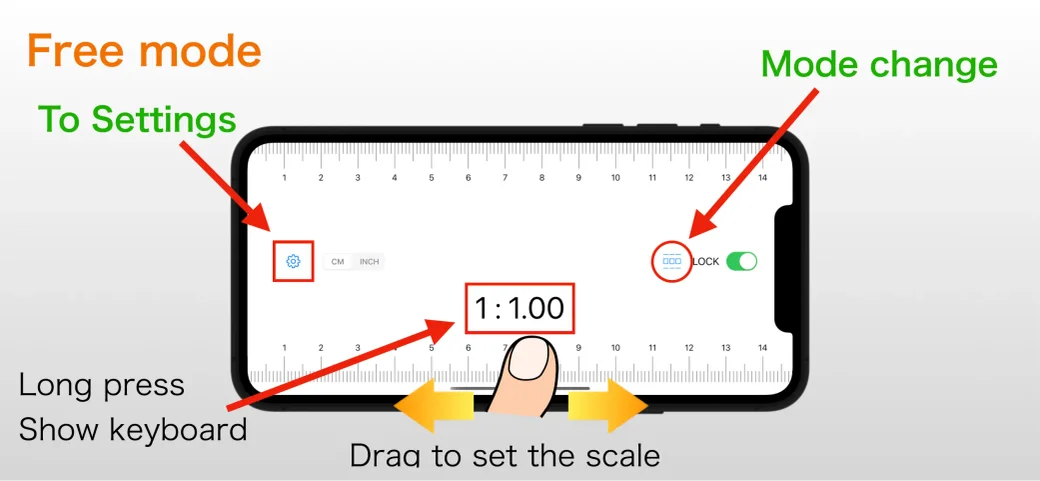
■Free mode
When dragging the screen at UNLOCK, you can set the scale in the range 1: 1 to 1: 100.
When you press and hold the scale value, the keyboard is displayed and you can enter the scale.
You can lock the scale on the ruler with a switch.
Sorry for the advertisement during unlocking.
After In-App Purchase, your ads will no longer be displayed.
Specification of Scale Ruler
- measure length
meter,inches
- magnification ratio
50% , 70.7% , 100% , 141% , 200%
- reduced scale
for meter
1:100 , 1:150 , 1:200 , 1:250 , 1:300 , 1:400 , 1:500 , 1:600
for inch
1:1 , 1:1.5 , 1:2 , 1:2.5 , 1:3 , 1:4 , 1:5 , 1:6
for inch(Architectural)
1:1 , 1:2 , 1:4 , 1:8 , 1:12 , 1:16 , 1:24 , 1:32 , 1:48 , 1:64
1:96 , 1:128 , 1:192 , 1:384
for inch(Engineering)
1:120 , 1:240 , 1:360 , 1:480 , 1:600 , 1:720
1:800 , 1:960 , 1:1080
■ Settings
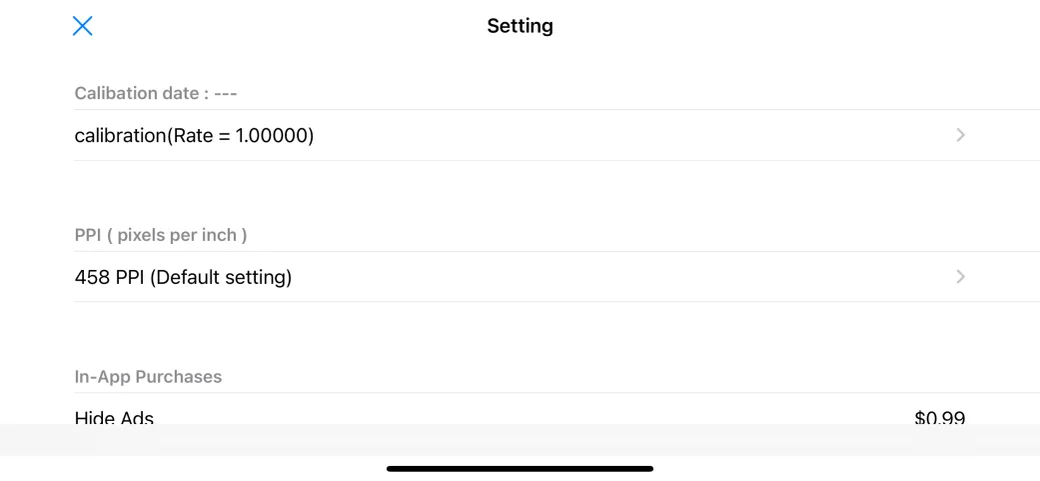
- Calibration
- PPI (pixels per inch) setting
- In-app purchase (ads not displayed)
- In-app purchase restoration
■ Calibration
Adjust the length of the ruler.
Use the correct ruler for adjustment.
"Calibration" button: Records the adjusted state and reflects the calibration result on the ruler.
"Reset" button: Returns the adjustment status to the specified value. It will not be recorded.
"Initialize" button: Returns the adjustment status to the specified value and reflects it on the ruler.
* Caution: The calibration value will be reset when the model changes.
■ PPI (pixels per inch) setting
If the model is undecided, check the PPI value of the model before setting the PPI value.
* Please set only when the model is undecided.
"OK" button: Record the entered PPI value and reflect it on the ruler display.
"Initialize" button: Returns the PPI value to the specified value and reflects it on the ruler.
* Caution: The PPI value will be reset when the model changes.
Neue Funktionen
Version 4.7 · 19.03.2026
Update for iPhone17e ,iPad Air 11-inch(M4),iPad Air 13-inch(M4).
App-Datenschutz
Was mitsunori oishi im App Store zum Umgang dieser App mit Daten angibt.
-
Daten, die zum Tracking Ihrer Person verwendet werden
Können verwendet werden, um Sie über Apps und Websites anderer Unternehmen hinweg zu verfolgen.
- Standort
- Kennungen
- Nutzungsdaten
- Diagnose
-
Mit Ihnen verknüpfte Daten
Können erfasst und mit Ihrer Identität verknüpft werden.
- Standort
- Kennungen
- Nutzungsdaten
- Diagnose
Die Datenschutzpraktiken können variieren, zum Beispiel je nach den von Ihnen verwendeten Funktionen oder Ihrem Alter.
Informationen
- Anbieter
- mitsunori oishi
- Kategorie
- Produktivität
- Version
- 4.7
- Aktualisiert
- 19.03.2026
- Veröffentlicht
- 08.10.2014
- Größe
- 4,1 MB
- Erfordert
- iOS 15.0 oder neuer
- Altersfreigabe
- 4+
- Preis
- Kostenlos
- In-App-Käufe
- Ja
- Sprachen
- Englisch, Japanisch
- Copyright
- © mitsunori oishi
Das könnte Ihnen auch gefallen
-
 100cm RulerProduktivität
-
 Ruler - Accurate RulerProduktivität
-
 PixelmesswerkzeugUI Layout Positionsmessung
-
 Ductulator - Duct SizingDienstprogramme
-
 Maßband Kamera - 3D LinealMessen: Raum, Wand, Grundriss
-
 Image Ruler - MeasuresProduktivität
-
 Construction Calc Pro 7Produktivität
-
 Photo Measures LiteProduktivität
-
 PipefitterRohrleitungsbau: Etage & Bogen
-
 Lineal Maßband 3D: AR MessenHaus Raum Metermaß, Vermessung