Ruler - Scale Ruler
Various scales can be set!
Designed for iPhone, iPad, iPod touch
Free · In-app purchases
- Age rating4+
- CategoryProductivity
- Developermitsunori oishi
- LanguagesEnglish+ 1 more
- Size4.1 MB
Links to the official App Store page
Download.org hosts no file of Ruler - Scale Ruler. The button opens its official App Store page, published by mitsunori oishi. Listing last checked on Nov 15, 2026.
Screenshots

About
Scale Ruler is the simple application to display the scale of various measurement units.
※ Warning:
- The accuracy of the scales cannot be guaranteed.
- Calibration and PPI values will be reset when the model changes.
- Set the PPI value only when the model is undecided.
- When you change the PPI value, perform calibration after the change.
■How to use:
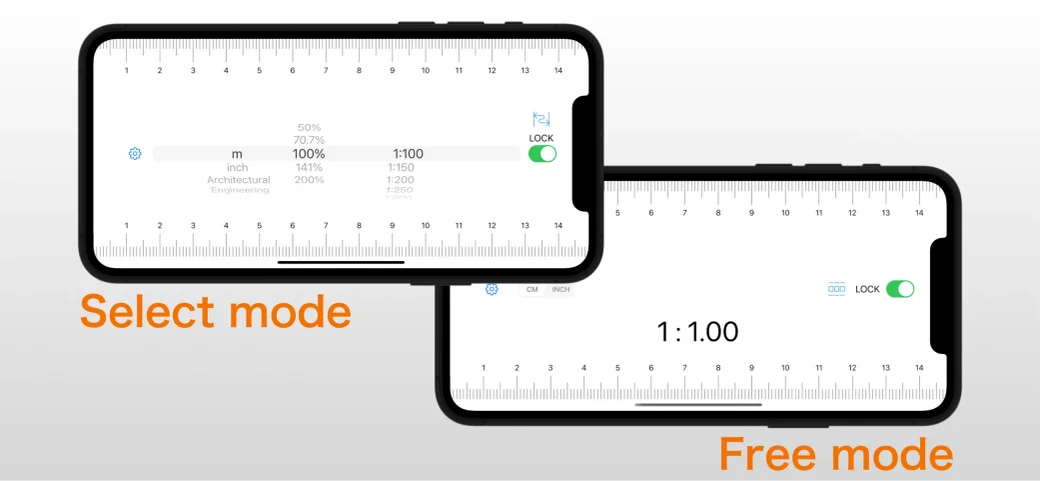
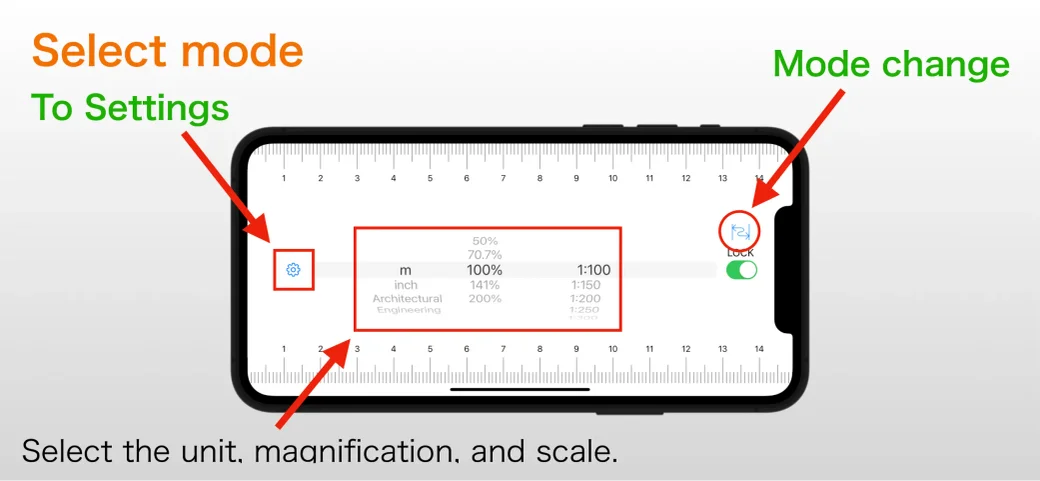
■Select mode
In UNLOCKED state, after choosing measurement unit, magnification ratio and reduced scale, the scale is displayed.
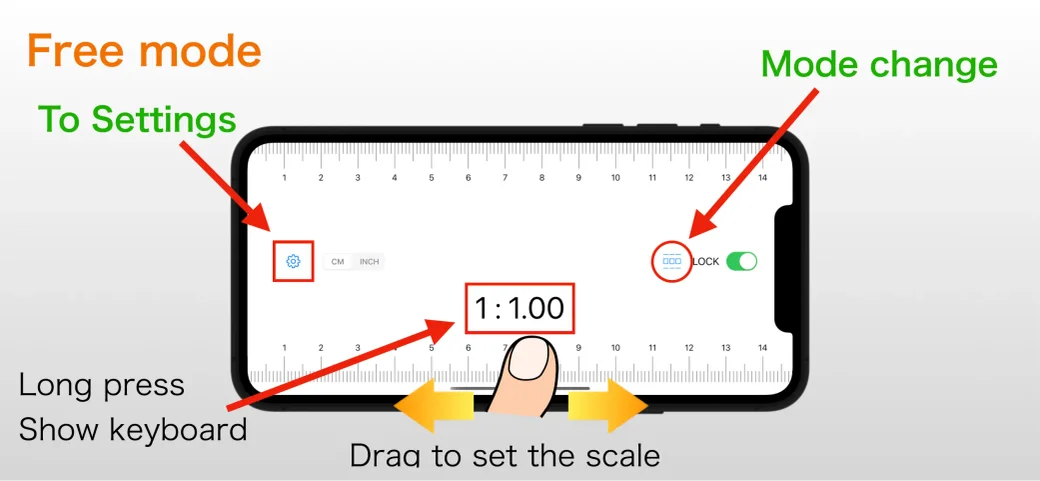
■Free mode
When dragging the screen at UNLOCK, you can set the scale in the range 1: 1 to 1: 100.
When you press and hold the scale value, the keyboard is displayed and you can enter the scale.
You can lock the scale on the ruler with a switch.
Sorry for the advertisement during unlocking.
After In-App Purchase, your ads will no longer be displayed.
Specification of Scale Ruler
- measure length
meter,inches
- magnification ratio
50% , 70.7% , 100% , 141% , 200%
- reduced scale
for meter
1:100 , 1:150 , 1:200 , 1:250 , 1:300 , 1:400 , 1:500 , 1:600
for inch
1:1 , 1:1.5 , 1:2 , 1:2.5 , 1:3 , 1:4 , 1:5 , 1:6
for inch(Architectural)
1:1 , 1:2 , 1:4 , 1:8 , 1:12 , 1:16 , 1:24 , 1:32 , 1:48 , 1:64
1:96 , 1:128 , 1:192 , 1:384
for inch(Engineering)
1:120 , 1:240 , 1:360 , 1:480 , 1:600 , 1:720
1:800 , 1:960 , 1:1080
■ Settings
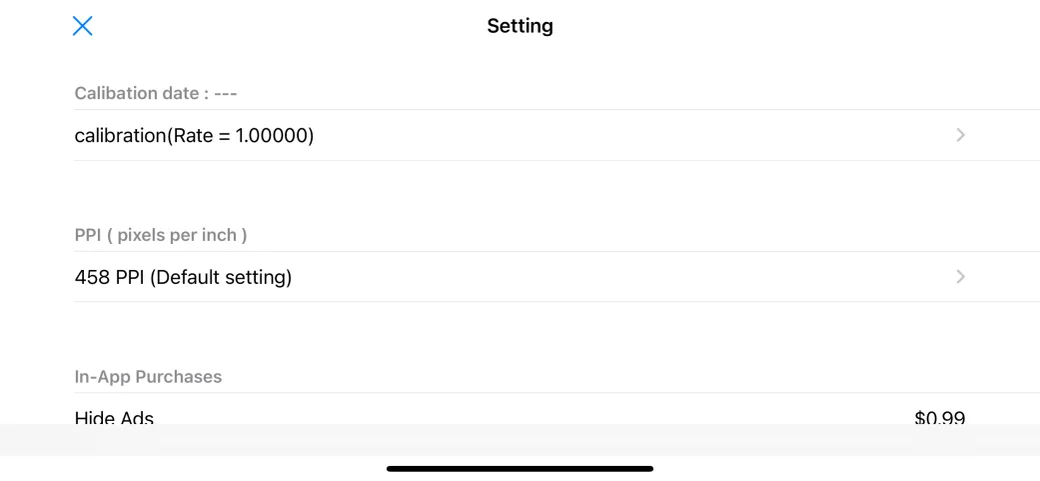
- Calibration
- PPI (pixels per inch) setting
- In-app purchase (ads not displayed)
- In-app purchase restoration
■ Calibration
Adjust the length of the ruler.
Use the correct ruler for adjustment.
"Calibration" button: Records the adjusted state and reflects the calibration result on the ruler.
"Reset" button: Returns the adjustment status to the specified value. It will not be recorded.
"Initialize" button: Returns the adjustment status to the specified value and reflects it on the ruler.
* Caution: The calibration value will be reset when the model changes.
■ PPI (pixels per inch) setting
If the model is undecided, check the PPI value of the model before setting the PPI value.
* Please set only when the model is undecided.
"OK" button: Record the entered PPI value and reflect it on the ruler display.
"Initialize" button: Returns the PPI value to the specified value and reflects it on the ruler.
* Caution: The PPI value will be reset when the model changes.
What’s new
Version 4.7 · Mar 19, 2026
Update for iPhone17e ,iPad Air 11-inch(M4),iPad Air 13-inch(M4).
App privacy
What mitsunori oishi declares on the App Store about how this app handles data.
-
Data used to track you
May be used to track you across apps and websites owned by other companies.
- Location
- Identifiers
- Usage data
- Diagnostics
-
Data linked to you
May be collected and linked to your identity.
- Location
- Identifiers
- Usage data
- Diagnostics
Privacy practices may vary, for example with the features you use or your age.
Information
- Seller
- mitsunori oishi
- Category
- Productivity
- Version
- 4.7
- Updated
- Mar 19, 2026
- Released
- Oct 8, 2014
- Size
- 4.1 MB
- Requires
- iOS 15.0 or later
- Age rating
- 4+
- Price
- Free
- In-app purchases
- Yes
- Languages
- English, Japanese
- Copyright
- © mitsunori oishi
You might also like
-
 100cm RulerProductivity
-
 Ruler - Accurate RulerProductivity
-
 Screenshot Pixel Measure ToolAI Screenshot & Layout Measure
-
 Ductulator - Duct SizingHVAC Duct Sizer
-
 Tape Measure Camera Ruler 3DRoom Area, Height & Floor Plan
-
 Image Ruler - MeasuresCamera Photo Measure Tape
-
 Construction Calc Pro 782 construction calculators.
-
 Photo Measures LiteMeasure, save and share
-
 Pipe FittingPipefitter Calculator & Offset
-
 AR Ruler: Digital Tape MeasureLidar Scanner: Distance・Length