Data WF by HuskyDEV
HuskyDev- PEGI 3Clasificación por edad
- PersonalizaciónCategoría
- 19/8/2025Actualizado
- GratisPrecio
Enlaza a la ficha oficial de huskydev.android.watchface.datafree en Google Play. Última comprobación el 26/11/2026.
Acerca de esta aplicación
Traducción automática de Google. Idioma original: Inglés (Estados Unidos).
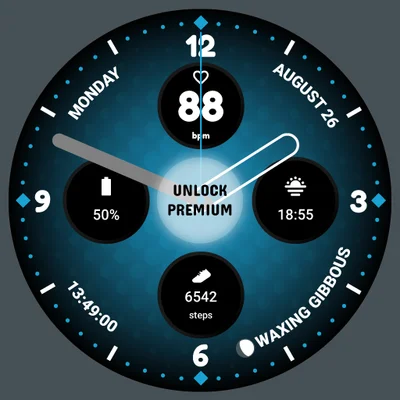
Una bonita esfera de reloj analógico impulsada por Watch Face Format
Data Watch Face es totalmente compatible con Wear OS 3, Wear OS 4 y Wear OS 5 y utiliza la tecnología Watch Face Format.
Esta es una versión gratuita de la esfera del reloj de datos que te permite probar opciones gratuitas y comprobar cómo se ve en tu reloj.
Así podrás comprobar si te gusta o no.
Para explorar todas las personalizaciones y opciones de la esfera del reloj, puede encontrar la versión completa de esta esfera del reloj en la tienda Google Play.
Se puede acceder fácilmente abriendo la aplicación del teléfono o tocando el botón "DESBLOQUEAR Premium" en la esfera del reloj, luego será redirigido a Data WF Premium en la tienda Google Play.
PERSONALIZACIÓN y OPCIONES
• Mantenga presionado el punto central para abrir la configuración de personalización
• 2x combinación de colores
• 2 estilos de marcador de hora
• 2x estilos de mano analógicos
• 3x Complicaciones (predefinidas por batería, pasos, amanecer/atardecer)
La aplicación del teléfono se puede instalar para ayudar a instalar la esfera del reloj en su dispositivo Wear OS. Para instalar la esfera del reloj en su dispositivo Wear OS, también puede seleccionar su reloj en el menú desplegable de instalación en Google Play Store.
Mostrar el texto original
The Data Watch Face is fully compatible with Wear OS 3, Wear OS 4 and Wear OS 5 and it uses Watch Face Format technology
This is a free version of the Data watch face that allows you to try out free options and check how it looks on your watch.
So you can check whether you like it or not.
To explore all the customizations and options of the watch face, you can find the full version of this watch face on the Google Play store.
It can be easily accessed by opening the phone app or tapping the "UNLOCK Premium" button on the watch face, then you will be redirected to the Data WF Premium on the Google Play store.
CUSTOMIZATION an OPTIONS
• Long press the center point to open customization settings
• 2x Color combination
• 2x Hour marker styles
• 2x Analog hand styles
• 3x Complications (predefined by battery, steps, sunrise/sunset)
The phone app can be installed to help install the watch face on your Wear OS device. To install the watch face on your Wear OS device, you can also select your watch from the install drop-down menu in the Google Play Store.
Seguridad de los datos
Lo que HuskyDev declara en Google Play sobre los datos que esta aplicación recopila y comparte.
- No se comparten datos con tercerosMás información sobre cómo los desarrolladores declaran lo que comparten
- No se recogen datosMás información sobre cómo los desarrolladores declaran lo que recogen
Novedades
Versión 1.01 · 19/8/2025
Update to SDK 35
Contacto del desarrollador
- Correo electrónicohuskydevcz@gmail.com
- Política de privacidadmediation-project-d483b.web.app
- DirecciónWeberova 1534/14 405 02 Děčín Czechia
Información
- Ofrecida por
- HuskyDev
- Categoría
- Personalización
- Versión
- 1.01
- Actualizado
- 19/8/2025
- Publicado
- 14/9/2024
- Clasificación por edad
- PEGI 3
- Precio
- Gratis
- Nombre del paquete
- huskydev.android.watchface.datafree
Aplicaciones similares
-
 CNRwatch045
Personalización
-
 MYY4 Watch Face
Arte y diseño
-
 IA111 Hybrid Sport Watchface
Personalización
-
 Digital Watchface D19
Personalización
-
 Numbers Cyan Esfera
Personalización
-
 Dream 53 Hybrid watch face
Personalización
-
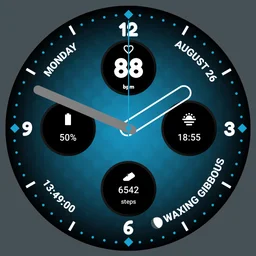 Data WF Premium by HuskyDEV
Personalización
-
 Casual Watch Face
Personalización
-
 Digital 5
Personalización
-
 SO758
Personalización
-
 Classic Fit
Personalización
-
 JHW Analog 5 PRO: Watch face
Personalización