Mark Two Watch Face
SkyMax Watch Faces- PEGI 3Clasificación por edad
- PersonalizaciónCategoría
- 6/9/2026Actualizado
- 0,89 €Precio
Enlaza a la ficha oficial de com.skymax.watchface.mark.two en Google Play. Última comprobación el 24/11/2026.
Acerca de esta aplicación
Traducción automática de Google. Idioma original: Inglés (Estados Unidos).
Una experiencia moderna y personalizable con Wear OS.
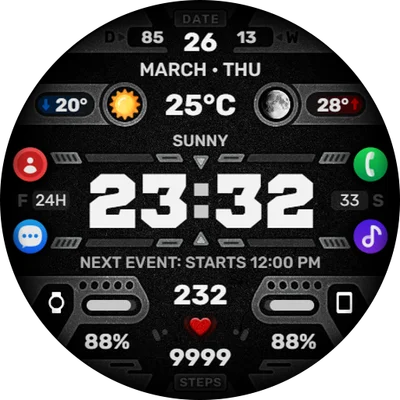
Esfera SkyMax «Mark Two»: Esta es una esfera digital para relojes inteligentes Wear OS. Puedes personalizar los colores, el fondo y los distintos indicadores para crear el diseño perfecto para ti.
Compatible con dispositivos Wear OS 5.0 API 34 o posterior.
Esta aplicación está diseñada para la mayoría de los dispositivos Wear OS.
** Instalación > Selecciona solo el reloj en el menú desplegable «Instalar». Si aparece el mensaje «Tus dispositivos no son compatibles» o tienes algún otro problema de instalación, prueba a usar nuestra aplicación complementaria para instalar la aplicación en tu reloj inteligente. Como último recurso, ve a Google Play Store en tu navegador para instalarla.
FUNCIONES:
› Formato de hora de 12 o 24 horas según la configuración de tu teléfono + segundos
› Fecha y día de la semana
› Contador de frecuencia cardíaca, nivel de pulsaciones por minuto con indicador de medición
› Contador de pasos y barra de progreso de pasos diarios
› Fase lunar
› Indicador de pronóstico del tiempo
› Pantalla siempre activa (AOD)
PERSONALIZACIÓN:
** Para disfrutar de todas las funciones, habilita los permisos necesarios para los accesos directos y las complicaciones.
› 30 opciones de color
› 4 accesos directos a aplicaciones personalizadas
› 3 complicaciones personalizadas (complementos) a tu elección: clima, batería, calendario y otras
› 2 estilos de pantalla AOD
› 6 opciones de brillo de pantalla AOD
NOTAS:
** Si después de actualizar la esfera del reloj, el sistema u otras situaciones, el contador de pasos u otros indicadores muestran "0", prueba lo siguiente. Mantén pulsada la pantalla del reloj para acceder al menú de selección de esferas → selecciona cualquier otra esfera disponible → luego elimina nuestra esfera del menú de selección (no del reloj) y vuelve a instalarla en tu reloj usando tu smartphone, desde el menú de esferas instaladas recientemente.
** Si la frecuencia cardíaca u otros indicadores también marcan "0", verifica los permisos en la configuración. Ve a "Ajustes" → "Aplicaciones" → "Permisos", busca esta esfera y configura los permisos necesarios. Asegúrate también de que la pantalla del reloj esté encendida y de que lo lleves puesto correctamente en la muñeca al medir tu frecuencia cardíaca.
APLICACIONES ADICIONALES:
** Si desea ver en la pantalla de su reloj la carga restante de la batería de su smartphone y otras funciones adicionales (complicaciones) que no están disponibles en su reloj, instale aplicaciones adicionales del desarrollador de estas aplicaciones: amoledwatchfaces™ (todos los créditos pertenecen al creador de la aplicación original).
• Complicación de batería del teléfono
https://play.google.com/store/apps/details?id=com.weartools.phonebattcomp
• Suite de complicaciones - Wear OS
https://play.google.com/store/apps/details?id=com.weartools.weekdayutccomp
• Complicación de frecuencia cardíaca
https://play.google.com/store/apps/details?id=com.weartools.heartratecomp
• Complicación de servicios de salud
https://play.google.com/store/apps/details?id=com.weartools.hscomplications
Únase a nosotros para obtener asistencia en vivo y participar en debates:
Telegram https://t.me/skymaxwatchfaces
Instagram https://www.instagram.com/skymaxwatchfaces
Mostrar el texto original
SkyMax «Mark Two» Watch Face — This is a digital watch face for Wear OS smartwatch. Colors, background and various indicators can be customized, allowing you to create the perfect layout for you!
Compatible with devices running Wear OS 5.0 API 34+ and later.
This app is designed for most Wear OS devices.
** Install > Select only the clock from the Install drop-down menu. If you see a "Your devices are not compatible" message or have any other installation issues, try using our companion app to install the app on your smartwatch. As a last resort, go to the Play Store in your browser to install.
FUNCTIONS:
› 12 or 24 hour time format depending on your phone settings + seconds
› Date, day of the week
› Heart rate counter, beats per minute level with measurement indicator
› Step counter and daily steps progress bar
› Moon phase type
› Weather forecast indicator
› Always On Display (AOD) supported
PERSONALIZATION:
** For full functionality, please enable required permissions for shortcuts and complications!
› 30 color options
› 4 custom application shortcuts
› 3 custom complications (add-ons) of your choice - weather, battery, calendar and others
› 2 AOD screen styles
› 6 AOD screen brightness options
NOTES:
** If after updating the watch face, updating the system or other situations, the step counter or other indicators show “0”, try the following. Touch and hold the watch display to get to the watch face selection menu → select any other available watch face → then remove our watch face from the watch face selection menu (not from the watch) and reinstall it on your watch using your smartphone, from the recently installed watch faces selection menu.
** If the heart rate or other indicators are also “0”, check the permissions in the settings. “Settings” → “Applications” → “Permissions”, find this watch face and configure the necessary permissions. Also make sure that the watch screen is on and that it is worn correctly on your wrist when measuring your heart rate.
ADDITIONAL APPLICATIONS:
** If you want to see on the screen of your watch “the remaining battery charge of your smartphone” and other additions (complications) that are not on your watch, install additional applications from the developer of these applications - amoledwatchfaces™ (all credits belong to the creator of the original application)
• Phone Battery Complication
https://play.google.com/store/apps/details?id=com.weartools.phonebattcomp
• Complications Suite - Wear OS
https://play.google.com/store/apps/details?id=com.weartools.weekdayutccomp
• Heart Rate Complication
https://play.google.com/store/apps/details?id=com.weartools.heartratecomp
• Health Services Complications
https://play.google.com/store/apps/details?id=com.weartools.hscomplications
Join us for live support and discussion:
Telegram https://t.me/skymaxwatchfaces
Instagram https://www.instagram.com/skymaxwatchfaces
Seguridad de los datos
Lo que SkyMax Watch Faces declara en Google Play sobre los datos que esta aplicación recopila y comparte.
- No se comparten datos con tercerosMás información sobre cómo los desarrolladores declaran lo que comparten
- No se recogen datosMás información sobre cómo los desarrolladores declaran lo que recogen
Contacto del desarrollador
- Correo electrónicoskymax.watchfaces@gmail.com
- Política de privacidadsites.google.com
- Direcciónул. Карла Маркса, дом 10, кв. 43 Хойники Гомельская область 247622 Belarus
Información
- Ofrecida por
- SkyMax Watch Faces
- Categoría
- Personalización
- Versión
- 1.0.2
- Actualizado
- 6/9/2026
- Publicado
- 1/5/2026
- Clasificación por edad
- PEGI 3
- Precio
- 0,89 €
- Nombre del paquete
- com.skymax.watchface.mark.two