Mark Two Watch Face
SkyMax Watch Faces- PEGI 3Classification d’âge
- PersonnalisationCatégorie
- 06/09/2026Mis à jour
- 0,89 €Prix
Renvoie vers la fiche Google Play officielle de com.skymax.watchface.mark.two. Dernière vérification le 24/11/2026.
À propos de cette application
Traduction automatique par Google. Langue d’origine : Anglais (États-Unis).
Une montre Wear OS moderne et personnalisable
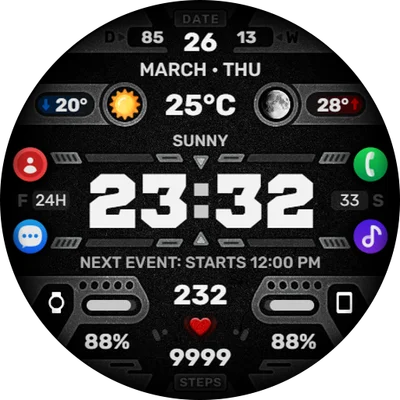
Cadran SkyMax « Mark Two » — Ce cadran numérique est compatible avec les montres connectées Wear OS. Personnalisez les couleurs, le fond et divers indicateurs pour créer l'affichage idéal !
Compatible avec les appareils fonctionnant sous Wear OS 5.0 API 34 et versions ultérieures.
Cette application est conçue pour la plupart des appareils Wear OS.
** Installation > Sélectionnez uniquement le cadran dans le menu déroulant « Installer ». Si le message « Vos appareils ne sont pas compatibles » s'affiche ou si vous rencontrez d'autres problèmes d'installation, essayez d'utiliser notre application compagnon pour installer l'application sur votre montre connectée. En dernier recours, rendez-vous sur le Play Store via votre navigateur.
FONCTIONS :
› Format de l'heure 12 ou 24 heures selon les paramètres de votre téléphone + secondes
› Date, jour de la semaine
› Fréquence cardiaque (battements par minute) avec indicateur de mesure
› Podomètre et barre de progression du nombre de pas quotidiens
› Phase de la lune
› Prévisions météo
› Affichage permanent (AOD) pris en charge
PERSONNALISATION :
** Pour une fonctionnalité optimale, veuillez autoriser les raccourcis et complications !
› 30 couleurs disponibles
› 4 raccourcis d'applications personnalisés
› 3 complications personnalisées (modules complémentaires) au choix : météo, batterie, calendrier, etc.
› 2 styles d'affichage AOD
› 6 niveaux de luminosité pour l'affichage permanent
REMARQUES :
** Si, après une mise à jour du cadran, du système ou autre, le podomètre ou d'autres indicateurs affichent « 0 », veuillez procéder comme suit. Maintenez votre doigt appuyé sur l'écran de la montre pour accéder au menu de sélection des cadrans → sélectionnez un autre cadran disponible → puis supprimez notre cadran du menu de sélection (et non de la montre) et réinstallez-le sur votre montre à l'aide de votre smartphone, depuis le menu des cadrans récemment installés.
** Si la fréquence cardiaque ou d'autres indicateurs affichent également « 0 », vérifiez les autorisations dans les paramètres. Accédez à « Paramètres » → « Applications » → « Autorisations », recherchez ce cadran et configurez les autorisations nécessaires. Assurez-vous également que l'écran de la montre est allumé et qu'elle est correctement positionnée à votre poignet lors de la mesure de votre fréquence cardiaque.
APPLICATIONS SUPPLÉMENTAIRES :
** Si vous souhaitez afficher sur l’écran de votre montre « le niveau de batterie restant de votre smartphone » et d’autres complications non présentes sur votre montre, installez les applications supplémentaires du développeur amoledwatchfaces™ (tous les droits appartiennent au créateur de l’application originale).
• Complication Batterie du téléphone
https://play.google.com/store/apps/details?id=com.weartools.phonebattcomp
• Suite de complications - Wear OS
https://play.google.com/store/apps/details?id=com.weartools.weekdayutccomp
• Complication Fréquence cardiaque
https://play.google.com/store/apps/details?id=com.weartools.heartratecomp
• Complications Services de santé
https://play.google.com/store/apps/details?id=com.weartools.hscomplications
Rejoignez-nous pour obtenir de l’aide et discuter en direct :
Telegram https://t.me/skymaxwatchfaces
Instagram : https://www.instagram.com/skymaxwatchfaces
Afficher le texte d’origine
SkyMax «Mark Two» Watch Face — This is a digital watch face for Wear OS smartwatch. Colors, background and various indicators can be customized, allowing you to create the perfect layout for you!
Compatible with devices running Wear OS 5.0 API 34+ and later.
This app is designed for most Wear OS devices.
** Install > Select only the clock from the Install drop-down menu. If you see a "Your devices are not compatible" message or have any other installation issues, try using our companion app to install the app on your smartwatch. As a last resort, go to the Play Store in your browser to install.
FUNCTIONS:
› 12 or 24 hour time format depending on your phone settings + seconds
› Date, day of the week
› Heart rate counter, beats per minute level with measurement indicator
› Step counter and daily steps progress bar
› Moon phase type
› Weather forecast indicator
› Always On Display (AOD) supported
PERSONALIZATION:
** For full functionality, please enable required permissions for shortcuts and complications!
› 30 color options
› 4 custom application shortcuts
› 3 custom complications (add-ons) of your choice - weather, battery, calendar and others
› 2 AOD screen styles
› 6 AOD screen brightness options
NOTES:
** If after updating the watch face, updating the system or other situations, the step counter or other indicators show “0”, try the following. Touch and hold the watch display to get to the watch face selection menu → select any other available watch face → then remove our watch face from the watch face selection menu (not from the watch) and reinstall it on your watch using your smartphone, from the recently installed watch faces selection menu.
** If the heart rate or other indicators are also “0”, check the permissions in the settings. “Settings” → “Applications” → “Permissions”, find this watch face and configure the necessary permissions. Also make sure that the watch screen is on and that it is worn correctly on your wrist when measuring your heart rate.
ADDITIONAL APPLICATIONS:
** If you want to see on the screen of your watch “the remaining battery charge of your smartphone” and other additions (complications) that are not on your watch, install additional applications from the developer of these applications - amoledwatchfaces™ (all credits belong to the creator of the original application)
• Phone Battery Complication
https://play.google.com/store/apps/details?id=com.weartools.phonebattcomp
• Complications Suite - Wear OS
https://play.google.com/store/apps/details?id=com.weartools.weekdayutccomp
• Heart Rate Complication
https://play.google.com/store/apps/details?id=com.weartools.heartratecomp
• Health Services Complications
https://play.google.com/store/apps/details?id=com.weartools.hscomplications
Join us for live support and discussion:
Telegram https://t.me/skymaxwatchfaces
Instagram https://www.instagram.com/skymaxwatchfaces
Sécurité des données
Ce que SkyMax Watch Faces déclare sur Google Play au sujet des données que cette application collecte et partage.
- Aucune donnée partagée avec des tiersEn savoir plus sur la manière dont les développeurs déclarent le partage
- Aucune donnée collectéeEn savoir plus sur la manière dont les développeurs déclarent la collecte
Coordonnées du développeur
- E-mailskymax.watchfaces@gmail.com
- Politique de confidentialitésites.google.com
- Adresseул. Карла Маркса, дом 10, кв. 43 Хойники Гомельская область 247622 Belarus
Informations
- Proposée par
- SkyMax Watch Faces
- Catégorie
- Personnalisation
- Version
- 1.0.2
- Mis à jour
- 06/09/2026
- Publié
- 01/05/2026
- Classification d’âge
- PEGI 3
- Prix
- 0,89 €
- Nom du package
- com.skymax.watchface.mark.two