Mark Two Watch Face
SkyMax Watch Faces- Rating 3+Batasan usia
- PersonalisasiKategori
- 6/9/2026Diperbarui
- Rp 16.000Harga
Tertaut ke halaman resmi com.skymax.watchface.mark.two di Google Play. Terakhir diperiksa pada 24/11/2026.
Tentang aplikasi ini
Terjemahan otomatis oleh Google. Bahasa asli: Inggris (Amerika Serikat).
Jam tangan Wear OS dengan pengalaman modern dan dapat disesuaikan.
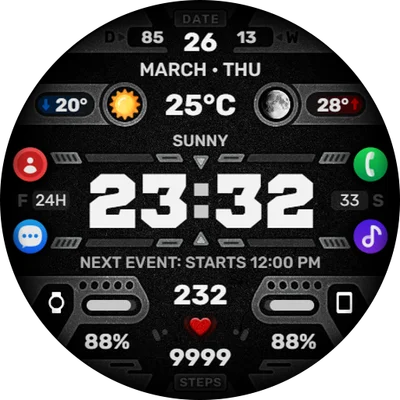
Tampilan Jam SkyMax «Mark Two» — Ini adalah tampilan jam digital untuk jam tangan pintar Wear OS. Warna, latar belakang, dan berbagai indikator dapat disesuaikan, memungkinkan Anda untuk membuat tata letak yang sempurna untuk Anda!
Kompatibel dengan perangkat yang menjalankan Wear OS 5.0 API 34+ dan yang lebih baru.
Aplikasi ini dirancang untuk sebagian besar perangkat Wear OS.
** Instal > Pilih hanya jam dari menu tarik-turun Instal. Jika Anda melihat pesan "Perangkat Anda tidak kompatibel" atau mengalami masalah instalasi lainnya, coba gunakan aplikasi pendamping kami untuk menginstal aplikasi di jam tangan pintar Anda. Sebagai upaya terakhir, buka Play Store di browser Anda untuk menginstal.
FUNGSI:
› Format waktu 12 atau 24 jam tergantung pengaturan ponsel Anda + detik
› Tanggal, hari dalam seminggu
› Penghitung detak jantung, level detak per menit dengan indikator pengukuran
› Penghitung langkah dan bilah kemajuan langkah harian
› Jenis fase bulan
› Indikator prakiraan cuaca
› Mendukung Always On Display (AOD)
PERSONALISASI:
** Untuk fungsionalitas penuh, harap aktifkan izin yang diperlukan untuk pintasan dan komplikasi!
› 30 pilihan warna
› 4 pintasan aplikasi khusus
› 3 komplikasi (tambahan) khusus pilihan Anda - cuaca, baterai, kalender, dan lainnya
› 2 gaya layar AOD
› 6 pilihan kecerahan layar AOD
CATATAN:
** Jika setelah memperbarui tampilan jam, memperbarui sistem, atau situasi lain, penghitung langkah atau indikator lain menunjukkan "0", coba hal berikut. Sentuh dan tahan layar jam untuk masuk ke menu pemilihan tampilan jam → pilih tampilan jam lain yang tersedia → lalu hapus tampilan jam kami dari menu pemilihan tampilan jam (bukan dari jam tangan) dan instal ulang di jam tangan Anda menggunakan ponsel cerdas Anda, dari menu pemilihan tampilan jam yang baru diinstal.
** Jika detak jantung atau indikator lainnya juga "0", periksa izin di pengaturan. "Pengaturan" → "Aplikasi" → "Izin", temukan tampilan jam ini dan konfigurasikan izin yang diperlukan. Pastikan juga layar jam menyala dan terpasang dengan benar di pergelangan tangan Anda saat mengukur detak jantung.
APLIKASI TAMBAHAN:
** Jika Anda ingin melihat di layar jam tangan Anda “sisa daya baterai ponsel cerdas Anda” dan tambahan (komplikasi) lainnya yang tidak ada di jam tangan Anda, instal aplikasi tambahan dari pengembang aplikasi ini - amoledwatchfaces™ (semua hak cipta milik pencipta aplikasi asli)
• Komplikasi Baterai Ponsel
https://play.google.com/store/apps/details?id=com.weartools.phonebattcomp
• Rangkaian Komplikasi - Wear OS
https://play.google.com/store/apps/details?id=com.weartools.weekdayutccomp
• Komplikasi Detak Jantung
https://play.google.com/store/apps/details?id=com.weartools.heartratecomp
• Komplikasi Layanan Kesehatan
https://play.google.com/store/apps/details?id=com.weartools.hscomplications
Bergabunglah dengan kami untuk dukungan langsung dan Diskusi:
Telegram https://t.me/skymaxwatchfaces
Instagram https://www.instagram.com/skymaxwatchfaces
Tampilkan teks asli
SkyMax «Mark Two» Watch Face — This is a digital watch face for Wear OS smartwatch. Colors, background and various indicators can be customized, allowing you to create the perfect layout for you!
Compatible with devices running Wear OS 5.0 API 34+ and later.
This app is designed for most Wear OS devices.
** Install > Select only the clock from the Install drop-down menu. If you see a "Your devices are not compatible" message or have any other installation issues, try using our companion app to install the app on your smartwatch. As a last resort, go to the Play Store in your browser to install.
FUNCTIONS:
› 12 or 24 hour time format depending on your phone settings + seconds
› Date, day of the week
› Heart rate counter, beats per minute level with measurement indicator
› Step counter and daily steps progress bar
› Moon phase type
› Weather forecast indicator
› Always On Display (AOD) supported
PERSONALIZATION:
** For full functionality, please enable required permissions for shortcuts and complications!
› 30 color options
› 4 custom application shortcuts
› 3 custom complications (add-ons) of your choice - weather, battery, calendar and others
› 2 AOD screen styles
› 6 AOD screen brightness options
NOTES:
** If after updating the watch face, updating the system or other situations, the step counter or other indicators show “0”, try the following. Touch and hold the watch display to get to the watch face selection menu → select any other available watch face → then remove our watch face from the watch face selection menu (not from the watch) and reinstall it on your watch using your smartphone, from the recently installed watch faces selection menu.
** If the heart rate or other indicators are also “0”, check the permissions in the settings. “Settings” → “Applications” → “Permissions”, find this watch face and configure the necessary permissions. Also make sure that the watch screen is on and that it is worn correctly on your wrist when measuring your heart rate.
ADDITIONAL APPLICATIONS:
** If you want to see on the screen of your watch “the remaining battery charge of your smartphone” and other additions (complications) that are not on your watch, install additional applications from the developer of these applications - amoledwatchfaces™ (all credits belong to the creator of the original application)
• Phone Battery Complication
https://play.google.com/store/apps/details?id=com.weartools.phonebattcomp
• Complications Suite - Wear OS
https://play.google.com/store/apps/details?id=com.weartools.weekdayutccomp
• Heart Rate Complication
https://play.google.com/store/apps/details?id=com.weartools.heartratecomp
• Health Services Complications
https://play.google.com/store/apps/details?id=com.weartools.hscomplications
Join us for live support and discussion:
Telegram https://t.me/skymaxwatchfaces
Instagram https://www.instagram.com/skymaxwatchfaces
Keamanan data
Yang dinyatakan SkyMax Watch Faces di Google Play tentang data yang dikumpulkan dan dibagikan aplikasi ini.
- Tidak ada data yang dibagikan kepada pihak ketigaPelajari lebih lanjut cara developer menyatakan pembagian data
- Tidak ada data yang dikumpulkanPelajari lebih lanjut cara developer menyatakan pengumpulan data
Kontak pengembang
- Emailskymax.watchfaces@gmail.com
- Kebijakan Privasisites.google.com
- Alamatул. Карла Маркса, дом 10, кв. 43 Хойники Гомельская область 247622 Belarus
Informasi
- Ditawarkan oleh
- SkyMax Watch Faces
- Kategori
- Personalisasi
- Versi
- 1.0.2
- Diperbarui
- 6/9/2026
- Dirilis
- 1/5/2026
- Batasan usia
- Rating 3+
- Harga
- Rp 16.000
- Nama paket
- com.skymax.watchface.mark.two