VOYAGER WorldTimer Watch Face
WatchBase- PEGI 3Clasificación por edad
- PersonalizaciónCategoría
- 29/10/2025Actualizado
- 1,79 €Precio
Enlaza a la ficha oficial de wb.voyager.automatic en Google Play. Última comprobación el 13/11/2026.
Acerca de esta aplicación
Traducción automática de Google. Idioma original: Inglés (Estados Unidos).
¡Esfera de reloj súper realista, funcional y súper festiva!
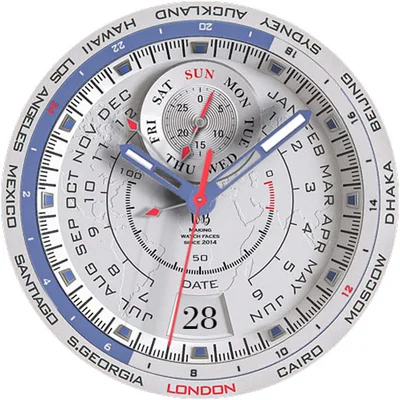
¡Nuestra nueva esfera de reloj VOYAGER es un Worldtimer diseñado con precisión con un diseño muy funcional y realista para Wear OS!
Disfrute del estilo clásico con temas adicionales de Navidad/Invierno y con un
Pantalla multifunción, ¡puedes personalizar la información que te importa!
NOTA: ¡Lea la sección de instrucciones y la sección de instalación!
ⓘ Características:
- Cronómetro mundial.
- Indicador de 12 zonas horarias diferentes.
- Pantalla multifunción (MFD).
- Muy realista.
- Color de MANOS cambiable (6 colores).
- Color de las manecillas indicadoras intercambiables (2 colores día/noche).
- Color de mano de SEGUNDOS cambiable (5 colores).
- Color/tema de FONDO cambiable (10 fondos diferentes).
- Hora y fecha.
- AOD (Siempre en exhibición).
ⓘ Cómo:
- Para personalizar la esfera de tu reloj, toca y mantén presionada la pantalla, luego toca personalizar.
* IMPORTANTE: si habilita la visualización MFD, debe elegirla/personalizarla con la información que desee. Si apaga el MFD, debe elegir "Vacío" como opción de complicación para evitar que se muestre texto/información sobre el indicador Mes.
ⓘ Indicador de fase lunar
- El indicador de fases lunares solo está disponible en color blanco. Si está habilitado, el indicador de fase lunar se superpone al MFD (si está habilitado).
¿Quieres otra esfera de reloj SÚPER REALISTA? Aquí tienes:
https://play.google.com/store/apps/details?id=wb.luna.benedicta
ⓘ Instalación
Cómo instalar: https://watchbase.store/static/ai/
Después de la instalación: https://watchbase.store/static/ai/ai.html
* La esfera del reloj Luna Benedicta se muestra en "Cómo instalar" y "Después de la instalación". El mismo proceso de instalación es válido para todas nuestras esferas de reloj.
Si tiene algún problema al instalar la esfera del reloj, tenga en cuenta que no tenemos control sobre el proceso de instalación ni sobre ningún otro proceso de Google Play/Watch. El problema más común al que se enfrenta la gente es que después de comprar la esfera del reloj y instalarla, no pueden verla ni encontrarla.
Para aplicar la esfera del reloj después de instalarla, toque y mantenga presionada la pantalla principal (la esfera del reloj actual) y deslice el dedo hacia la izquierda para buscarla. Si no puede verlo, toque el signo "+" al final (agregue una esfera de reloj) y busque nuestra esfera de reloj allí.
Usamos una aplicación complementaria para el teléfono para facilitar el proceso de instalación. Si compra nuestra esfera de reloj, toque el botón de instalación (en la aplicación del teléfono), debe verificar su reloj... aparecerá una pantalla con la esfera del reloj... toque instalar nuevamente y espere a que finalice la instalación. Si ya compraste la esfera del reloj y todavía te pide que la compres nuevamente en el reloj, no te preocupes, no se te cobrará dos veces. Este es un problema de sincronización común, solo espera un poco o intenta reiniciar tu reloj.
Otra solución para instalar la esfera del reloj es intentar instalarla desde un navegador, iniciado sesión con su cuenta (cuenta de Google Play que usa en el reloj).
ÚNETE a WatchBase.
Grupo de Facebook (grupo de esferas de reloj generales):
https://www.facebook.com/groups/1170256566402887/
Pagina de Facebook:
https://www.facebook.com/WatchBase
Instagram:
https://www.instagram.com/watch.base/
SUSCRÍBETE a nuestro canal de YouTube:
https://www.youtube.com/c/WATCHBASE?sub_confirmation=1
https://www.youtube.com/c/WATCHBASE
Mostrar el texto original
Our new VOYAGER watch face is a precisely crafted Worldtimer with a very functional and realistic design for Wear OS!
Enjoy the classic look with additional Christmas/Winter themes and with a
Multi-Function display, you can customize the info that matters to you!
NOTE: Please read the how to section and installation section !!!
ⓘ Features:
- Worldtimer.
- 12 different Time zones indicator.
- Multi-function Display (MFD).
- Very realistic.
- Changeable HANDS color (6 colors).
- Changeable indicator hands color (2 colors day/night).
- Changeable SECONDS hand color (5 colors).
- Changeable BACKGROUND color/theme (10 different backgrounds).
- Time and date.
- AOD (Always on display).
ⓘ How to:
- To customize your watch face, touch and hold on the screen, then tap on customize.
* IMPORTANT - if you enable MFD display you must choose/customize it with the information you want. If you turn off the MFD you must choose "Empty" as a complication option to avoid text/info being displayed over the Month indicator.
ⓘ Moon-phase indicator
- The moon phases indicator is only available in white color theme. If enabled the Moon-phase indicator overlays the MFD (if enabled).
Want another SUPER REALISTIC watch face? Here you go:
https://play.google.com/store/apps/details?id=wb.luna.benedicta
ⓘ Installation
How to install: https://watchbase.store/static/ai/
After installation: https://watchbase.store/static/ai/ai.html
* Luna Benedicta watch face shown in the "How to install" and "After installation". The same installation process is valid for all of our watch faces.
If you have any issues installing the watch face, please note that we have no control over the installation process or any other Google Play / Watch processes. The most common issue that people face is after they buy the watch face and install it, they can't see/find it.
In order to apply the watch face after you install it, touch and hold on the main screen (your current watch face) the swipe left to look for it. If you can't see it, tap on the " + " sign at the end (add a watch face) and find our watch face there.
We use a companion app for the phone to make the installation process easier. If you buy our watch face, tap on the install button (on the phone app) you must check your watch.. a screen will appear with the watch face.. tap install again and wait for the installation to finish. If you already bought the watch face and it still asks you to buy it again on the watch, don't worry you will not be charged twice. This is a common synchronization issue, just wait a little or try to restart your watch.
Another solution for installing the watch face is to try to install it from a browser, logged with your account (google play account that you use on the watch).
JOIN WatchBase.
Facebook group (General watch faces group):
https://www.facebook.com/groups/1170256566402887/
Facebook page:
https://www.facebook.com/WatchBase
Instagram:
https://www.instagram.com/watch.base/
SUBSCRIBE to our YouTube channel:
https://www.youtube.com/c/WATCHBASE?sub_confirmation=1
https://www.youtube.com/c/WATCHBASE
Seguridad de los datos
Lo que WatchBase declara en Google Play sobre los datos que esta aplicación recopila y comparte.
- No se comparten datos con tercerosMás información sobre cómo los desarrolladores declaran lo que comparten
- No se recogen datosMás información sobre cómo los desarrolladores declaran lo que recogen
Contacto del desarrollador
- Correo electrónicosupport@belvek.com
- Política de privacidadwatchbase.store
- Dirección6 Prof. Georgi Bradistilov str./blvd. 1700 Sofia Bulgaria
Información
- Ofrecida por
- WatchBase
- Categoría
- Personalización
- Actualizado
- 29/10/2025
- Publicado
- 14/12/2023
- Clasificación por edad
- PEGI 3
- Precio
- 1,79 €
- Nombre del paquete
- wb.voyager.automatic