VOYAGER WorldTimer Watch Face
WatchBase- Rating 3+Batasan usia
- PersonalisasiKategori
- 29/10/2025Diperbarui
- Rp 28.000Harga
Tertaut ke halaman resmi wb.voyager.automatic di Google Play. Terakhir diperiksa pada 13/11/2026.
Tentang aplikasi ini
Terjemahan otomatis oleh Google. Bahasa asli: Inggris (Amerika Serikat).
Tampilan jam super realistis, fungsional, dan super meriah!
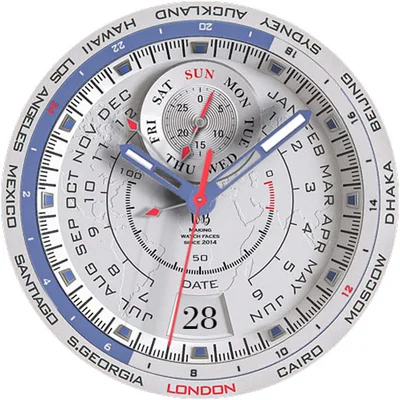
Tampilan jam VOYAGER kami yang baru adalah Worldtimer yang dibuat secara presisi dengan desain yang sangat fungsional dan realistis untuk Wear OS!
Nikmati tampilan klasik dengan tambahan tema Natal/Musim Dingin dan dengan a
Tampilan Multi-Fungsi, Anda dapat menyesuaikan info yang penting bagi Anda!
CATATAN: Silakan baca bagian cara dan bagian instalasi!!!
Fitur:
- Pengatur Waktu Dunia.
- 12 indikator zona waktu yang berbeda.
- Tampilan Multi-fungsi (MFD).
- Sangat realistis.
- Warna TANGAN yang dapat diubah (6 warna).
- Warna jarum indikator yang dapat diubah (2 warna siang/malam).
- Warna tangan DETIK yang dapat diubah (5 warna).
- Warna/tema LATAR BELAKANG yang dapat diubah (10 latar belakang berbeda).
- Waktu dan tanggal.
- AOD (Selalu dipajang).
Cara:
- Untuk menyesuaikan tampilan jam Anda, sentuh dan tahan pada layar, lalu ketuk sesuaikan.
* PENTING - jika Anda mengaktifkan tampilan MFD Anda harus memilih/menyesuaikannya dengan informasi yang Anda inginkan. Jika Anda mematikan MFD, Anda harus memilih "Kosong" sebagai opsi rumit untuk menghindari teks/info ditampilkan pada indikator Bulan.
Indikator fase bulan
- Indikator fase bulan hanya tersedia dalam tema warna putih. Jika diaktifkan, indikator fase Bulan akan melapisi MFD (jika diaktifkan).
Ingin tampilan jam SUPER REALISTIS lainnya? Ini dia:
https://play.google.com/store/apps/details?id=wb.luna.benedicta
Instalasi
Cara menginstal: https://watchbase.store/static/ai/
Setelah instalasi: https://watchbase.store/static/ai/ai.html
* Tampilan jam Luna Benedicta ditampilkan di "Cara menginstal" dan "Setelah instalasi". Proses instalasi yang sama berlaku untuk semua tampilan jam kami.
Jika Anda mengalami masalah saat memasang tampilan jam, harap diperhatikan bahwa kami tidak memiliki kendali atas proses pemasangan atau proses Google Play/Tonton lainnya. Masalah paling umum yang dihadapi orang adalah setelah mereka membeli tampilan jam dan memasangnya, mereka tidak dapat melihat/menemukannya.
Untuk menerapkan tampilan jam setelah Anda menginstalnya, sentuh dan tahan pada layar utama (tampilan jam Anda saat ini) geser ke kiri untuk mencarinya. Jika Anda tidak dapat melihatnya, ketuk tanda "+" di akhir (tambahkan tampilan jam) dan temukan tampilan jam kami di sana.
Kami menggunakan aplikasi pendamping untuk ponsel untuk mempermudah proses instalasi. Jika Anda membeli tampilan jam kami, ketuk tombol instal (di aplikasi ponsel), Anda harus memeriksa jam tangan Anda.. sebuah layar akan muncul dengan tampilan jam.. ketuk instal lagi dan tunggu hingga instalasi selesai. Jika Anda sudah membeli tampilan jam dan masih meminta Anda untuk membelinya lagi di jam tangan tersebut, jangan khawatir Anda tidak akan dikenakan biaya dua kali. Ini adalah masalah sinkronisasi yang umum, tunggu sebentar atau coba mulai ulang jam tangan Anda.
Solusi lain untuk memasang tampilan jam adalah mencoba memasangnya dari browser, login dengan akun Anda (akun google play yang Anda gunakan di jam tangan).
GABUNG WatchBase.
Grup Facebook (Grup tampilan jam umum):
https://www.facebook.com/groups/1170256566402887/
Halaman Facebook:
https://www.facebook.com/WatchBase
Instagram:
https://www.instagram.com/watch.base/
BERLANGGANAN saluran YouTube kami:
https://www.youtube.com/c/WATCHBASE?sub_confirmation=1
https://www.youtube.com/c/WATCHBASE
Tampilkan teks asli
Our new VOYAGER watch face is a precisely crafted Worldtimer with a very functional and realistic design for Wear OS!
Enjoy the classic look with additional Christmas/Winter themes and with a
Multi-Function display, you can customize the info that matters to you!
NOTE: Please read the how to section and installation section !!!
ⓘ Features:
- Worldtimer.
- 12 different Time zones indicator.
- Multi-function Display (MFD).
- Very realistic.
- Changeable HANDS color (6 colors).
- Changeable indicator hands color (2 colors day/night).
- Changeable SECONDS hand color (5 colors).
- Changeable BACKGROUND color/theme (10 different backgrounds).
- Time and date.
- AOD (Always on display).
ⓘ How to:
- To customize your watch face, touch and hold on the screen, then tap on customize.
* IMPORTANT - if you enable MFD display you must choose/customize it with the information you want. If you turn off the MFD you must choose "Empty" as a complication option to avoid text/info being displayed over the Month indicator.
ⓘ Moon-phase indicator
- The moon phases indicator is only available in white color theme. If enabled the Moon-phase indicator overlays the MFD (if enabled).
Want another SUPER REALISTIC watch face? Here you go:
https://play.google.com/store/apps/details?id=wb.luna.benedicta
ⓘ Installation
How to install: https://watchbase.store/static/ai/
After installation: https://watchbase.store/static/ai/ai.html
* Luna Benedicta watch face shown in the "How to install" and "After installation". The same installation process is valid for all of our watch faces.
If you have any issues installing the watch face, please note that we have no control over the installation process or any other Google Play / Watch processes. The most common issue that people face is after they buy the watch face and install it, they can't see/find it.
In order to apply the watch face after you install it, touch and hold on the main screen (your current watch face) the swipe left to look for it. If you can't see it, tap on the " + " sign at the end (add a watch face) and find our watch face there.
We use a companion app for the phone to make the installation process easier. If you buy our watch face, tap on the install button (on the phone app) you must check your watch.. a screen will appear with the watch face.. tap install again and wait for the installation to finish. If you already bought the watch face and it still asks you to buy it again on the watch, don't worry you will not be charged twice. This is a common synchronization issue, just wait a little or try to restart your watch.
Another solution for installing the watch face is to try to install it from a browser, logged with your account (google play account that you use on the watch).
JOIN WatchBase.
Facebook group (General watch faces group):
https://www.facebook.com/groups/1170256566402887/
Facebook page:
https://www.facebook.com/WatchBase
Instagram:
https://www.instagram.com/watch.base/
SUBSCRIBE to our YouTube channel:
https://www.youtube.com/c/WATCHBASE?sub_confirmation=1
https://www.youtube.com/c/WATCHBASE
Keamanan data
Yang dinyatakan WatchBase di Google Play tentang data yang dikumpulkan dan dibagikan aplikasi ini.
- Tidak ada data yang dibagikan kepada pihak ketigaPelajari lebih lanjut cara developer menyatakan pembagian data
- Tidak ada data yang dikumpulkanPelajari lebih lanjut cara developer menyatakan pengumpulan data
Kontak pengembang
- Emailsupport@belvek.com
- Kebijakan Privasiwatchbase.store
- Alamat6 Prof. Georgi Bradistilov str./blvd. 1700 Sofia Bulgaria
Informasi
- Ditawarkan oleh
- WatchBase
- Kategori
- Personalisasi
- Diperbarui
- 29/10/2025
- Dirilis
- 14/12/2023
- Batasan usia
- Rating 3+
- Harga
- Rp 28.000
- Nama paket
- wb.voyager.automatic