VOYAGER WorldTimer Watch Face
WatchBase- PEGI 3Classification d’âge
- PersonnalisationCatégorie
- 29/10/2025Mis à jour
- 1,79 €Prix
Renvoie vers la fiche Google Play officielle de wb.voyager.automatic. Dernière vérification le 13/11/2026.
À propos de cette application
Traduction automatique par Google. Langue d’origine : Anglais (États-Unis).
Cadran de montre super réaliste, fonctionnel et super festif !
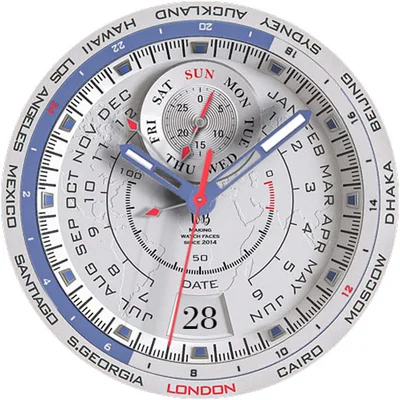
Notre nouveau cadran de montre VOYAGER est une horloge mondiale conçue avec précision avec un design très fonctionnel et réaliste pour Wear OS !
Profitez du look classique avec des thèmes Noël/hiver supplémentaires et avec un
Écran multifonction, vous pouvez personnaliser les informations qui comptent pour vous !
REMARQUE : Veuillez lire la section Comment faire et la section Installation !!!
ⓘ Caractéristiques :
- Heure mondiale.
- 12 indicateurs de fuseaux horaires différents.
- Écran multifonction (MFD).
- Très réaliste.
- Couleur des MAINS modifiable (6 couleurs).
- Couleur des aiguilles indicatrices modifiable (2 couleurs jour/nuit).
- Couleur de l'aiguille des SECONDES modifiable (5 couleurs).
- Couleur/thème d'ARRIÈRE-PLAN modifiable (10 arrière-plans différents).
- Heure et date.
- AOD (Toujours affiché).
ⓘ Comment :
- Pour personnaliser le cadran de votre montre, touchez et maintenez sur l'écran, puis appuyez sur personnaliser.
* IMPORTANT - si vous activez l'affichage MFD, vous devez le choisir/personnaliser avec les informations souhaitées. Si vous éteignez le MFD, vous devez choisir « Vide » comme option de complication pour éviter que du texte/informations ne s'affichent sur l'indicateur du mois.
ⓘ Indicateur de phase de lune
- L'indicateur des phases de lune est uniquement disponible dans le thème de couleur blanche. S'il est activé, l'indicateur de phase de lune recouvre le MFD (si activé).
Vous voulez un autre cadran de montre SUPER RÉALISTE ? Voici:
https://play.google.com/store/apps/details?id=wb.luna.benedicta
ⓘInstallation
Comment installer : https://watchbase.store/static/ai/
Après l'installation : https://watchbase.store/static/ai/ai.html
* Le cadran de la montre Luna Benedicta est présenté dans les sections « Comment installer » et « Après l'installation ». Le même processus d'installation est valable pour tous nos cadrans de montre.
Si vous rencontrez des problèmes pour installer le cadran de la montre, veuillez noter que nous n'avons aucun contrôle sur le processus d'installation ou sur tout autre processus Google Play/Watch. Le problème le plus courant auquel les gens sont confrontés est qu’après avoir acheté le cadran de la montre et l’avoir installé, ils ne peuvent plus le voir/le trouver.
Afin d'appliquer le cadran de la montre après l'avoir installé, touchez et maintenez sur l'écran principal (le cadran de votre montre actuel) le balayage vers la gauche pour le rechercher. Si vous ne le voyez pas, appuyez sur le signe « + » à la fin (ajoutez un cadran de montre) et trouvez-y notre cadran de montre.
Nous utilisons une application compagnon pour le téléphone pour faciliter le processus d'installation. Si vous achetez notre cadran de montre, appuyez sur le bouton d'installation (sur l'application du téléphone), vous devez vérifier votre montre.. un écran apparaîtra avec le cadran de la montre.. appuyez à nouveau sur installer et attendez la fin de l'installation. Si vous avez déjà acheté le cadran de la montre et qu'il vous demande toujours de l'acheter à nouveau sur la montre, ne vous inquiétez pas, vous ne serez pas facturé deux fois. Il s'agit d'un problème de synchronisation courant, attendez un peu ou essayez de redémarrer votre montre.
Une autre solution pour installer le cadran de la montre est d'essayer de l'installer depuis un navigateur, connecté avec votre compte (compte Google Play que vous utilisez sur la montre).
REJOIGNEZ WatchBase.
Groupe Facebook (groupe de cadrans généraux) :
https://www.facebook.com/groups/1170256566402887/
La page Facebook:
https://www.facebook.com/WatchBase
Instagram :
https://www.instagram.com/watch.base/
ABONNEZ-VOUS à notre chaîne YouTube :
https://www.youtube.com/c/WATCHBASE?sub_confirmation=1
https://www.youtube.com/c/WATCHBASE
Afficher le texte d’origine
Our new VOYAGER watch face is a precisely crafted Worldtimer with a very functional and realistic design for Wear OS!
Enjoy the classic look with additional Christmas/Winter themes and with a
Multi-Function display, you can customize the info that matters to you!
NOTE: Please read the how to section and installation section !!!
ⓘ Features:
- Worldtimer.
- 12 different Time zones indicator.
- Multi-function Display (MFD).
- Very realistic.
- Changeable HANDS color (6 colors).
- Changeable indicator hands color (2 colors day/night).
- Changeable SECONDS hand color (5 colors).
- Changeable BACKGROUND color/theme (10 different backgrounds).
- Time and date.
- AOD (Always on display).
ⓘ How to:
- To customize your watch face, touch and hold on the screen, then tap on customize.
* IMPORTANT - if you enable MFD display you must choose/customize it with the information you want. If you turn off the MFD you must choose "Empty" as a complication option to avoid text/info being displayed over the Month indicator.
ⓘ Moon-phase indicator
- The moon phases indicator is only available in white color theme. If enabled the Moon-phase indicator overlays the MFD (if enabled).
Want another SUPER REALISTIC watch face? Here you go:
https://play.google.com/store/apps/details?id=wb.luna.benedicta
ⓘ Installation
How to install: https://watchbase.store/static/ai/
After installation: https://watchbase.store/static/ai/ai.html
* Luna Benedicta watch face shown in the "How to install" and "After installation". The same installation process is valid for all of our watch faces.
If you have any issues installing the watch face, please note that we have no control over the installation process or any other Google Play / Watch processes. The most common issue that people face is after they buy the watch face and install it, they can't see/find it.
In order to apply the watch face after you install it, touch and hold on the main screen (your current watch face) the swipe left to look for it. If you can't see it, tap on the " + " sign at the end (add a watch face) and find our watch face there.
We use a companion app for the phone to make the installation process easier. If you buy our watch face, tap on the install button (on the phone app) you must check your watch.. a screen will appear with the watch face.. tap install again and wait for the installation to finish. If you already bought the watch face and it still asks you to buy it again on the watch, don't worry you will not be charged twice. This is a common synchronization issue, just wait a little or try to restart your watch.
Another solution for installing the watch face is to try to install it from a browser, logged with your account (google play account that you use on the watch).
JOIN WatchBase.
Facebook group (General watch faces group):
https://www.facebook.com/groups/1170256566402887/
Facebook page:
https://www.facebook.com/WatchBase
Instagram:
https://www.instagram.com/watch.base/
SUBSCRIBE to our YouTube channel:
https://www.youtube.com/c/WATCHBASE?sub_confirmation=1
https://www.youtube.com/c/WATCHBASE
Sécurité des données
Ce que WatchBase déclare sur Google Play au sujet des données que cette application collecte et partage.
- Aucune donnée partagée avec des tiersEn savoir plus sur la manière dont les développeurs déclarent le partage
- Aucune donnée collectéeEn savoir plus sur la manière dont les développeurs déclarent la collecte
Coordonnées du développeur
- E-mailsupport@belvek.com
- Politique de confidentialitéwatchbase.store
- Adresse6 Prof. Georgi Bradistilov str./blvd. 1700 Sofia Bulgaria
Informations
- Proposée par
- WatchBase
- Catégorie
- Personnalisation
- Mis à jour
- 29/10/2025
- Publié
- 14/12/2023
- Classification d’âge
- PEGI 3
- Prix
- 1,79 €
- Nom du package
- wb.voyager.automatic