
Avantido
To-dos by voice and photo
Diseñada para iPhone
Gratis · Compras en la aplicación
- Clasificación por edad4+
- CategoríaProductividad
- DesarrolladorGlobal Solutions Systems GmbH
- IdiomasInglés+ 2 más
- Tamaño2,1 MB
Enlaza a la página oficial de App Store
Download.org no aloja ningún archivo de Avantido. El botón abre la página de la aplicación en App Store, donde la publica Global Solutions Systems GmbH. Ficha comprobada por última vez el 18/11/2026.
Capturas de pantalla
Acerca de
El desarrollador no ha proporcionado este texto en tu idioma.
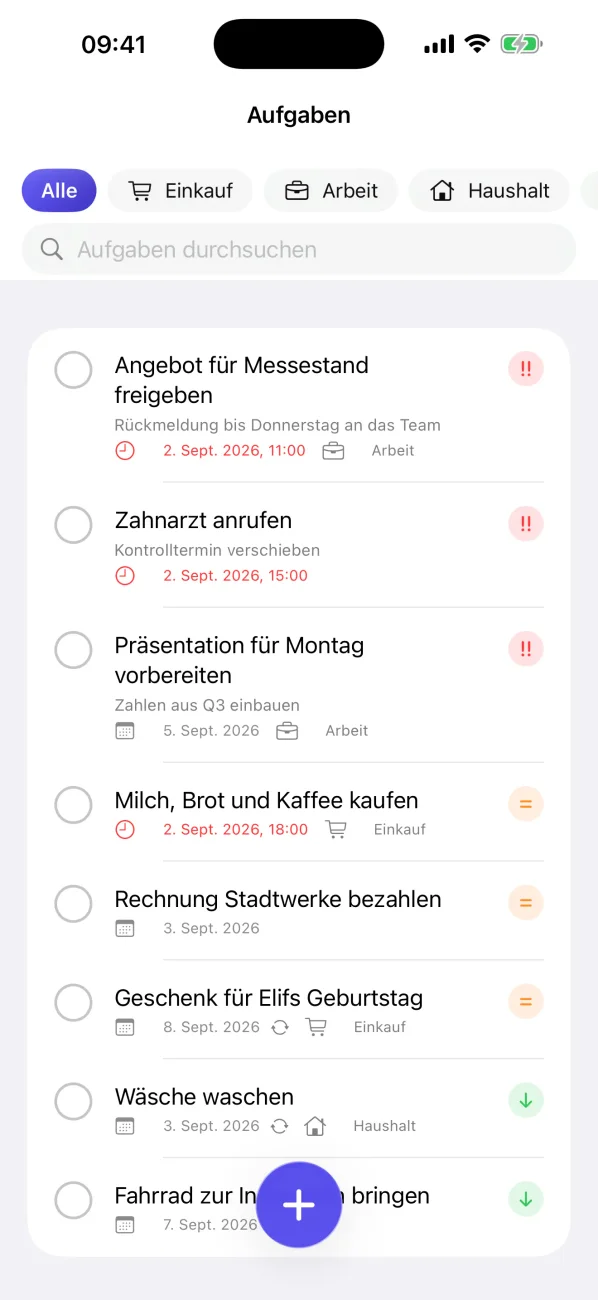
Avantido turns thoughts into finished tasks. Type, speak or take a photo – the app sorts out the rest.
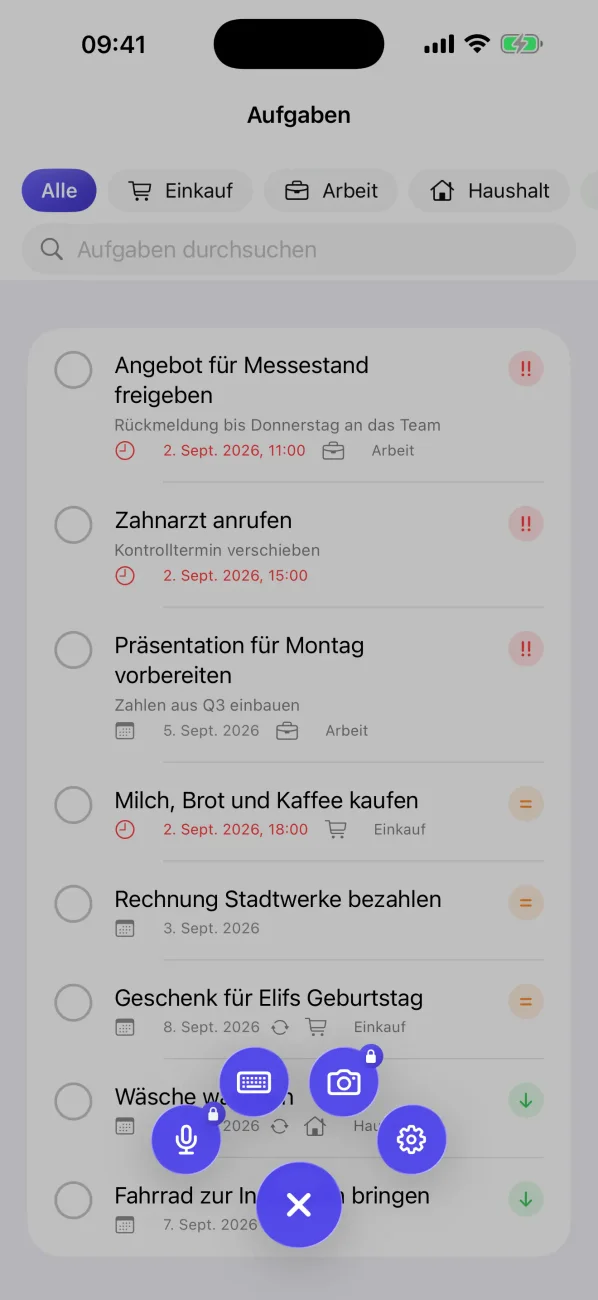
CAPTURE TASKS
• Type: noted in seconds, with priority, due date and note.
• Speak (Pro): dictate what is on your mind – Avantido turns it into clean, separate tasks.
• Photograph (Pro): snap a note, a whiteboard or a shelf. The AI reads the tasks out of it, or suggests what would need doing.
AI ANALYSIS (Pro)
• One long thought becomes several clearly worded tasks – prioritised and sorted into a category.
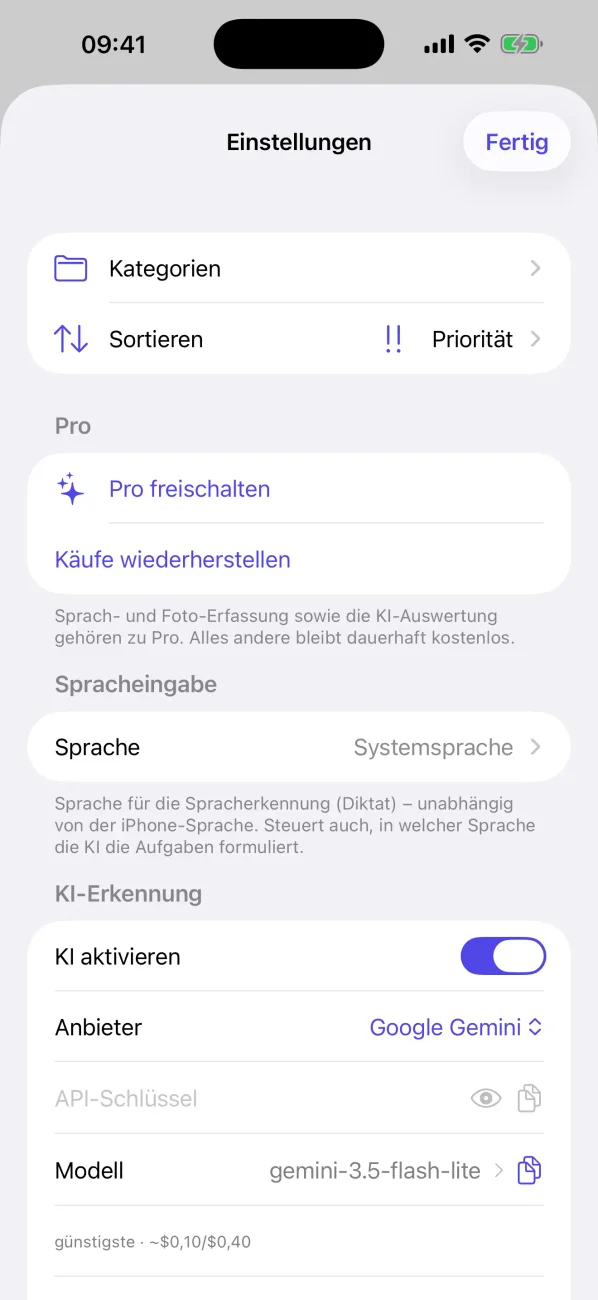
• You use your own API key (Google Gemini, OpenAI or Anthropic). Your provider bills you for AI usage; it is not included in the purchase price.
• Without a key everything else remains fully usable.
CATEGORIES WITH ACTIONS
• Create categories and define what should happen automatically: remind me, add to the calendar, write to the Reminders app.
• Overridable per task at any time.
DATES & REMINDERS
• Due dates with a notification at the right moment.
• Recurring tasks: completing one means the next is already lined up.
• Export to Apple Calendar and Reminders.
WHEREVER YOU ARE
• Widget for home and lock screen showing what is due today.
• Siri shortcuts: add a task, complete a task, ask what is due today.
• iCloud sync across your devices.
• Share a task as a file – anyone with Avantido takes it over with one tap.
AVANTIDO PRO (one-time purchase, no subscription)
• Voice capture
• Photo capture
• AI analysis
Free forever: text tasks, lists, categories, reminders, calendar export, recurrence, widget, Siri and iCloud sync.
PRIVACY
• No account, no sign-in, no tracking, no ads.
• No server of our own: your tasks stay on your device and in your private iCloud.
• Data goes to the AI only when you use that feature – straight from your device to your provider.
Novedades
Versión 1.2.0 · 4/11/2026
New: a shortcut on the “+” button.
Hold the “+” button and pull up to start voice capture right away — no detour through the menu. You choose what the gesture does in Settings: voice, text, photo or off.
A short tap still opens the menu with everything in it.
Privacidad de la aplicación
Lo que Global Solutions Systems GmbH declara en App Store sobre cómo esta aplicación gestiona los datos.
-
Datos no vinculados a ti
Pueden recopilarse, pero no se vinculan a tu identidad.
- Contenido del usuario
Las prácticas de privacidad pueden variar, por ejemplo, según las funciones que uses o tu edad.
Información
- Vendedor
- Global Solutions Systems GmbH
- Categoría
- Productividad
- Versión
- 1.2.0
- Actualizado
- 4/11/2026
- Publicado
- 18/9/2026
- Tamaño
- 2,1 MB
- Requiere
- iOS 18.0 o posterior
- Clasificación por edad
- 4+
- Precio
- Gratis
- Compras en la aplicación
- Sí
- Idiomas
- Inglés, Alemán, Turco
- Copyright
- © 2026 Global Solutions Systems GmbH
Quizá también te guste
-
 AfterSnap: Foto a acciónEscanea, traduce y actúa
-
 Recall - Screenshot ReminderProductividad
-
 ScreenFolio: Screenshot OCRProductividad
-
 Timeara – Days & CountdownProductividad
-
 LaytuhProductividad
-
 AiReminder: Task Reminder AppProductividad
-
 I On It: Recordatorios por vozDilo: tarea, llamada, mensaje
-
 Screenshot ScannerEscanear horarios de captura
-
 Reminder & Tasks: Remind AIProductividad
-
 Tuck: recuerda tus capturasCaptura, comparte, recuerda