
OrgQuick
Org charts from plain text
Diseñada para iPhone, iPad, Mac
Gratis · Compras en la aplicación
- Clasificación por edad4+
- CategoríaProductividad
- DesarrolladorFabrizio Lodi
- IdiomasInglés+ 1 más
- Tamaño689,0 KB
Enlaza a la página oficial de App Store
Download.org no aloja ningún archivo de OrgQuick. El botón abre la página de la aplicación en App Store, donde la publica Fabrizio Lodi. Ficha comprobada por última vez el 12/11/2026.
Capturas de pantalla
Acerca de
El desarrollador no ha proporcionado este texto en tu idioma.
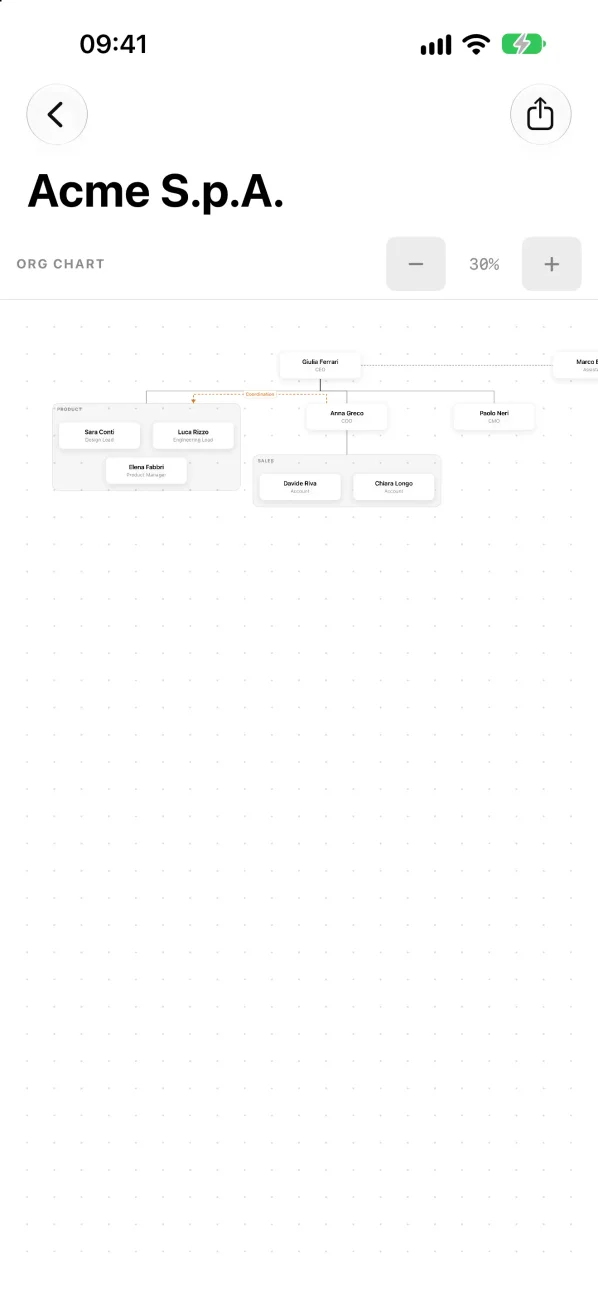
OrgQuick turns a few lines of text into a tidy org chart that updates as you
type. No boxes to drag around: type the names, indent them to build the
hierarchy, and the diagram draws itself.
HOW IT WORKS
You type on the left, the org chart appears live on the right. Indentation makes
the levels; a handful of symbols do the rest:
• Indentation for the hierarchy — who reports to whom
• :: for the role — Mario Rossi :: CEO
• # for a group — a box that gathers a department
• > for an assistant, placed to the side
• ~ for a direct link between any two people or departments, with a label: a
cross-team relationship, not a hierarchical one
WHAT YOU CAN DO
• Watch the chart change in real time as you edit the text
• Gather people into groups, laid out over several rows to save space
• Add assistants and cross-links that route around the other boxes
• Export to PDF, ready to print or share
• Sync through iCloud: your charts follow you across Mac, iPad and iPhone
MAC, IPAD, IPHONE
On Mac and iPad you write and edit, with the editor next to the diagram; on
iPhone you read the chart. Everything stays in sync through iCloud, with no
account and no setup.
FREE, WITH AN OPTIONAL UNLOCK
The free version builds one org chart up to three levels deep. With “Unlock
everything”, a one-off purchase, you remove every limit: unlimited charts and
unlimited depth.
PRIVACY
Your org charts are just text and they stay yours: saved on your device and, if
you turn on iCloud, in your private iCloud space. There is no server of mine, no
account, no analytics, no tracking.
Novedades
Versión 1.3 · 20/10/2026
You can now add line breaks to names and roles: type | where the line should break (e.g. Maria Rossi :: Director | North Area). Cards grow to fit the text.
Privacidad de la aplicación
Lo que Fabrizio Lodi declara en App Store sobre cómo esta aplicación gestiona los datos.
-
No se recopilan datos
El desarrollador no recopila ningún dato de esta aplicación.
Las prácticas de privacidad pueden variar, por ejemplo, según las funciones que uses o tu edad.
Información
- Vendedor
- Fabrizio Lodi
- Categoría
- Productividad
- Versión
- 1.3
- Actualizado
- 20/10/2026
- Publicado
- 1/10/2026
- Tamaño
- 689,0 KB
- Requiere
- iOS 17.0 o posterior
- Clasificación por edad
- 4+
- Precio
- Gratis
- Compras en la aplicación
- Sí
- Idiomas
- Inglés, Italiano
- Copyright
- © 2026 Fabrizio Lodi
Quizá también te guste
-
 HMind: Mapas mentalesSin cuenta y sin conexión
-
 neoloopyProductividad
-
 Organization Chart BuilderProductividad
-
 Structured To Do List: TalioopProductividad
-
 OrgChartX - Organization ChartProductividad
-
 BeeMind: Smart Work NotesProductividad
-
 Clary: Your Second BrainProductividad
-
 txt.edit: Code & Text EditorProductividad
-
 Nutbox: enlaces, fotos, textoGuarda todo para más tarde
-
 Roma: AI Tasks & RemindersProductividad