
OrgQuick
Org charts from plain text
Designed for iPhone, iPad, Mac
In-app purchases
- Age rating4+
- CategoryProductivity
- DeveloperFabrizio Lodi
- LanguagesEnglish+ 1 more
- Size689.0 KB
Links to the official App Store page
Download.org hosts no file of OrgQuick. The button opens its official App Store page, published by Fabrizio Lodi. Listing last checked on Nov 12, 2026.
Screenshots
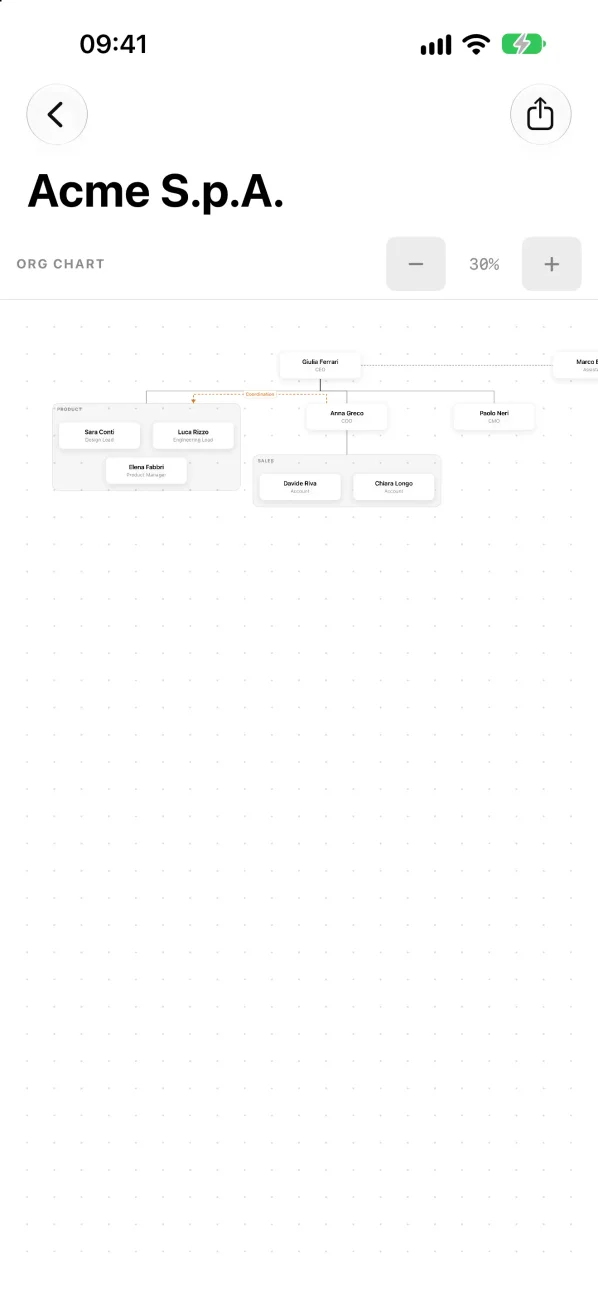
About
OrgQuick turns a few lines of text into a tidy org chart that updates as you
type. No boxes to drag around: type the names, indent them to build the
hierarchy, and the diagram draws itself.
HOW IT WORKS
You type on the left, the org chart appears live on the right. Indentation makes
the levels; a handful of symbols do the rest:
• Indentation for the hierarchy — who reports to whom
• :: for the role — Mario Rossi :: CEO
• # for a group — a box that gathers a department
• > for an assistant, placed to the side
• ~ for a direct link between any two people or departments, with a label: a
cross-team relationship, not a hierarchical one
WHAT YOU CAN DO
• Watch the chart change in real time as you edit the text
• Gather people into groups, laid out over several rows to save space
• Add assistants and cross-links that route around the other boxes
• Export to PDF, ready to print or share
• Sync through iCloud: your charts follow you across Mac, iPad and iPhone
MAC, IPAD, IPHONE
On Mac and iPad you write and edit, with the editor next to the diagram; on
iPhone you read the chart. Everything stays in sync through iCloud, with no
account and no setup.
FREE, WITH AN OPTIONAL UNLOCK
The free version builds one org chart up to three levels deep. With “Unlock
everything”, a one-off purchase, you remove every limit: unlimited charts and
unlimited depth.
PRIVACY
Your org charts are just text and they stay yours: saved on your device and, if
you turn on iCloud, in your private iCloud space. There is no server of mine, no
account, no analytics, no tracking.
What’s new
Version 1.3 · Oct 20, 2026
You can now add line breaks to names and roles: type | where the line should break (e.g. Maria Rossi :: Director | North Area). Cards grow to fit the text.
App privacy
What Fabrizio Lodi declares on the App Store about how this app handles data.
-
Data not collected
The developer does not collect any data from this app.
Privacy practices may vary, for example with the features you use or your age.
Information
- Seller
- Fabrizio Lodi
- Category
- Productivity
- Version
- 1.3
- Updated
- Oct 20, 2026
- Released
- Oct 1, 2026
- Size
- 689.0 KB
- Requires
- iOS 17.0 or later
- Age rating
- 4+
- In-app purchases
- Yes
- Languages
- English, Italian
- Copyright
- © 2026 Fabrizio Lodi
You might also like
-
 HMind: Mind Map & OutlineBrainstorm offline, no sign-up
-
 neoloopyCausal loops & system maps
-
 Organization Chart BuilderProductivity
-
 Structured To Do List: TalioopDaily Planner Focus & Tasks
-
 OrgChartX - Organization ChartEasy Structure Visualization
-
 BeeMind: Smart Work NotesSave snippets. Connect ideas.
-
 Clary: Your Second BrainYour AI Executive Assistant
-
 txt.edit: Code & Text EditorMarkdown, JSON, HTML & XML
-
 Nutbox: bookmarks, screenshotsSave it now, find it later
-
 Roma: AI Tasks & RemindersSay it. Do it. Keep it.