
OrgQuick
Org charts from plain text
Conçue pour iPhone, iPad, Mac
Gratuit · Achats intégrés
- Classification d’âge4+
- CatégorieProductivité
- DéveloppeurFabrizio Lodi
- LanguesAnglais+ 1 de plus
- Taille689,0 Ko
Renvoie vers la page App Store officielle
Download.org n’héberge aucun fichier de OrgQuick. Le bouton ouvre la page de l’application sur App Store, où Fabrizio Lodi la publie. Fiche vérifiée pour la dernière fois le 12/11/2026.
Captures d’écran
À propos
Le développeur n’a pas fourni ce texte dans votre langue.
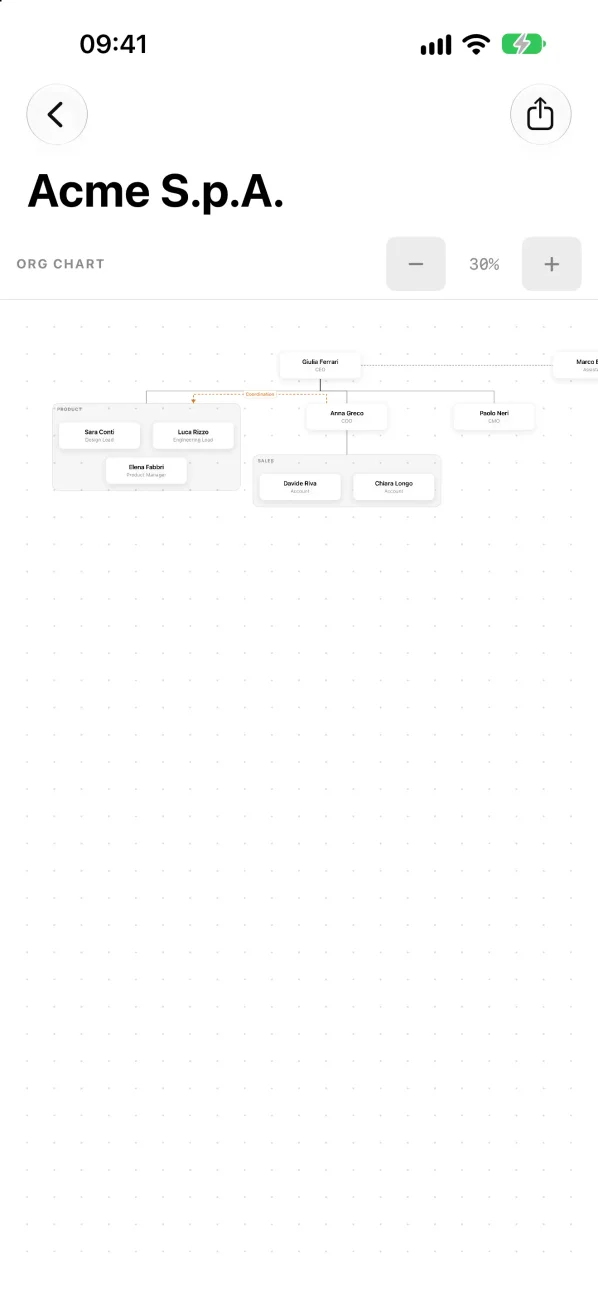
OrgQuick turns a few lines of text into a tidy org chart that updates as you
type. No boxes to drag around: type the names, indent them to build the
hierarchy, and the diagram draws itself.
HOW IT WORKS
You type on the left, the org chart appears live on the right. Indentation makes
the levels; a handful of symbols do the rest:
• Indentation for the hierarchy — who reports to whom
• :: for the role — Mario Rossi :: CEO
• # for a group — a box that gathers a department
• > for an assistant, placed to the side
• ~ for a direct link between any two people or departments, with a label: a
cross-team relationship, not a hierarchical one
WHAT YOU CAN DO
• Watch the chart change in real time as you edit the text
• Gather people into groups, laid out over several rows to save space
• Add assistants and cross-links that route around the other boxes
• Export to PDF, ready to print or share
• Sync through iCloud: your charts follow you across Mac, iPad and iPhone
MAC, IPAD, IPHONE
On Mac and iPad you write and edit, with the editor next to the diagram; on
iPhone you read the chart. Everything stays in sync through iCloud, with no
account and no setup.
FREE, WITH AN OPTIONAL UNLOCK
The free version builds one org chart up to three levels deep. With “Unlock
everything”, a one-off purchase, you remove every limit: unlimited charts and
unlimited depth.
PRIVACY
Your org charts are just text and they stay yours: saved on your device and, if
you turn on iCloud, in your private iCloud space. There is no server of mine, no
account, no analytics, no tracking.
Nouveautés
Version 1.3 · 20/10/2026
You can now add line breaks to names and roles: type | where the line should break (e.g. Maria Rossi :: Director | North Area). Cards grow to fit the text.
Confidentialité de l’application
Ce que Fabrizio Lodi déclare sur l’App Store au sujet du traitement des données par cette application.
-
Données non collectées
Le développeur ne collecte aucune donnée à partir de cette application.
Les pratiques en matière de confidentialité peuvent varier, notamment en fonction des fonctionnalités que vous utilisez ou de votre âge.
Informations
- Vendeur
- Fabrizio Lodi
- Catégorie
- Productivité
- Version
- 1.3
- Mis à jour
- 20/10/2026
- Publié
- 01/10/2026
- Taille
- 689,0 Ko
- Nécessite
- iOS 17.0 ou version ultérieure
- Classification d’âge
- 4+
- Prix
- Gratuit
- Achats intégrés
- Oui
- Langues
- Anglais, Italien
- Copyright
- © 2026 Fabrizio Lodi
Vous aimerez peut-être aussi
-
 HMind : Carte mentale & planHors ligne et sans compte
-
 neoloopyProductivité
-
 Organization Chart BuilderProductivité
-
 Structured To Do List: TalioopProductivité
-
 OrgChartX - OrganigrammeStructures d'Équipe Efficaces
-
 BeeMind: Smart Work NotesProductivité
-
 Clary: Your Second BrainProductivité
-
 txt.edit: Code & Text EditorProductivité
-
 Nutbox: liens, photos, texteTout garder, tout retrouver
-
 Roma: AI Tasks & RemindersProductivité