Gold Mandala
StarWatchfaces- PEGI 3Classification d’âge
- PersonnalisationCatégorie
- 23/08/2026Mis à jour
- 2,09 €Prix
Renvoie vers la fiche Google Play officielle de com.starwatchfaces.goldmandala. Dernière vérification le 24/11/2026.

Captures d’écran

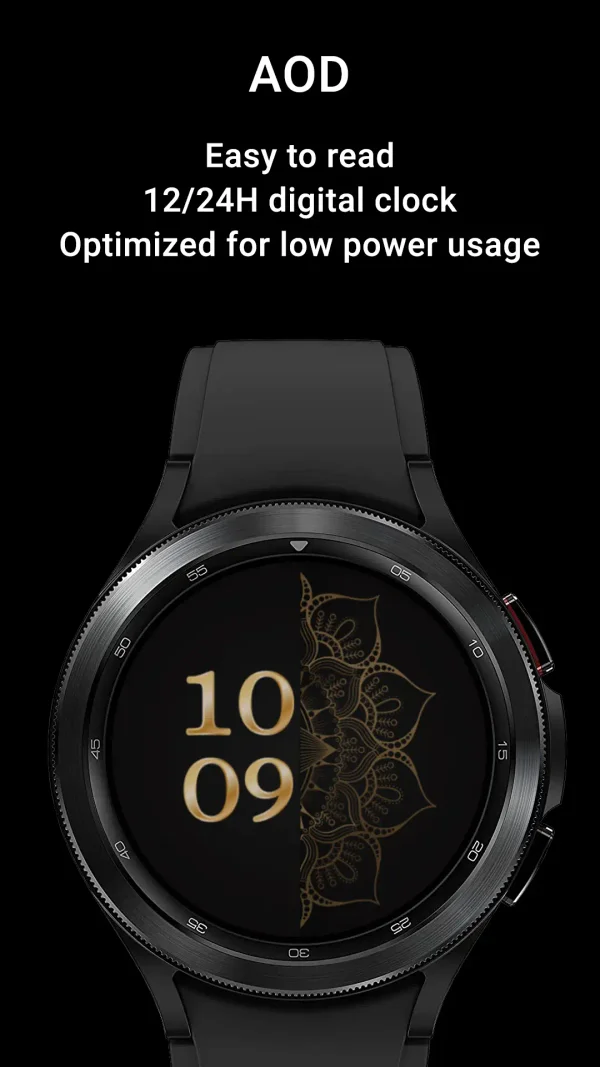
À propos de cette application
Traduction automatique par Google. Langue d’origine : Anglais (États-Unis).
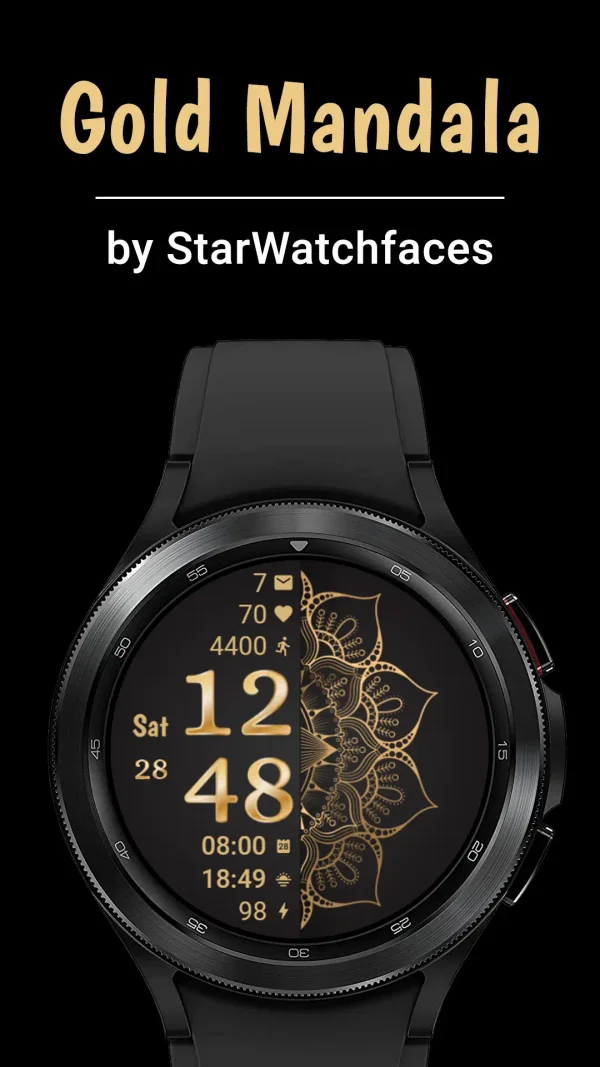
Le cadran ultime luxueux et élégant pour vous avec un design unique
Présentation de Gold Mandala pour Wear OS - le cadran de montre luxueux et élégant ultime pour vous. Ce superbe cadran présente un magnifique design de mandala doré, associé à une heure numérique affichée en chiffres dorés élégants. Mais ce n'est pas seulement un joli visage : Gold Mandala fournit également des statistiques utiles telles que les pas, les notifications, la fréquence cardiaque et les informations sur la batterie, ainsi que deux complications qui peuvent afficher toutes les données que vous souhaitez et trois raccourcis personnalisables pour vous faciliter la vie et vous aider. lancez rapidement vos applications préférées. Que vous vous habilliez pour une soirée ou que vous souhaitiez simplement ajouter une touche de glamour à votre routine quotidienne, Gold Mandala est le choix parfait. Alors pourquoi attendre ? Offrez-vous le luxe et la sophistication de Gold Mandala dès aujourd'hui !
Pour personnaliser le cadran :
1. Appuyez et maintenez sur l'écran
2. Appuyez sur le bouton Personnaliser pour sélectionner la couleur, les données pour les complications et les applications à lancer avec les raccourcis personnalisés.
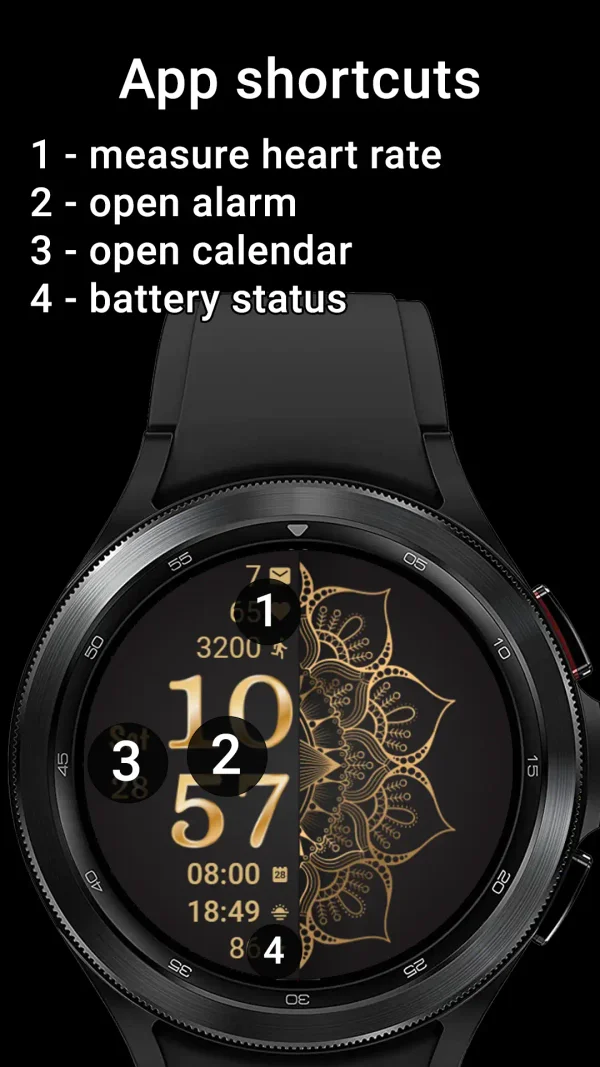
Personnalisez le cadran comme vous le souhaitez : choisissez la meilleure couleur pour les statistiques, sélectionnez les données souhaitées pour les 2 complications, sélectionnez les applications que vous souhaitez lancer à l'aide des 3 raccourcis personnalisables et profitez du cadran ! Vérifiez les captures d'écran de la liste du Store pour mieux comprendre où sont placés les raccourcis.
N'oubliez pas : utilisez l'application compagnon sur votre téléphone pour découvrir d'autres cadrans étonnants créés par nos soins !
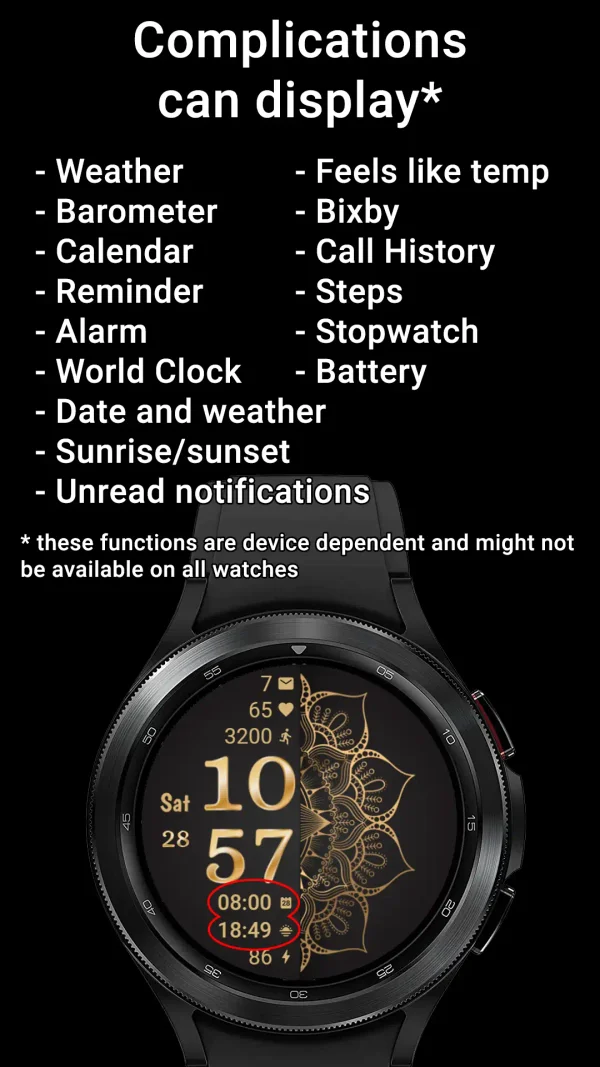
Les complications peuvent afficher* :
- Météo
- On dirait un temp
- Baromètre
-Bixby
- Calendrier
- Historique des appels
- Rappel
- Pas
- Date et météo
- Lever du soleil
- Alarme
- Chronomètre
- Horloge mondiale
- Batterie
- Notifications non lues
Pour afficher les données souhaitées, appuyez longuement sur l'écran, puis appuyez sur le bouton Personnaliser et choisissez les données souhaitées pour les 2 complications.
* ces fonctions dépendent de l'appareil et peuvent ne pas être disponibles sur toutes les montres
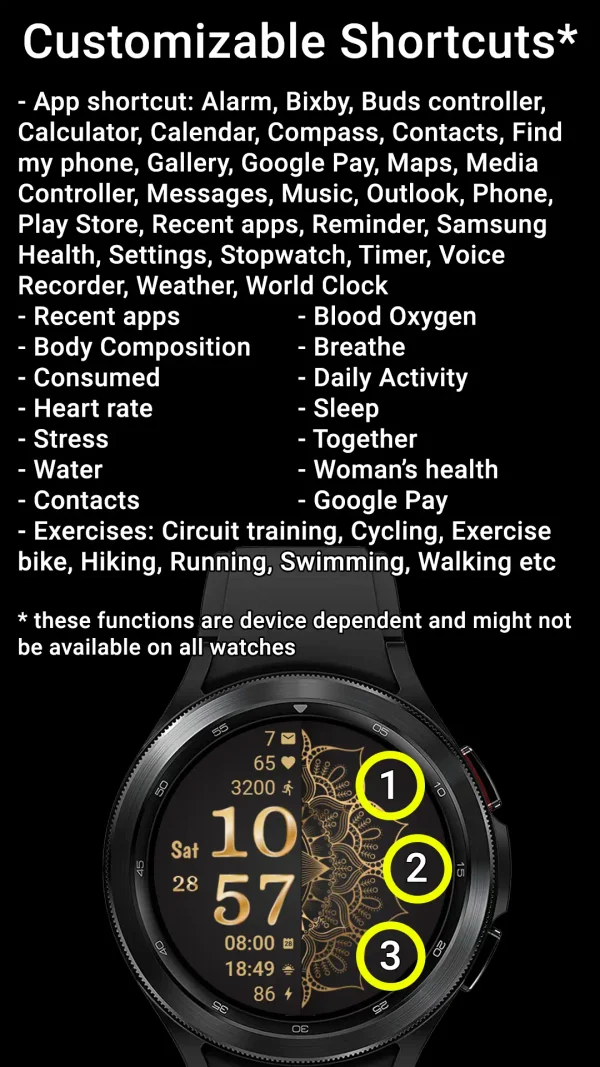
Pour le raccourci personnalisable, vous disposez de ces options* :
- Raccourci d'application : alarme, Bixby, contrôleur Buds, calculatrice, calendrier, boussole, contacts, trouver mon téléphone, galerie, Google Pay, cartes, contrôleur multimédia, messages, musique, Outlook, téléphone, Play Store, applications récentes, rappel, Samsung. Santé, Paramètres, Chronomètre, Minuterie, Voix
Enregistreur, Météo, Horloge Mondiale
- Applications récentes
- Oxygène sanguin
- La composition corporelle
- Respirer
- Consommé
- Les activités quotidiennes
- Rythme cardiaque
- Dormir
- Stresser
- Ensemble
- Eau
- La santé de la femme
- Contacts
- Google Pay
- Exercices : entraînement en circuit, cyclisme, vélo d'appartement, randonnée, course à pied, natation, marche, etc.
Pour afficher le raccourci souhaité, appuyez longuement sur l'écran, puis appuyez sur le bouton Personnaliser et choisissez le raccourci souhaité pour les 3 emplacements de raccourci personnalisables.
* ces fonctions dépendent de l'appareil et peuvent ne pas être disponibles sur toutes les montres
Pour plus de cadrans, visitez notre site Web.
Apprécier!
Afficher le texte d’origine
Introducing Gold Mandala for Wear OS - the ultimate luxurious and elegant watchface for you. This stunning watchface features a beautiful golden mandala design, paired with digital time displayed in elegant golden numbers. But it's not just a pretty face - Gold Mandala also provides useful stats like steps, notifications, heart rate, and battery information, as well as two complications that can display any data you wish and three customizable shortcuts to make your life easier and help you quickly launch your favorite apps. Whether you're dressing up for a night out or just want to add a touch of glamour to your daily routine, Gold Mandala is the perfect choice. So why wait? Treat yourself to the luxury and sophistication of Gold Mandala today!
To customize the watchface:
1. Press and hold on the display
2. Tap the Customize button to select color, data for complications and the apps to launch with the custom shortcuts.
Customize the watchface as you wish: choose the best looking color for stats, select the data you want for the 2 complications, select your desired apps to launch using the 3 customizable shortcuts and enjoy using the watchface! Check the screenshots from the store listing to better understand where the shortcuts are placed.
Don't forget: use the companion app on your phone to discover other amazing watchfaces made by us!
The complications can display*:
- Weather
- Feels like temp
- Barometer
- Bixby
- Calendar
- Call History
- Reminder
- Steps
- Date and weather
- Sunrise/sunset
- Alarm
- Stopwatch
- World Clock
- Battery
- Unread notifications
To display the data you want, tap and hold on the display, then press the Customize button and choose the data you want for the 2 complications.
* these functions are device dependent and might not be available on all watches
For the customizable shortcut you have these options*:
- App shortcut: Alarm, Bixby, Buds controller, Calculator, Calendar, Compass, Contacts, Find my phone, Gallery, Google Pay, Maps, Media Controller, Messages, Music, Outlook, Phone, Play Store, Recent apps, Reminder, Samsung Health, Settings, Stopwatch, Timer, Voice
Recorder, Weather, World Clock
- Recent apps
- Blood Oxygen
- Body Composition
- Breathe
- Consumed
- Daily Activity
- Heart rate
- Sleep
- Stress
- Together
- Water
- Woman’s health
- Contacts
- Google Pay
- Exercises: Circuit training, Cycling, Exercise bike, Hiking, Running, Swimming, Walking etc
To display the shortcut you want, tap and hold on the display, then press the Customize button and choose the shortcut you want for the 3 customizable shortcut slots.
* these functions are device dependent and might not be available on all watches
For more watchfaces, visit our website.
Enjoy!
Sécurité des données
Ce que StarWatchfaces déclare sur Google Play au sujet des données que cette application collecte et partage.
- Aucune donnée partagée avec des tiersEn savoir plus sur la manière dont les développeurs déclarent le partage
- Aucune donnée collectéeEn savoir plus sur la manière dont les développeurs déclarent la collecte
Coordonnées du développeur
- Site webstarwatchfaces.com
- E-mailWearOS@starwatchfaces.com
- Politique de confidentialitéstarwatchfaces.com
- AdresseStrada Carol Davila 8 bloc 118A sc A et 1 ap 5 100462 Ploiești Romania
Informations
- Proposée par
- StarWatchfaces
- Catégorie
- Personnalisation
- Version
- 1.0.0
- Mis à jour
- 23/08/2026
- Publié
- 06/01/2023
- Classification d’âge
- PEGI 3
- Prix
- 2,09 €
- Nom du package
- com.starwatchfaces.goldmandala
Applications similaires
-
 Digital Gold Flower Watch Face
Personnalisation
-
 WaTchG007: Digital watch face
Personnalisation
-
 RMDN2 Watch Face for Wear OS
Personnalisation
-
 Golden Oriental Watch Face
Personnalisation
-
 A150 Wind Watch Face
Personnalisation
-
 Auric Silk Nebula
Personnalisation
-
 Vintage 5
Personnalisation
-
 B.efore midnight tonight
Personnalisation
-
 TVV Luxury Flowers Watch Face
Personnalisation
-
 Butterfly Blossom
Personnalisation
-
 Jasmine Digital Watch Face
Personnalisation
-
 FLW079 Golden Leaves
Personnalisation