AppBlocker: Block Apps & Focus
AI for Lower Screentime
Conçue pour iPhone, iPad
- Classification d’âge4+
- CatégorieProductivité
- DéveloppeurCrescent Harbor LLC
- LanguesAnglais
- Taille27,8 Mo
AppBlocker: Block Apps & Focus n’est peut-être pas disponible sur App Store pour le moment
La fiche de la boutique était inaccessible lors de notre dernière vérification. Le lien mène toujours à la page App Store officielle.
Captures d’écran

À propos
Le développeur n’a pas fourni ce texte dans votre langue.
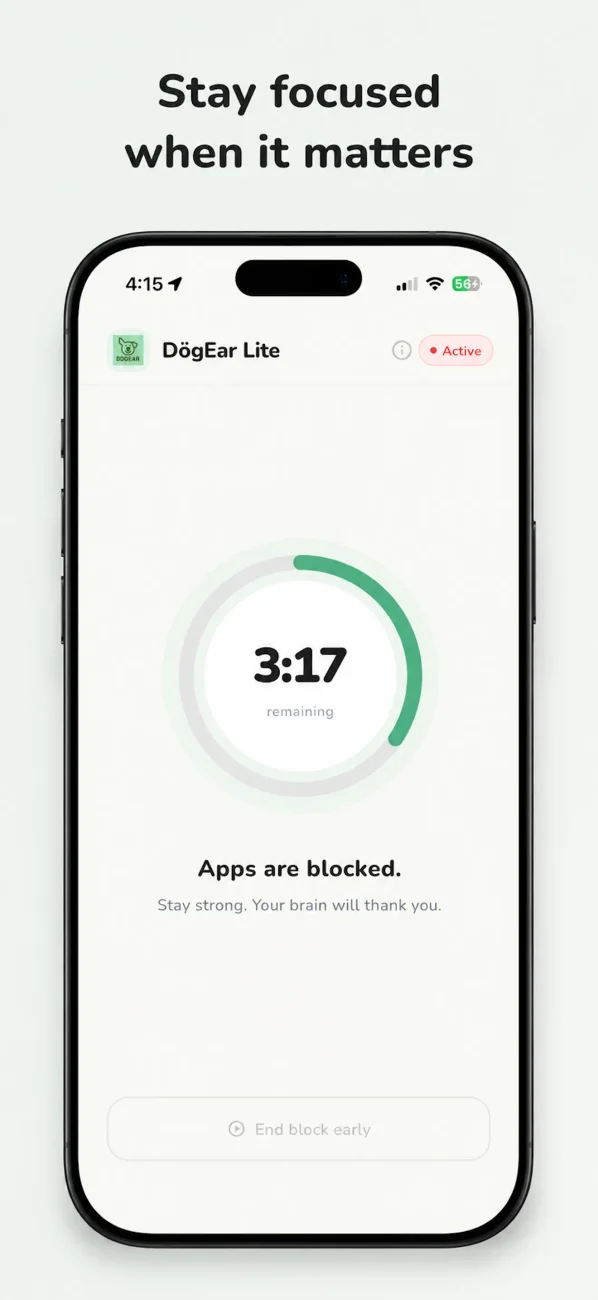
AppBlocker is a free app blocker for iPhone. Pick the apps that distract you, set a timer, and they stay locked until time runs out. Use it to focus, study, sleep better, reduce screen time, or break the habit of doomscrolling.
No account. No sign-up. Your app choices stay on your device.
WHAT APPBLOCKER DOES
- Blocks distracting apps like Instagram, TikTok, YouTube and X for a set time
- Lets you choose the duration every time, from 5 minutes to an hour
- Keeps blocked apps locked for the full session
- Shows your screen time today, this week and over two weeks, with an hourly chart and category breakdown
- Tracks your focus streak so you can build a daily habit
- Includes Auto-Break and Doomscroll Protection to help you stop endless scrolling
- Works on iPhone using Apple's Screen Time and Family Controls
HOW TO BLOCK APPS ON IPHONE
1. Open AppBlocker and tap Choose Apps to Block.
2. Pick the apps you want locked.
3. Choose how long, then start the block.
4. Your apps stay blocked until the timer ends.
WHO IT'S FOR
- Students who want to study without phone distractions
- Anyone who wants to cut down on social media and screen time
- People who want to sleep earlier and stop scrolling in bed
- Remote workers and professionals protecting deep focus time
- Parents and adults who want a simple focus timer for their own phone
FREQUENTLY ASKED QUESTIONS
Is AppBlocker free?
Yes. AppBlocker is free to use. Optional rewarded ads let you end a block early if you really need to.
Do I need an account?
No. There is no sign-up and no account.
Is my data private?
Your app choices and Screen Time data stay on your device. AppBlocker does not send the apps you block or use to any server.
How does AppBlocker block apps?
It uses Apple's Screen Time and Family Controls, so blocking is handled by iOS itself.
Why did Doomscroll Protection kick in late?
iOS controls when apps receive Screen Time events. Low battery, Low Power Mode, or very late hours can delay them. Keep your battery charged and Low Power Mode off for the most reliable protection.
AppBlocker is a simple, focused app blocker and screen time tracker for iPhone. One job, done well: block the apps that pull you in, and get your time back.
Nouveautés
Version 1.0.9 · 21/10/2026
Fixes and performance improvements.
Confidentialité de l’application
Ce que Crescent Harbor LLC déclare sur l’App Store au sujet du traitement des données par cette application.
-
Données utilisées pour vous suivre
Peuvent être utilisées pour vous suivre sur des applications et des sites web appartenant à d’autres sociétés.
- Emplacement
- Identifiants
- Données d’utilisation
-
Données établissant un lien avec vous
Peuvent être collectées et liées à votre identité.
- Emplacement
-
Données n’établissant aucun lien avec vous
Peuvent être collectées, mais ne sont pas liées à votre identité.
- Identifiants
- Données d’utilisation
- Diagnostic
Les pratiques en matière de confidentialité peuvent varier, notamment en fonction des fonctionnalités que vous utilisez ou de votre âge.
Informations
- Vendeur
- Crescent Harbor LLC
- Catégorie
- Productivité
- Version
- 1.0.9
- Mis à jour
- 21/10/2026
- Publié
- 12/06/2026
- Taille
- 27,8 Mo
- Nécessite
- iOS 17.6 ou version ultérieure
- Classification d’âge
- 4+
- Langues
- Anglais
- Copyright
- © 2025 AppBlocker
Vous aimerez peut-être aussi
-
 App Blocker: Block Apps & SiteProductivité
-
 ScreenMinus: Screen TimeProductivité
-
 Toll — Focus & App BlockerProductivité
-
 Curfew: Bloqueur Apps & SitesBloquez apps et sites un temps
-
 LockdAI: Screen Time ControlProductivité
-
 Stop Doomscrolling - AlbaProductivité
-
 App Guardian: App BlockerProductivité
-
 Synctodo: Task List & SubtasksProductivité
-
 Opeal : Blocage des applisConcentrez-vous avant de jouer
-
 Prove It: App BlockerProductivité