- 対象年齢4+
- カテゴリ仕事効率化
- 開発元Crescent Harbor LLC
- 言語英語
- サイズ27.8 MB
App Storeの公式ページにリンクしています
Download.orgはAppBlocker: Block Apps & Focusのファイルを一切ホストしていません。ボタンを押すと、Crescent Harbor LLCが公開しているApp Storeのアプリページが開きます。ページの最終確認:2026/11/15。
スクリーンショット

概要
開発元はこのテキストをお使いの言語で提供していません。
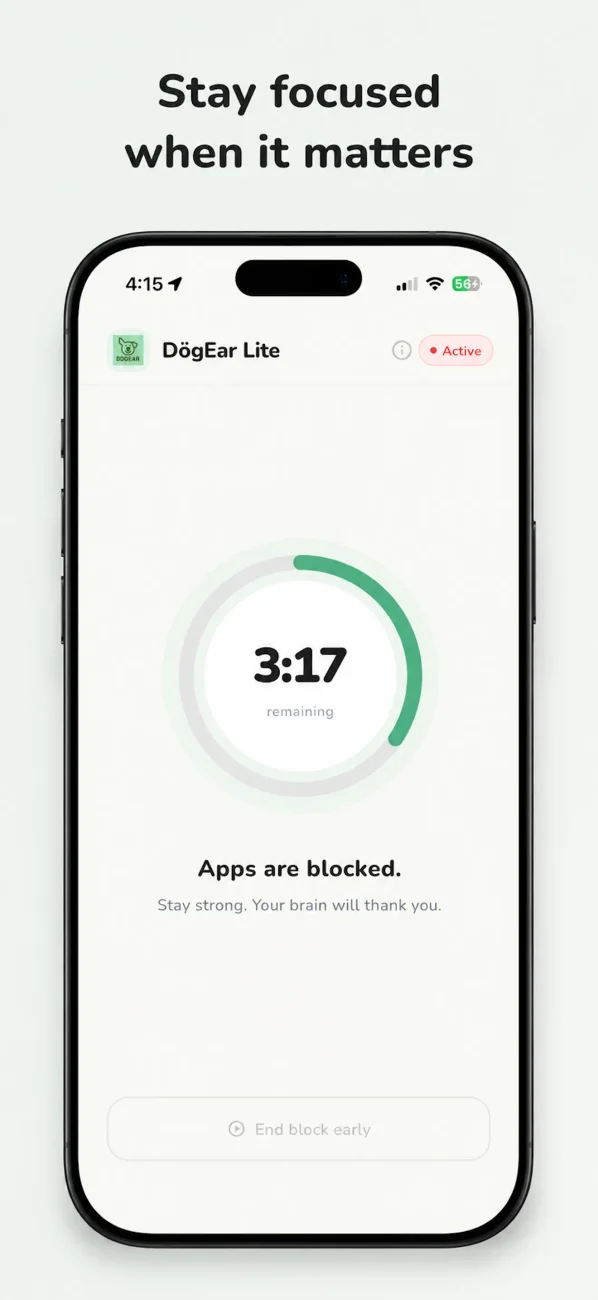
AppBlocker is a free app blocker for iPhone. Pick the apps that distract you, set a timer, and they stay locked until time runs out. Use it to focus, study, sleep better, reduce screen time, or break the habit of doomscrolling.
No account. No sign-up. Your app choices stay on your device.
WHAT APPBLOCKER DOES
- Blocks distracting apps like Instagram, TikTok, YouTube and X for a set time
- Lets you choose the duration every time, from 5 minutes to an hour
- Keeps blocked apps locked for the full session
- Shows your screen time today, this week and over two weeks, with an hourly chart and category breakdown
- Tracks your focus streak so you can build a daily habit
- Includes Auto-Break and Doomscroll Protection to help you stop endless scrolling
- Works on iPhone using Apple's Screen Time and Family Controls
HOW TO BLOCK APPS ON IPHONE
1. Open AppBlocker and tap Choose Apps to Block.
2. Pick the apps you want locked.
3. Choose how long, then start the block.
4. Your apps stay blocked until the timer ends.
WHO IT'S FOR
- Students who want to study without phone distractions
- Anyone who wants to cut down on social media and screen time
- People who want to sleep earlier and stop scrolling in bed
- Remote workers and professionals protecting deep focus time
- Parents and adults who want a simple focus timer for their own phone
FREQUENTLY ASKED QUESTIONS
Is AppBlocker free?
Yes. AppBlocker is free to use. Optional rewarded ads let you end a block early if you really need to.
Do I need an account?
No. There is no sign-up and no account.
Is my data private?
Your app choices and Screen Time data stay on your device. AppBlocker does not send the apps you block or use to any server.
How does AppBlocker block apps?
It uses Apple's Screen Time and Family Controls, so blocking is handled by iOS itself.
Why did Doomscroll Protection kick in late?
iOS controls when apps receive Screen Time events. Low battery, Low Power Mode, or very late hours can delay them. Keep your battery charged and Low Power Mode off for the most reliable protection.
AppBlocker is a simple, focused app blocker and screen time tracker for iPhone. One job, done well: block the apps that pull you in, and get your time back.
新機能
バージョン 1.0.9 · 2026/10/21
Fixes and performance improvements.
アプリのプライバシー
このアプリのデータの取り扱いについて、Crescent Harbor LLCがApp Storeで申告している内容です。
-
ユーザーのトラッキングに使用されるデータ
他社のアプリやウェブサイトを横断してユーザーをトラッキングする目的で使用される場合があります。
- 位置情報
- ID
- 使用状況データ
-
ユーザーに関連付けられたデータ
収集され、ユーザーの識別情報に関連付けられる場合があります。
- 位置情報
-
ユーザーに関連付けられないデータ
収集される場合がありますが、ユーザーの識別情報には関連付けられません。
- ID
- 使用状況データ
- 診断
プライバシーの取り扱いは、ご利用の機能やお客様の年齢などに応じて異なる場合があります。
情報
- 販売元
- Crescent Harbor LLC
- カテゴリ
- 仕事効率化
- バージョン
- 1.0.9
- 更新日
- 2026/10/21
- リリース
- 2026/6/12
- サイズ
- 27.8 MB
- 必要条件
- iOS 17.6以降
- 対象年齢
- 4+
- 価格
- 無料
- 言語
- 英語
- 著作権
- © 2025 AppBlocker
こちらもおすすめ
-
 App Blocker: Block Apps & Site仕事効率化
-
 ScreenMinus: Screen Time仕事効率化
-
 Toll — Focus & App Blocker仕事効率化
-
 Curfew: App & Site Blocker仕事効率化
-
 LockdAI: Screen Time Control仕事効率化
-
 Stop Doomscrolling - Alba仕事効率化
-
 アプリ門番:SNS・アプリ制限無意識スクロールを止めて集中
-
 Synctodo: Task List & Subtasks仕事効率化
-
 スクリーンタイム管理・集中タイマー・デジタルウェルビーイングアプリ制限・集中タイマー・スマホ依存対策・効率化
-
 Prove It: App Blocker仕事効率化