Fantazio
Digital maps for in person RPG
Conçue pour iPad
Gratuit · Achats intégrés
- Classification d’âge4+
- CatégorieJeux de rôle
- DéveloppeurJeremy Beker
- LanguesAnglais
- Taille6,9 Mo
Renvoie vers la page App Store officielle
Download.org n’héberge aucun fichier de Fantazio. Le bouton ouvre la page de l’application sur App Store, où Jeremy Beker la publie. Fiche vérifiée pour la dernière fois le 14/11/2026.
Captures d’écran


À propos
Le développeur n’a pas fourni ce texte dans votre langue.
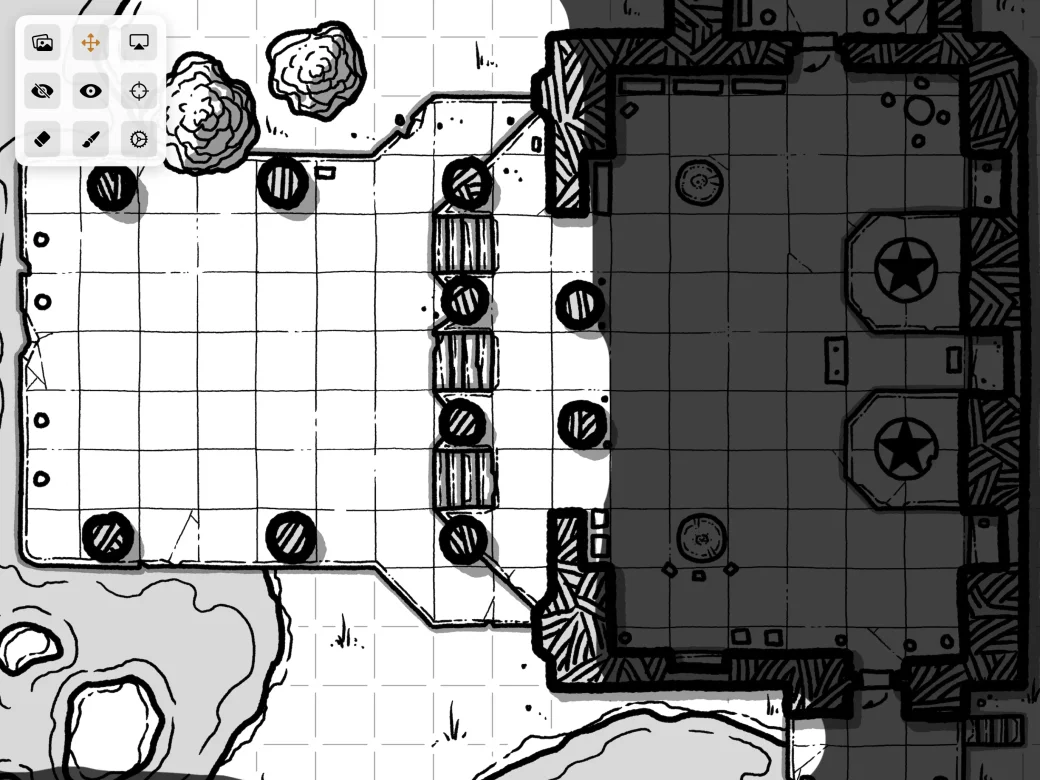
Having great maps for your gaming sessions helps everyone have more fun. But printing tons of maps for everyone to see can be a pain (and expensive). Just showing a map on a screen can reveal too much about your adventure. Fantazio lets you, the GM, have the flexibility to use as many maps as you would like, hiding and revealing only what you want your players to see.
Your iPad will show and control your view of the map. By sharing your iPad screen via AirPlay or connecting an external diplay, your players will only see the areas you revealed to them.
Nouveautés
Version 2.1.0 · 27/01/2026
Map Library
Manage unlimited maps from a single session. The new Map Library lets you add, rename, reorder, and switch between maps instantly. Each map maintains its own
independent fog of war settings, so you can prepare multiple dungeon levels or encounter areas and switch between them during play. The external display only
updates when you tap the AirPlay button, letting you prep maps privately before revealing them to players.
Import Maps from Files
You can now import map images directly from the Files app in addition to your Photo Library. This makes it easier to use maps downloaded from the web or stored in
cloud services like iCloud, Dropbox, or Google Drive.
Refreshed Tool Icons
The hide and reveal brush tools have new, more intuitive icons. The hide brush now uses a paintbrush icon, while the reveal brush uses an eraser icon. The reset
view button has been updated to use a scope/crosshairs icon for better clarity.
Improved Onboarding
A new "Floating Palette Buttons" page has been added to the onboarding tutorial, showing all nine tool icons with clear descriptions of what each one does. This
helps new users quickly understand the interface.
Better Error Messages
When importing a map image that is too large or invalid, you will now see a clear error message explaining the issue instead of the import silently failing.
Bug Fixes
- Fixed issues with map scale and position being corrupted when switching between maps
- Fixed the reset button to properly restore the initial view after app restart
- Various improvements to help documentation accuracy and consistency
Confidentialité de l’application
Ce que Jeremy Beker déclare sur l’App Store au sujet du traitement des données par cette application.
-
Données non collectées
Le développeur ne collecte aucune donnée à partir de cette application.
Les pratiques en matière de confidentialité peuvent varier, notamment en fonction des fonctionnalités que vous utilisez ou de votre âge.
Informations
- Vendeur
- Jeremy Beker
- Catégorie
- Jeux de rôle
- Version
- 2.1.0
- Mis à jour
- 27/01/2026
- Publié
- 10/06/2020
- Taille
- 6,9 Mo
- Nécessite
- iOS 18.0 ou version ultérieure
- Classification d’âge
- 4+
- Prix
- Gratuit
- Achats intégrés
- Oui
- Langues
- Anglais
- Copyright
- © 2026 Jeremy Beker
Vous aimerez peut-être aussi
-
 MapMe: Map Maker for DnD 5eDungeons & Dragons Map Creator
-
 CalamusJeux de rôle
-
 Mirrorscape: Tabletop AR MapsJeux de rôle
-
 My Sound DelveJeux de rôle
-
 Elderbrain SoundscapesJeux de rôle
-
 PrismScrollDMJeux de rôle
-
 PrismScroll PhoenixJeux de rôle
-
 RPG Master Sounds MixerDnD music tabletop soundboard
-
 Dungeon Roller: Générateur RPGOutils & Générateurs pour JDR
-
 RPG Sounds Fantasy WorldsJeux de rôle