Fantazio
Digital maps for in person RPG
Được thiết kế cho iPad
Miễn phí · Mua hàng trong ứng dụng
- Độ tuổi4+
- Danh mụcNhập Vai
- Nhà phát triểnJeremy Beker
- Ngôn ngữTiếng Anh
- Kích thước6,9 MB
Liên kết đến trang App Store chính thức
Download.org không lưu trữ tệp nào của Fantazio. Nút này mở trang ứng dụng trên App Store, nơi Jeremy Beker phát hành ứng dụng. Trang được kiểm tra lần cuối: 14/11/2026.
Ảnh chụp màn hình


Giới thiệu
Nhà phát triển chưa cung cấp nội dung này bằng ngôn ngữ của bạn.
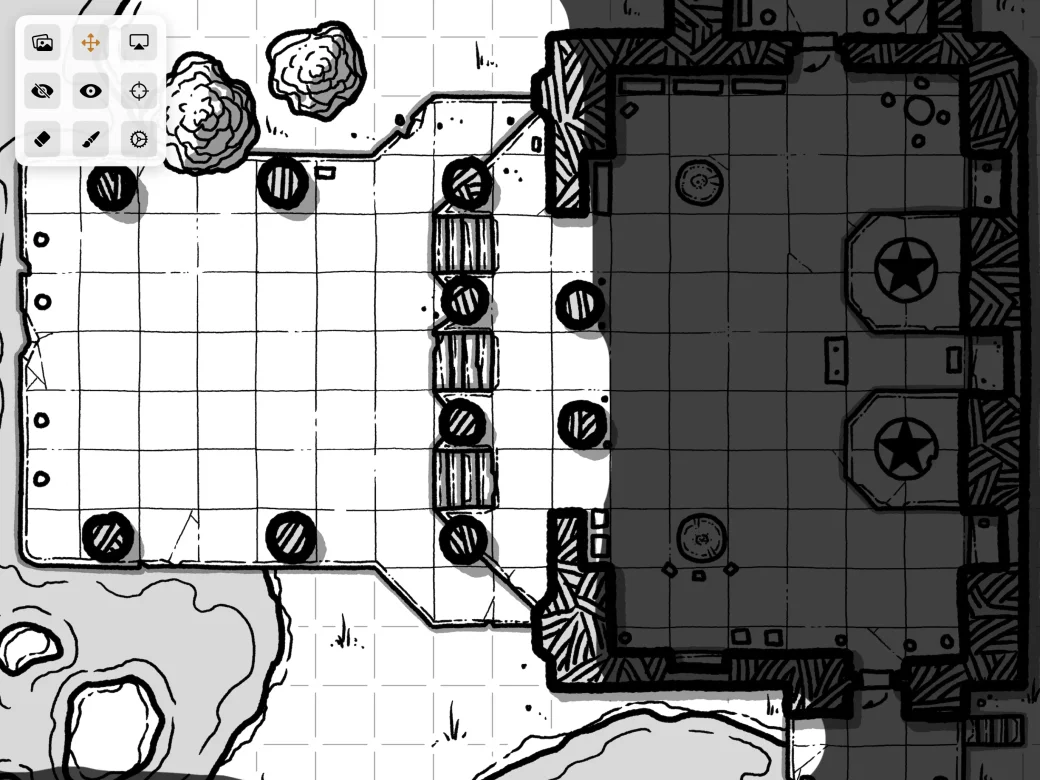
Having great maps for your gaming sessions helps everyone have more fun. But printing tons of maps for everyone to see can be a pain (and expensive). Just showing a map on a screen can reveal too much about your adventure. Fantazio lets you, the GM, have the flexibility to use as many maps as you would like, hiding and revealing only what you want your players to see.
Your iPad will show and control your view of the map. By sharing your iPad screen via AirPlay or connecting an external diplay, your players will only see the areas you revealed to them.
Có gì mới
Phiên bản 2.1.0 · 27/01/2026
Map Library
Manage unlimited maps from a single session. The new Map Library lets you add, rename, reorder, and switch between maps instantly. Each map maintains its own
independent fog of war settings, so you can prepare multiple dungeon levels or encounter areas and switch between them during play. The external display only
updates when you tap the AirPlay button, letting you prep maps privately before revealing them to players.
Import Maps from Files
You can now import map images directly from the Files app in addition to your Photo Library. This makes it easier to use maps downloaded from the web or stored in
cloud services like iCloud, Dropbox, or Google Drive.
Refreshed Tool Icons
The hide and reveal brush tools have new, more intuitive icons. The hide brush now uses a paintbrush icon, while the reveal brush uses an eraser icon. The reset
view button has been updated to use a scope/crosshairs icon for better clarity.
Improved Onboarding
A new "Floating Palette Buttons" page has been added to the onboarding tutorial, showing all nine tool icons with clear descriptions of what each one does. This
helps new users quickly understand the interface.
Better Error Messages
When importing a map image that is too large or invalid, you will now see a clear error message explaining the issue instead of the import silently failing.
Bug Fixes
- Fixed issues with map scale and position being corrupted when switching between maps
- Fixed the reset button to properly restore the initial view after app restart
- Various improvements to help documentation accuracy and consistency
Quyền riêng tư của ứng dụng
Những gì Jeremy Beker khai báo trên App Store về cách ứng dụng này xử lý dữ liệu.
-
Dữ liệu không được thu thập
Nhà phát triển không thu thập bất kỳ dữ liệu nào từ ứng dụng này.
Phương thức đảm bảo quyền riêng tư có thể khác nhau, chẳng hạn như tuỳ theo các tính năng bạn sử dụng hoặc độ tuổi của bạn.
Thông tin
- Người bán
- Jeremy Beker
- Danh mục
- Nhập Vai
- Phiên bản
- 2.1.0
- Cập nhật
- 27/01/2026
- Phát hành
- 10/06/2020
- Kích thước
- 6,9 MB
- Yêu cầu
- iOS 18.0 trở lên
- Độ tuổi
- 4+
- Giá
- Miễn phí
- Mua hàng trong ứng dụng
- Có
- Ngôn ngữ
- Tiếng Anh
- Bản quyền
- © 2026 Jeremy Beker