
Head Tracker
Head Tracking with your iPhone
Conçue pour iPhone, iPad, iPod touch
Gratuit · Achats intégrés
- Classification d’âge4+
- CatégorieUtilitaires
- DéveloppeurJohn Yu
- LanguesAnglais+ 1 de plus
- Taille1,5 Mo
Renvoie vers la page App Store officielle
Download.org n’héberge aucun fichier de Head Tracker. Le bouton ouvre la page de l’application sur App Store, où John Yu la publie. Fiche vérifiée pour la dernière fois le 16/11/2026.
Captures d’écran

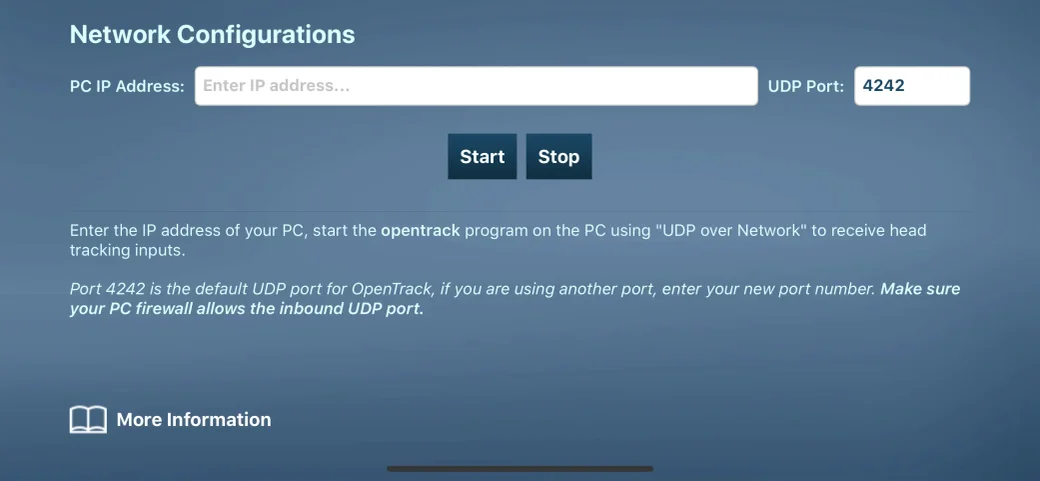
À propos
Le développeur n’a pas fourni ce texte dans votre langue.
Head Tracker uses iPhone’s front-facing TrueDepth camera to provide responsive and accurate 6DOF (degree of freedom) head tracking input to opentrack. Allowing users to enjoy flight and driving simulation games without expensive hardware or wearing uncomfortable headsets.
==================================
Supported Devices (iPhone 11 and newer)
==================================
This app requires device with TrueDepth camera or Devices with A12 or later processors: iPhone 11, iPhone SE(2nd Gen), iPad (8th Gen), Pro (2nd Gen) and later are supported.
=================
Features
=================
- 6 DOF
- Connects over wifi network, no need for cables
- No need to wear any uncomfortable head tracking headsets
- Accurate and responsive (up to 60fps)
- simple to setup
==================================
opentrack supported games includes:
==================================
- Microsoft Flight Simulator
- FSX
- DCS World
- Star Citizen
- Elite: Dangerous
- IL2
- Euro Truck
- and more.
=================
Customer Reviews
=================
"Installation took a couple of minutes on the PC and after the latest update is now smooth as butter. Looking forward to more improvements! Works perfectly on Euro Truck and other racing sims I play like Assetto Corsa etc"
"I sold my TrackIR headset some years ago and missed it now in the new Flight Simulator - and guess what: this is combined with opentrack the ideal replacement. It “just works” and is easy to set up. Fair pricing. 5 stars. Thank you, John."
=================
How to use:
=================
- Open Head Tracker app on your iPhone, set your PC's IP address, then start
- Launch opentrack application on your PC, select "Network over UDP" and the "freetrack 2.0" protocol, and press start
- Start your favourite simulator game, it will now follow you head movements in the virtual cockpit.
Visit https://jbcconsulting448679429.wordpress.com/head-tracking-quick-start/ for detailed instructions and download opentrack preset profile.
==================================
Versions (Free and in-app purchase)
==================================
Try out the free version. The free version allows you to play for 10 minutes per session, you can restart to extend the trial.
Upgrade to the full version via in-app purchase to remove trial limit and automatic screen dimming to reduce battery usage.
==================================
More Information and Support
==================================
Visit https://jbcconsulting448679429.wordpress.com for more tips, network setup and troubleshooting instruction on configuring head tracking, and contact me for support.
Nouveautés
Version 1.0.5 · 23/05/2026
bug fixes.
Confidentialité de l’application
Ce que John Yu déclare sur l’App Store au sujet du traitement des données par cette application.
-
Données non collectées
Le développeur ne collecte aucune donnée à partir de cette application.
Les pratiques en matière de confidentialité peuvent varier, notamment en fonction des fonctionnalités que vous utilisez ou de votre âge.
Informations
- Vendeur
- John Yu
- Catégorie
- Utilitaires
- Version
- 1.0.5
- Mis à jour
- 23/05/2026
- Publié
- 21/08/2020
- Taille
- 1,5 Mo
- Nécessite
- iOS 15.6 ou version ultérieure
- Classification d’âge
- 4+
- Prix
- Gratuit
- Achats intégrés
- Oui
- Langues
- Anglais, Chinois simplifié
- Copyright
- © Copyright (c) 2020, JBC
Vous aimerez peut-être aussi
-
 SimFly PadUtilitaires
-
 VatScopeUtilitaires
-
 GameGlassUtilitaires
-
 TrackBridge: Head TrackingUtilitaires
-
 Unofficial DCS CompanionUtilitaires
-
 TruckSim GPS - ETS2 ATS CarteNavigation Simulateur Camion
-
 SIM-DashboardUtilitaires
-
 MSFS MAP NGcarte et graphiques pour MSFS
-
 ETPhoneUtilitaires
-
 LiDAR PointerUtilitaires