Head Tracker
Head Tracking with your iPhone
Dirancang untuk iPhone, iPad, iPod touch
Gratis · Pembelian dalam aplikasi
- Batasan usia4+
- KategoriKegunaan
- PengembangJohn Yu
- BahasaInggris+ 1 lainnya
- Ukuran1,5 MB
Tertaut ke halaman resmi App Store
Download.org tidak menyimpan file Head Tracker apa pun. Tombol ini membuka halaman aplikasi di App Store, tempat John Yu menerbitkannya. Halaman terakhir diperiksa pada 16/11/2026.
Tangkapan layar

Tentang
Pengembang belum menyediakan teks ini dalam bahasa Anda.
Head Tracker uses iPhone’s front-facing TrueDepth camera to provide responsive and accurate 6DOF (degree of freedom) head tracking input to opentrack. Allowing users to enjoy flight and driving simulation games without expensive hardware or wearing uncomfortable headsets.
==================================
Supported Devices (iPhone 11 and newer)
==================================
This app requires device with TrueDepth camera or Devices with A12 or later processors: iPhone 11, iPhone SE(2nd Gen), iPad (8th Gen), Pro (2nd Gen) and later are supported.
=================
Features
=================
- 6 DOF
- Connects over wifi network, no need for cables
- No need to wear any uncomfortable head tracking headsets
- Accurate and responsive (up to 60fps)
- simple to setup
==================================
opentrack supported games includes:
==================================
- Microsoft Flight Simulator
- FSX
- DCS World
- Star Citizen
- Elite: Dangerous
- IL2
- Euro Truck
- and more.
=================
Customer Reviews
=================
"Installation took a couple of minutes on the PC and after the latest update is now smooth as butter. Looking forward to more improvements! Works perfectly on Euro Truck and other racing sims I play like Assetto Corsa etc"
"I sold my TrackIR headset some years ago and missed it now in the new Flight Simulator - and guess what: this is combined with opentrack the ideal replacement. It “just works” and is easy to set up. Fair pricing. 5 stars. Thank you, John."
=================
How to use:
=================
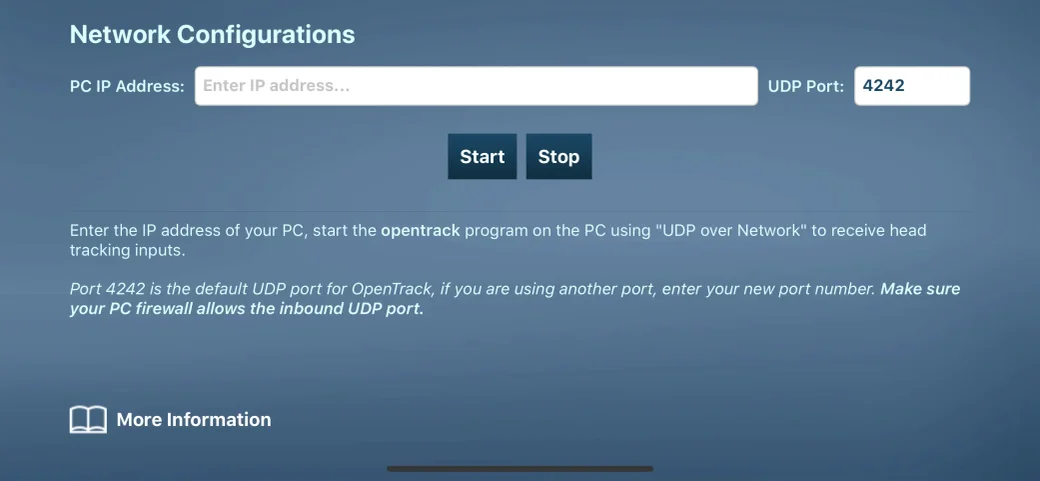
- Open Head Tracker app on your iPhone, set your PC's IP address, then start
- Launch opentrack application on your PC, select "Network over UDP" and the "freetrack 2.0" protocol, and press start
- Start your favourite simulator game, it will now follow you head movements in the virtual cockpit.
Visit https://jbcconsulting448679429.wordpress.com/head-tracking-quick-start/ for detailed instructions and download opentrack preset profile.
==================================
Versions (Free and in-app purchase)
==================================
Try out the free version. The free version allows you to play for 10 minutes per session, you can restart to extend the trial.
Upgrade to the full version via in-app purchase to remove trial limit and automatic screen dimming to reduce battery usage.
==================================
More Information and Support
==================================
Visit https://jbcconsulting448679429.wordpress.com for more tips, network setup and troubleshooting instruction on configuring head tracking, and contact me for support.
Yang baru
Versi 1.0.5 · 23/5/2026
bug fixes.
Privasi aplikasi
Yang dinyatakan John Yu di App Store tentang cara aplikasi ini menangani data.
-
Data tidak dikumpulkan
Pengembang tidak mengumpulkan data apa pun dari aplikasi ini.
Praktik privasi dapat bervariasi, misalnya berdasarkan fitur yang Anda gunakan atau usia Anda.
Informasi
- Penjual
- John Yu
- Kategori
- Kegunaan
- Versi
- 1.0.5
- Diperbarui
- 23/5/2026
- Dirilis
- 21/8/2020
- Ukuran
- 1,5 MB
- Memerlukan
- iOS 15.6 atau yang lebih baru
- Batasan usia
- 4+
- Harga
- Gratis
- Pembelian dalam aplikasi
- Ya
- Bahasa
- Inggris, Tionghoa Sederhana
- Hak cipta
- © Copyright (c) 2020, JBC