
Head Tracker
Head Tracking with your iPhone
Designed for iPhone, iPad, iPod touch
Free · In-app purchases
- Age rating4+
- CategoryUtilities
- DeveloperJohn Yu
- LanguagesEnglish+ 1 more
- Size1.5 MB
Links to the official App Store page
Download.org hosts no file of Head Tracker. The button opens its official App Store page, published by John Yu. Listing last checked on Nov 16, 2026.
Screenshots

About
Head Tracker uses iPhone’s front-facing TrueDepth camera to provide responsive and accurate 6DOF (degree of freedom) head tracking input to opentrack. Allowing users to enjoy flight and driving simulation games without expensive hardware or wearing uncomfortable headsets.
==================================
Supported Devices (iPhone 11 and newer)
==================================
This app requires device with TrueDepth camera or Devices with A12 or later processors: iPhone 11, iPhone SE(2nd Gen), iPad (8th Gen), Pro (2nd Gen) and later are supported.
=================
Features
=================
- 6 DOF
- Connects over wifi network, no need for cables
- No need to wear any uncomfortable head tracking headsets
- Accurate and responsive (up to 60fps)
- simple to setup
==================================
opentrack supported games includes:
==================================
- Microsoft Flight Simulator
- FSX
- DCS World
- Star Citizen
- Elite: Dangerous
- IL2
- Euro Truck
- and more.
=================
Customer Reviews
=================
"Installation took a couple of minutes on the PC and after the latest update is now smooth as butter. Looking forward to more improvements! Works perfectly on Euro Truck and other racing sims I play like Assetto Corsa etc"
"I sold my TrackIR headset some years ago and missed it now in the new Flight Simulator - and guess what: this is combined with opentrack the ideal replacement. It “just works” and is easy to set up. Fair pricing. 5 stars. Thank you, John."
=================
How to use:
=================
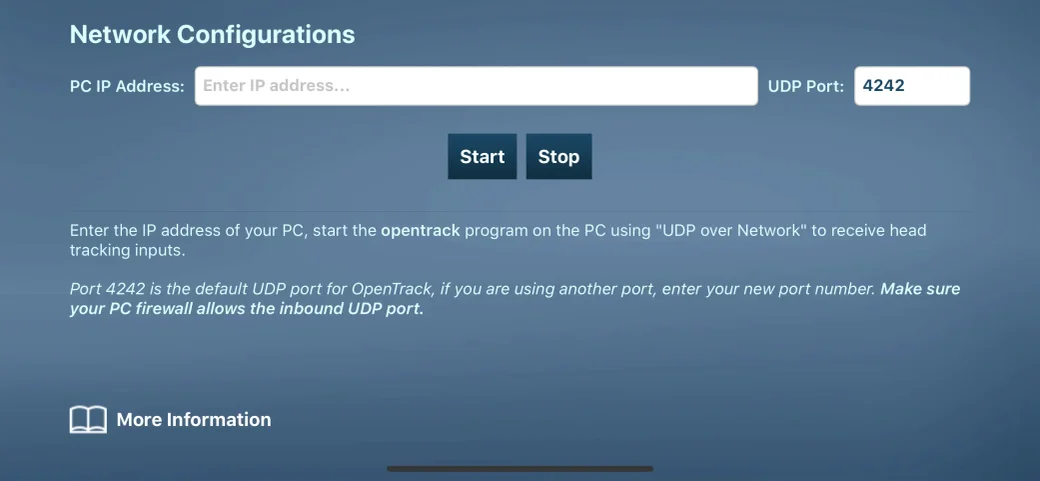
- Open Head Tracker app on your iPhone, set your PC's IP address, then start
- Launch opentrack application on your PC, select "Network over UDP" and the "freetrack 2.0" protocol, and press start
- Start your favourite simulator game, it will now follow you head movements in the virtual cockpit.
Visit https://jbcconsulting448679429.wordpress.com/head-tracking-quick-start/ for detailed instructions and download opentrack preset profile.
==================================
Versions (Free and in-app purchase)
==================================
Try out the free version. The free version allows you to play for 10 minutes per session, you can restart to extend the trial.
Upgrade to the full version via in-app purchase to remove trial limit and automatic screen dimming to reduce battery usage.
==================================
More Information and Support
==================================
Visit https://jbcconsulting448679429.wordpress.com for more tips, network setup and troubleshooting instruction on configuring head tracking, and contact me for support.
What’s new
Version 1.0.5 · May 23, 2026
bug fixes.
App privacy
What John Yu declares on the App Store about how this app handles data.
-
Data not collected
The developer does not collect any data from this app.
Privacy practices may vary, for example with the features you use or your age.
Information
- Seller
- John Yu
- Category
- Utilities
- Version
- 1.0.5
- Updated
- May 23, 2026
- Released
- Aug 21, 2020
- Size
- 1.5 MB
- Requires
- iOS 15.6 or later
- Age rating
- 4+
- Price
- Free
- In-app purchases
- Yes
- Languages
- English, Simplified Chinese
- Copyright
- © Copyright (c) 2020, JBC
You might also like
-
 SimFly PadChecklist & record for sim fly
-
 VatScopeView everything on VATSIM
-
 GameGlassTouch interfaces for games
-
 TrackBridge: Head TrackingMotion Controller for PC Sims
-
 Unofficial DCS CompanionDCS Manuals, AI & Checklists
-
 TruckSim GPS - ETS2 & ATS MapTruck Sim Voice Navigation
-
 SIM-DashboardUtilities
-
 MSFS MAP NGmoving map and charts for MSFS
-
 ETPhoneEye Tracking Tool
-
 LiDAR PointerDistance measuring tool