Modulo Calculator, iCalcModulo
Calculate division remainders
Conçue pour iPhone, iPad, iPod touch
Gratuit
- Classification d’âge4+
- CatégorieUtilitaires
- DéveloppeurTakao Ichimura
- LanguesAnglais+ 1 de plus
- Taille9,0 Mo
Renvoie vers la page App Store officielle
Download.org n’héberge aucun fichier de Modulo Calculator, iCalcModulo. Le bouton ouvre la page de l’application sur App Store, où Takao Ichimura la publie. Fiche vérifiée pour la dernière fois le 21/11/2026.
Captures d’écran
À propos
Le développeur n’a pas fourni ce texte dans votre langue.
iCalcModulo is a simple and easy-to-use calculator with a familiar operation system, plus a remainder calculation function (division with a "remainder").
It can be calculated by the same operation as real calculators. (Compliant with calculator of company C)
It also has functions unique to the calculator app, such as displaying calculation history and calculation formulas.
There is ⓘ button to display the information page that describes instructions.
Thank you for using iCalc.
(Instructions)
The operation for Arithmetic Calculations, Root Calculations, Constant Calculation and Independent Memory Calculation are the same as real general calculators. (Compliant with calculator of company C)
The original operations and functions are as follows.
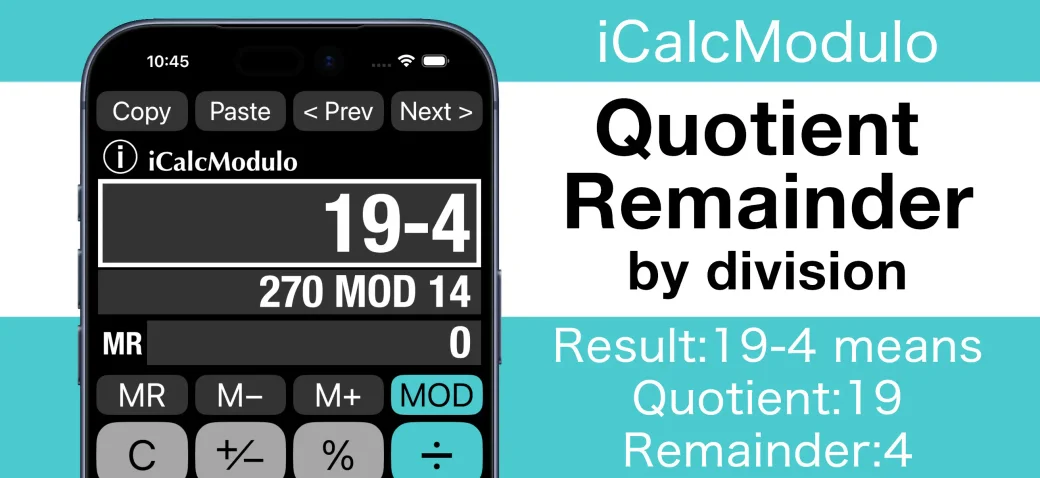
- When performing division by pressing [MOD] instead of [÷] to calculate, the quotient and remainder will be displayed. The remainder is calculated so that it is greater than or equal to 0.
- For example, when calculating the quotient and remainder of 30 ÷ 7, if you operate [3] [0] [MOD] [7] [=], the calculation result '4-2', which means the quotient is 4 and the remainder is 2, is displayed on the result display.
- For example in a dispensing work, a calculation when counting 3 tablets a day and 90 days with 14 tablets per sheet is [3] [×] [9] [0] [MOD] [1] [4] [=], the result '19-4', which means 19 sheets and 4 tablets, is displayed.
- If the result of calculation with the [MOD] key is used for the next calculation, the value of the quotient will be used.
- After calculation with the [=] key, the result is displayed on the main display and a white frame is added.
- If you tap an operator key instead of [=] key to calculate, the operator turns white, indicating that you are preparing for the next calculation.
- The calculation formula is displayed below the main display.
- Flipping the main display while inputting, the minimum digit of the displayed input value will be erased one by one.
- Flipping the MR display for independent memory to erase the value in independent memory.
- Call the calculation history with [< Prev] key. Repeat tapping to call older history. If you called a calculation history that was too old, you can use [Next >] key to return to newer history.
- Tapping [C] key to erase the entered value. And [C] key changes to [AC] key.
- Tapping [MR] key to enter the value of the independent memory. And [MR] key changes to [MC] key.
- [Copy] and [Paste] keys for clipboard.
- Percent Calculations
What is 25% of 100?
[1] [00] [×] [2] [5] [%] → 50
25% of what number is 100?
[1] [00] [÷] [2] [5] [%] → 400
What is 100 increased by 25%?
[1] [00] [+] [2] [5] [%] → 125
What is 100 decreased by 25%?
[1] [00] [−] [2] [5] [%] → 75
(Others)
- The calculation range is −999,999,999,999 ~ 999,999,999,999.
- The maximum number of digits is 12.
- The developer assumes no responsibility for any loss or claims by third parties which may arise from the use of this app.
Nouveautés
Version 2.2.1 · 17/11/2026
Updated screenshots.
Confidentialité de l’application
Ce que Takao Ichimura déclare sur l’App Store au sujet du traitement des données par cette application.
-
Données utilisées pour vous suivre
Peuvent être utilisées pour vous suivre sur des applications et des sites web appartenant à d’autres sociétés.
- Emplacement
- Identifiants
- Données d’utilisation
-
Données n’établissant aucun lien avec vous
Peuvent être collectées, mais ne sont pas liées à votre identité.
- Emplacement
- Identifiants
- Données d’utilisation
Les pratiques en matière de confidentialité peuvent varier, notamment en fonction des fonctionnalités que vous utilisez ou de votre âge.
Informations
- Vendeur
- Takao Ichimura
- Catégorie
- Utilitaires
- Version
- 2.2.1
- Mis à jour
- 17/11/2026
- Publié
- 02/10/2022
- Taille
- 9,0 Mo
- Nécessite
- iOS 15.0 ou version ultérieure
- Classification d’âge
- 4+
- Prix
- Gratuit
- Langues
- Anglais, Japonais
- Copyright
- © 2022 Takao Ichimura
Vous aimerez peut-être aussi
-
 RedCrab CalculatorUtilitaires
-
 Numerix CalculatorUtilitaires
-
 Calculatrice CIassiqueCalculatrice Classique
-
 Smart Calculator·Utilitaires
-
 GOLD • CALCULATOREsthétique & Mathématiques
-
 Calculatir - CalculatorUtilitaires
-
 Calculatrice + Histoire & %Science, fractions et unités
-
 Omega CalculatorUtilitaires
-
 Calculi: Scientific CalculatorUtilitaires
-
 Calculatrice: 15 CalculatricesCalculatrice pour iPhone