
Modulo Calculator, iCalcModulo
Calculate division remainders
Được thiết kế cho iPhone, iPad, iPod touch
Miễn phí
- Độ tuổi4+
- Danh mụcTiện Ích
- Nhà phát triểnTakao Ichimura
- Ngôn ngữTiếng Anh+ 1 ngôn ngữ khác
- Kích thước9,0 MB
Liên kết đến trang App Store chính thức
Download.org không lưu trữ tệp nào của Modulo Calculator, iCalcModulo. Nút này mở trang ứng dụng trên App Store, nơi Takao Ichimura phát hành ứng dụng. Trang được kiểm tra lần cuối: 21/11/2026.
Ảnh chụp màn hình
Giới thiệu
Nhà phát triển chưa cung cấp nội dung này bằng ngôn ngữ của bạn.
iCalcModulo is a simple and easy-to-use calculator with a familiar operation system, plus a remainder calculation function (division with a "remainder").
It can be calculated by the same operation as real calculators. (Compliant with calculator of company C)
It also has functions unique to the calculator app, such as displaying calculation history and calculation formulas.
There is ⓘ button to display the information page that describes instructions.
Thank you for using iCalc.
(Instructions)
The operation for Arithmetic Calculations, Root Calculations, Constant Calculation and Independent Memory Calculation are the same as real general calculators. (Compliant with calculator of company C)
The original operations and functions are as follows.
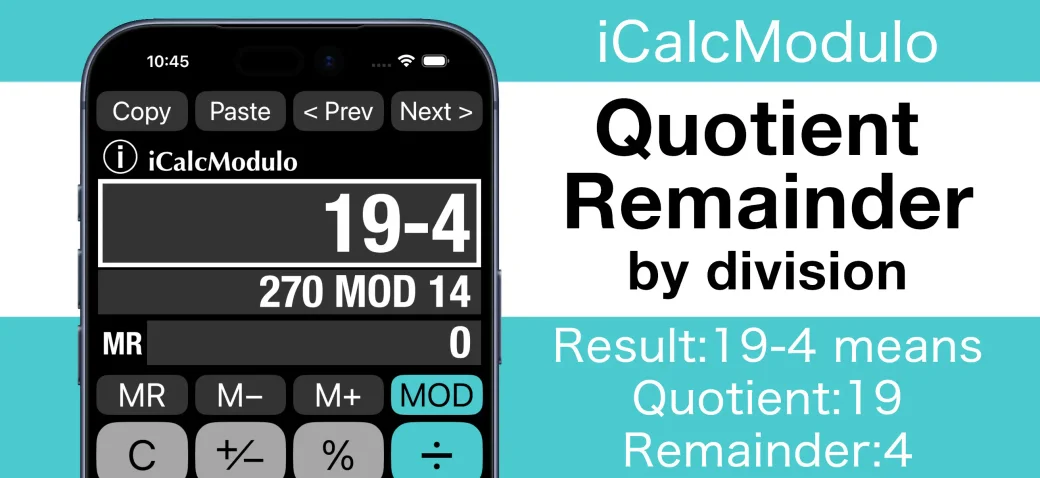
- When performing division by pressing [MOD] instead of [÷] to calculate, the quotient and remainder will be displayed. The remainder is calculated so that it is greater than or equal to 0.
- For example, when calculating the quotient and remainder of 30 ÷ 7, if you operate [3] [0] [MOD] [7] [=], the calculation result '4-2', which means the quotient is 4 and the remainder is 2, is displayed on the result display.
- For example in a dispensing work, a calculation when counting 3 tablets a day and 90 days with 14 tablets per sheet is [3] [×] [9] [0] [MOD] [1] [4] [=], the result '19-4', which means 19 sheets and 4 tablets, is displayed.
- If the result of calculation with the [MOD] key is used for the next calculation, the value of the quotient will be used.
- After calculation with the [=] key, the result is displayed on the main display and a white frame is added.
- If you tap an operator key instead of [=] key to calculate, the operator turns white, indicating that you are preparing for the next calculation.
- The calculation formula is displayed below the main display.
- Flipping the main display while inputting, the minimum digit of the displayed input value will be erased one by one.
- Flipping the MR display for independent memory to erase the value in independent memory.
- Call the calculation history with [< Prev] key. Repeat tapping to call older history. If you called a calculation history that was too old, you can use [Next >] key to return to newer history.
- Tapping [C] key to erase the entered value. And [C] key changes to [AC] key.
- Tapping [MR] key to enter the value of the independent memory. And [MR] key changes to [MC] key.
- [Copy] and [Paste] keys for clipboard.
- Percent Calculations
What is 25% of 100?
[1] [00] [×] [2] [5] [%] → 50
25% of what number is 100?
[1] [00] [÷] [2] [5] [%] → 400
What is 100 increased by 25%?
[1] [00] [+] [2] [5] [%] → 125
What is 100 decreased by 25%?
[1] [00] [−] [2] [5] [%] → 75
(Others)
- The calculation range is −999,999,999,999 ~ 999,999,999,999.
- The maximum number of digits is 12.
- The developer assumes no responsibility for any loss or claims by third parties which may arise from the use of this app.
Có gì mới
Phiên bản 2.2.1 · 17/11/2026
Updated screenshots.
Quyền riêng tư của ứng dụng
Những gì Takao Ichimura khai báo trên App Store về cách ứng dụng này xử lý dữ liệu.
-
Dữ liệu được sử dụng để theo dõi bạn
Có thể được sử dụng để theo dõi bạn trên các ứng dụng và trang web do công ty khác sở hữu.
- Vị trí
- Mã định danh
- Dữ liệu sử dụng
-
Dữ liệu không liên kết với bạn
Có thể được thu thập nhưng không liên kết với danh tính của bạn.
- Vị trí
- Mã định danh
- Dữ liệu sử dụng
Phương thức đảm bảo quyền riêng tư có thể khác nhau, chẳng hạn như tuỳ theo các tính năng bạn sử dụng hoặc độ tuổi của bạn.
Thông tin
- Người bán
- Takao Ichimura
- Danh mục
- Tiện Ích
- Phiên bản
- 2.2.1
- Cập nhật
- 17/11/2026
- Phát hành
- 02/10/2022
- Kích thước
- 9,0 MB
- Yêu cầu
- iOS 15.0 trở lên
- Độ tuổi
- 4+
- Giá
- Miễn phí
- Ngôn ngữ
- Tiếng Anh, Tiếng Nhật
- Bản quyền
- © 2022 Takao Ichimura
Có thể bạn cũng thích
-
 RedCrab CalculatorTiện Ích
-
 Numerix CalculatorTiện Ích
-
 Calculator CIassicTiện Ích
-
 Smart Calculator·Tiện Ích
-
 GOLD • CALCULATORTiện Ích
-
 Calculatir - CalculatorTiện Ích
-
 Calculator: History & PercentTiện Ích
-
 Omega CalculatorTiện Ích
-
 Calculi: Scientific CalculatorTiện Ích
-
 Máy tính - 15 Máy tínhMáy tính cho iPhone