Modulo Calculator, iCalcModulo
Calculate division remainders
iPhone, iPad, iPod touch için tasarlandı
Ücretsiz
- Yaş sınırı4+
- KategoriYardımcılar
- GeliştiriciTakao Ichimura
- Dillerİngilizce+ 1 dil daha
- Boyut9,0 MB
Resmi App Store sayfasına bağlanır
Download.org, Modulo Calculator, iCalcModulo için hiçbir dosya barındırmaz. Düğme, uygulamanın App Store üzerindeki sayfasını açar; uygulamayı orada Takao Ichimura yayınlar. Sayfanın son kontrolü: 21.11.2026.
Ekran görüntüleri
Hakkında
Geliştirici bu metni dilinizde sunmamış.
iCalcModulo is a simple and easy-to-use calculator with a familiar operation system, plus a remainder calculation function (division with a "remainder").
It can be calculated by the same operation as real calculators. (Compliant with calculator of company C)
It also has functions unique to the calculator app, such as displaying calculation history and calculation formulas.
There is ⓘ button to display the information page that describes instructions.
Thank you for using iCalc.
(Instructions)
The operation for Arithmetic Calculations, Root Calculations, Constant Calculation and Independent Memory Calculation are the same as real general calculators. (Compliant with calculator of company C)
The original operations and functions are as follows.
- When performing division by pressing [MOD] instead of [÷] to calculate, the quotient and remainder will be displayed. The remainder is calculated so that it is greater than or equal to 0.
- For example, when calculating the quotient and remainder of 30 ÷ 7, if you operate [3] [0] [MOD] [7] [=], the calculation result '4-2', which means the quotient is 4 and the remainder is 2, is displayed on the result display.
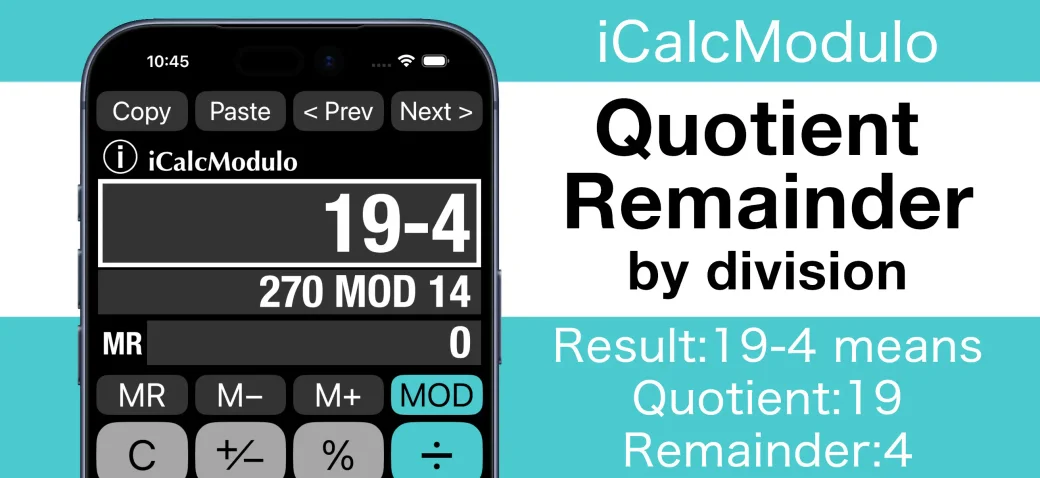
- For example in a dispensing work, a calculation when counting 3 tablets a day and 90 days with 14 tablets per sheet is [3] [×] [9] [0] [MOD] [1] [4] [=], the result '19-4', which means 19 sheets and 4 tablets, is displayed.
- If the result of calculation with the [MOD] key is used for the next calculation, the value of the quotient will be used.
- After calculation with the [=] key, the result is displayed on the main display and a white frame is added.
- If you tap an operator key instead of [=] key to calculate, the operator turns white, indicating that you are preparing for the next calculation.
- The calculation formula is displayed below the main display.
- Flipping the main display while inputting, the minimum digit of the displayed input value will be erased one by one.
- Flipping the MR display for independent memory to erase the value in independent memory.
- Call the calculation history with [< Prev] key. Repeat tapping to call older history. If you called a calculation history that was too old, you can use [Next >] key to return to newer history.
- Tapping [C] key to erase the entered value. And [C] key changes to [AC] key.
- Tapping [MR] key to enter the value of the independent memory. And [MR] key changes to [MC] key.
- [Copy] and [Paste] keys for clipboard.
- Percent Calculations
What is 25% of 100?
[1] [00] [×] [2] [5] [%] → 50
25% of what number is 100?
[1] [00] [÷] [2] [5] [%] → 400
What is 100 increased by 25%?
[1] [00] [+] [2] [5] [%] → 125
What is 100 decreased by 25%?
[1] [00] [−] [2] [5] [%] → 75
(Others)
- The calculation range is −999,999,999,999 ~ 999,999,999,999.
- The maximum number of digits is 12.
- The developer assumes no responsibility for any loss or claims by third parties which may arise from the use of this app.
Yenilikler
Sürüm 2.2.1 · 17.11.2026
Updated screenshots.
Uygulama gizliliği
Bu uygulamanın verileri nasıl işlediği hakkında Takao Ichimura tarafından App Store üzerinde yapılan beyan.
-
Sizi izlemek için kullanılan veriler
Başka şirketlere ait uygulamalarda ve web sitelerinde sizi izlemek için kullanılabilir.
- Konum
- Tanımlayıcılar
- Kullanım verileri
-
Sizinle ilişkilendirilmeyen veriler
Toplanabilir ancak kimliğinizle ilişkilendirilmez.
- Konum
- Tanımlayıcılar
- Kullanım verileri
Gizlilik uygulamaları, örneğin kullandığınız özelliklere veya yaşınıza göre değişiklik gösterebilir.
Bilgiler
- Satıcı
- Takao Ichimura
- Kategori
- Yardımcılar
- Sürüm
- 2.2.1
- Güncellendi
- 17.11.2026
- Yayın tarihi
- 02.10.2022
- Boyut
- 9,0 MB
- Gereksinim
- iOS 15.0 veya sonrası
- Yaş sınırı
- 4+
- Fiyat
- Ücretsiz
- Diller
- İngilizce, Japonca
- Telif hakkı
- © 2022 Takao Ichimura
Bunları da beğenebilirsiniz
-
 RedCrab CalculatorYardımcılar
-
 Numerix CalculatorYardımcılar
-
 Calculator CIassicYardımcılar
-
 Smart Calculator·Yardımcılar
-
 GOLD • CALCULATORYardımcılar
-
 Calculatir - CalculatorYardımcılar
-
 Calculator: History & PercentYardımcılar
-
 Omega CalculatorYardımcılar
-
 Calculi: Scientific CalculatorYardımcılar
-
 Hesap Makinesi: 15 CalculatorsiPhone için Hesap Makinesi