
ScreenStreak
Taper your smartphone habit
Conçue pour iPhone, iPod touch
Gratuit
- Classification d’âge4+
- CatégorieProductivité
- DéveloppeurDaniel Redmond
- LanguesAnglais
- Taille28,9 Mo
Renvoie vers la page App Store officielle
Download.org n’héberge aucun fichier de ScreenStreak. Le bouton ouvre la page de l’application sur App Store, où Daniel Redmond la publie. Fiche vérifiée pour la dernière fois le 22/11/2026.
Captures d’écran

À propos
Le développeur n’a pas fourni ce texte dans votre langue.
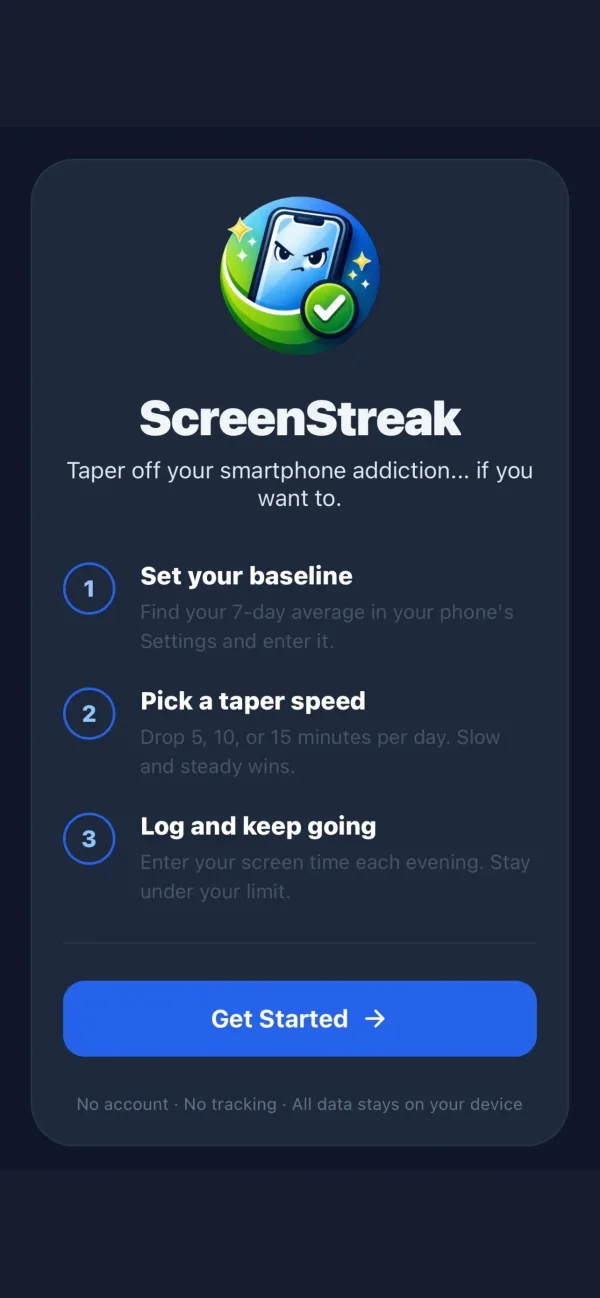
Most screen time apps don't work. They block apps cold turkey. Your willpower lasts three days. Then you disable the block and you're right back where you started — except now you feel worse about it.
ScreenStreak works differently.
It uses gradual tapering — reducing your daily limit by just a few minutes each day. Small enough that you barely notice. Consistent enough that it actually sticks. By the time you reach your goal, the habit is yours. Not the app's.
HOW IT WORKS
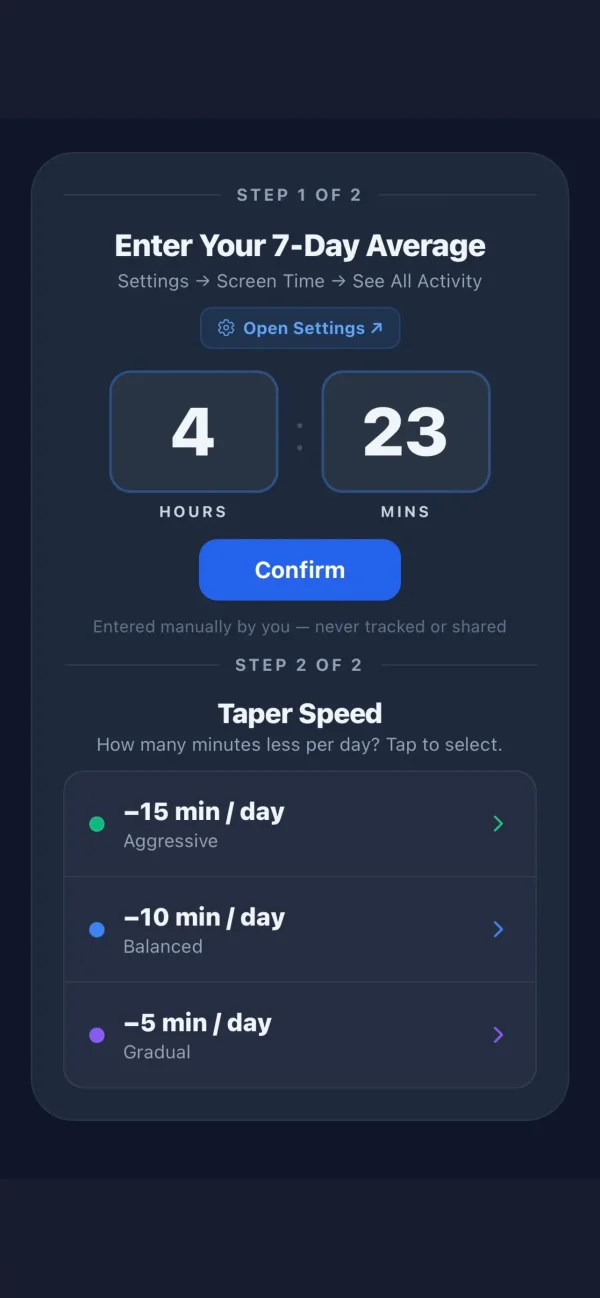
Find your 7-day screen time average in Settings → Screen Time → See All Activity (iPhone). Enter it as your baseline. Choose a taper speed — 5, 10, or 15 fewer minutes per day. Your limit drops automatically every day you succeed. Fail a day and the limit holds — giving you another shot at the same goal before moving on. Reach 30 minutes and the app locks there. Habit built.
That's it. No permissions. No tracking. Just you, your numbers, and a streak worth protecting.
THE HONEST PART
You may notice boredom, restlessness, or the urge to check your phone — especially early on. That's normal. It won't always be easy. You might fail before lasting change sticks. Reset and keep going. The streak is a tool, not a verdict.
FOR FAMILIES
ScreenStreak is built to be used together, not imposed from above. Set the reduction speed collaboratively. Let them own their streak. Tapering works because it's a choice — not a punishment.
FEATURES
-100% manual — you enter your screen time each day. No permissions required. We don't read your data, ever.
-Taper speed: 5, 10, or 15 minutes less per successful day — fail and the limit holds until you succeed
-Streak counter with a 2-day grace window for missed days
-Time Saved — tracks cumulative minutes saved vs your original 7-day average, not just today's goal
-Glitch protection — flag Apple Screen Time miscalculations without breaking your streak
-Smart warnings — the app alerts you when your streak is at risk before it's too late
-Weekly recalibration — only suggested when your usage is consistently above your taper goal, never when you're doing well
-Struggling? After 3 tough days the app suggests a gentler taper speed
-Taper to 30 — one tap to finish the final stretch when you're close to the goal
-Hold at 1 hour level— lock your limit when you're happy with where you are
-Update your baseline anytime — even after hitting 30 minutes, you can reset and start fresh
-Optional 8 PM daily reminder. Screen Streak
Nouveautés
Version 1.1 · 13/05/2026
Updated design
Confidentialité de l’application
Ce que Daniel Redmond déclare sur l’App Store au sujet du traitement des données par cette application.
-
Données non collectées
Le développeur ne collecte aucune donnée à partir de cette application.
Les pratiques en matière de confidentialité peuvent varier, notamment en fonction des fonctionnalités que vous utilisez ou de votre âge.
Informations
- Vendeur
- Daniel Redmond
- Catégorie
- Productivité
- Version
- 1.1
- Mis à jour
- 13/05/2026
- Publié
- 26/04/2026
- Taille
- 28,9 Mo
- Nécessite
- iOS 15.1 ou version ultérieure
- Classification d’âge
- 4+
- Prix
- Gratuit
- Langues
- Anglais
- Copyright
- © 2026 ScreenStreak
Vous aimerez peut-être aussi
-
 The Friendly ReminderProductivité
-
 Normal: Screen Time ControlProductivité
-
 Socialite: Stay ConnectedProductivité
-
 log off - unrot your brainProductivité
-
 ViewDo - Tâches & RappelsVos notes sur votre écran !
-
 Angel HabsProductivité
-
 Barrier: Screen Time For FocusBloquez applis, limitez écran
-
 Habit Tracker - FlameSuis tes streaks & habitudes
-
 Cluely: AI NotetakerProductivité
-
 Email Cleaner: Inbox ZapperDésabonner, Nettoyer & Filtrer