
ScreenStreak
Taper your smartphone habit
Được thiết kế cho iPhone, iPod touch
Miễn phí
- Độ tuổi4+
- Danh mụcHiệu Suất
- Nhà phát triểnDaniel Redmond
- Ngôn ngữTiếng Anh
- Kích thước28,9 MB
Liên kết đến trang App Store chính thức
Download.org không lưu trữ tệp nào của ScreenStreak. Nút này mở trang ứng dụng trên App Store, nơi Daniel Redmond phát hành ứng dụng. Trang được kiểm tra lần cuối: 22/11/2026.
Ảnh chụp màn hình

Giới thiệu
Nhà phát triển chưa cung cấp nội dung này bằng ngôn ngữ của bạn.
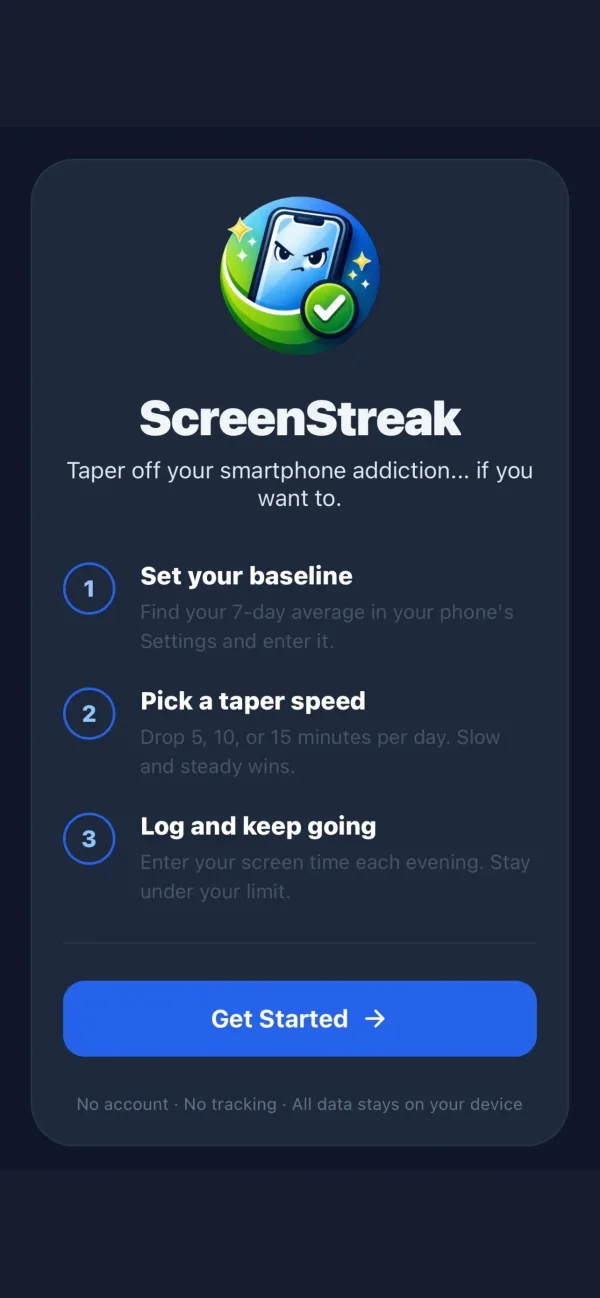
Most screen time apps don't work. They block apps cold turkey. Your willpower lasts three days. Then you disable the block and you're right back where you started — except now you feel worse about it.
ScreenStreak works differently.
It uses gradual tapering — reducing your daily limit by just a few minutes each day. Small enough that you barely notice. Consistent enough that it actually sticks. By the time you reach your goal, the habit is yours. Not the app's.
HOW IT WORKS
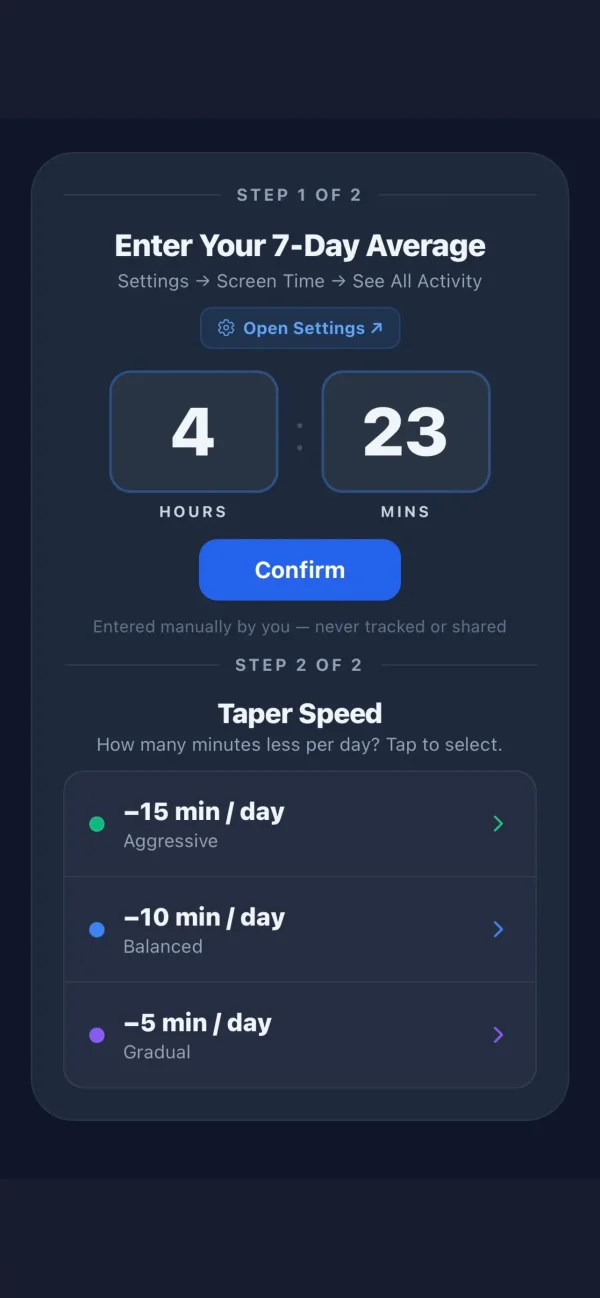
Find your 7-day screen time average in Settings → Screen Time → See All Activity (iPhone). Enter it as your baseline. Choose a taper speed — 5, 10, or 15 fewer minutes per day. Your limit drops automatically every day you succeed. Fail a day and the limit holds — giving you another shot at the same goal before moving on. Reach 30 minutes and the app locks there. Habit built.
That's it. No permissions. No tracking. Just you, your numbers, and a streak worth protecting.
THE HONEST PART
You may notice boredom, restlessness, or the urge to check your phone — especially early on. That's normal. It won't always be easy. You might fail before lasting change sticks. Reset and keep going. The streak is a tool, not a verdict.
FOR FAMILIES
ScreenStreak is built to be used together, not imposed from above. Set the reduction speed collaboratively. Let them own their streak. Tapering works because it's a choice — not a punishment.
FEATURES
-100% manual — you enter your screen time each day. No permissions required. We don't read your data, ever.
-Taper speed: 5, 10, or 15 minutes less per successful day — fail and the limit holds until you succeed
-Streak counter with a 2-day grace window for missed days
-Time Saved — tracks cumulative minutes saved vs your original 7-day average, not just today's goal
-Glitch protection — flag Apple Screen Time miscalculations without breaking your streak
-Smart warnings — the app alerts you when your streak is at risk before it's too late
-Weekly recalibration — only suggested when your usage is consistently above your taper goal, never when you're doing well
-Struggling? After 3 tough days the app suggests a gentler taper speed
-Taper to 30 — one tap to finish the final stretch when you're close to the goal
-Hold at 1 hour level— lock your limit when you're happy with where you are
-Update your baseline anytime — even after hitting 30 minutes, you can reset and start fresh
-Optional 8 PM daily reminder. Screen Streak
Có gì mới
Phiên bản 1.1 · 13/05/2026
Updated design
Quyền riêng tư của ứng dụng
Những gì Daniel Redmond khai báo trên App Store về cách ứng dụng này xử lý dữ liệu.
-
Dữ liệu không được thu thập
Nhà phát triển không thu thập bất kỳ dữ liệu nào từ ứng dụng này.
Phương thức đảm bảo quyền riêng tư có thể khác nhau, chẳng hạn như tuỳ theo các tính năng bạn sử dụng hoặc độ tuổi của bạn.
Thông tin
- Người bán
- Daniel Redmond
- Danh mục
- Hiệu Suất
- Phiên bản
- 1.1
- Cập nhật
- 13/05/2026
- Phát hành
- 26/04/2026
- Kích thước
- 28,9 MB
- Yêu cầu
- iOS 15.1 trở lên
- Độ tuổi
- 4+
- Giá
- Miễn phí
- Ngôn ngữ
- Tiếng Anh
- Bản quyền
- © 2026 ScreenStreak
Có thể bạn cũng thích
-
 The Friendly ReminderHiệu Suất
-
 Normal: Screen Time ControlHiệu Suất
-
 Socialite: Stay ConnectedHiệu Suất
-
 log off - unrot your brainHiệu Suất
-
 ViewDo - Ghi chú Màn hìnhGhi chú ngay trên màn hình!
-
 Angel HabsHiệu Suất
-
 Barrier: Screen Time For FocusHiệu Suất
-
 Habit Tracker - FlameHiệu Suất
-
 Cluely: AI NotetakerHiệu Suất
-
 Email Cleaner: Inbox ZapperHiệu Suất