- Age rating4+
- CategoryProductivity
- DeveloperDaniel Redmond
- LanguagesEnglish
- Size28.9 MB
Links to the official App Store page
Download.org hosts no file of ScreenStreak. The button opens its official App Store page, published by Daniel Redmond. Listing last checked on Nov 22, 2026.
Screenshots

About
Most screen time apps don't work. They block apps cold turkey. Your willpower lasts three days. Then you disable the block and you're right back where you started — except now you feel worse about it.
ScreenStreak works differently.
It uses gradual tapering — reducing your daily limit by just a few minutes each day. Small enough that you barely notice. Consistent enough that it actually sticks. By the time you reach your goal, the habit is yours. Not the app's.
HOW IT WORKS
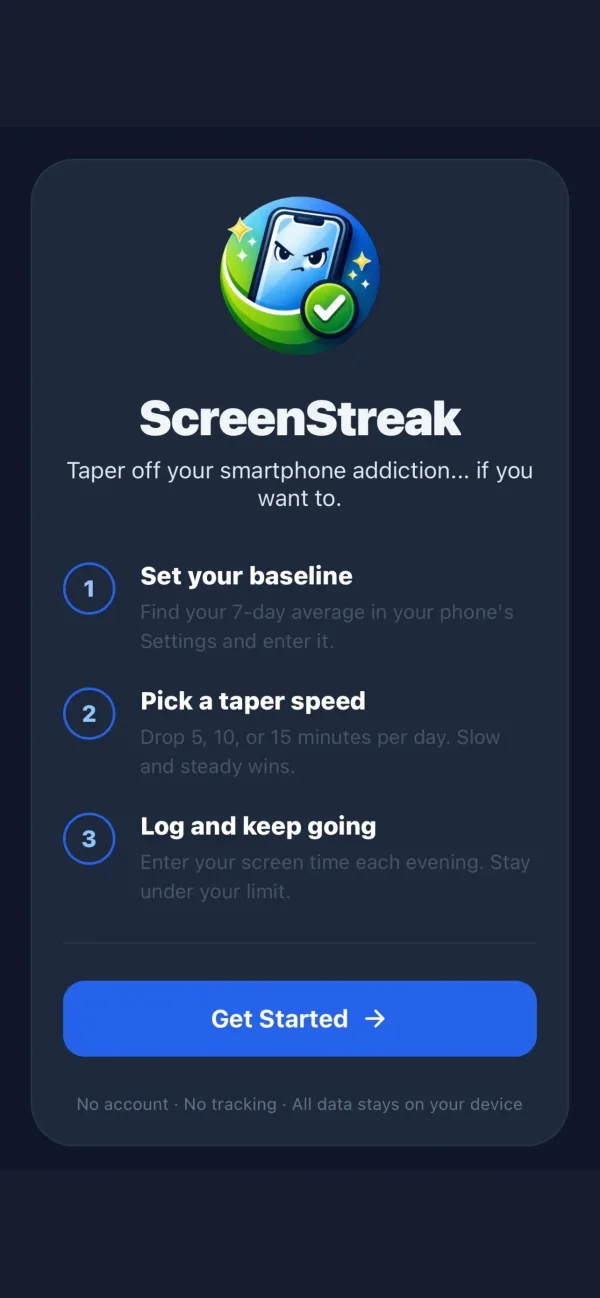
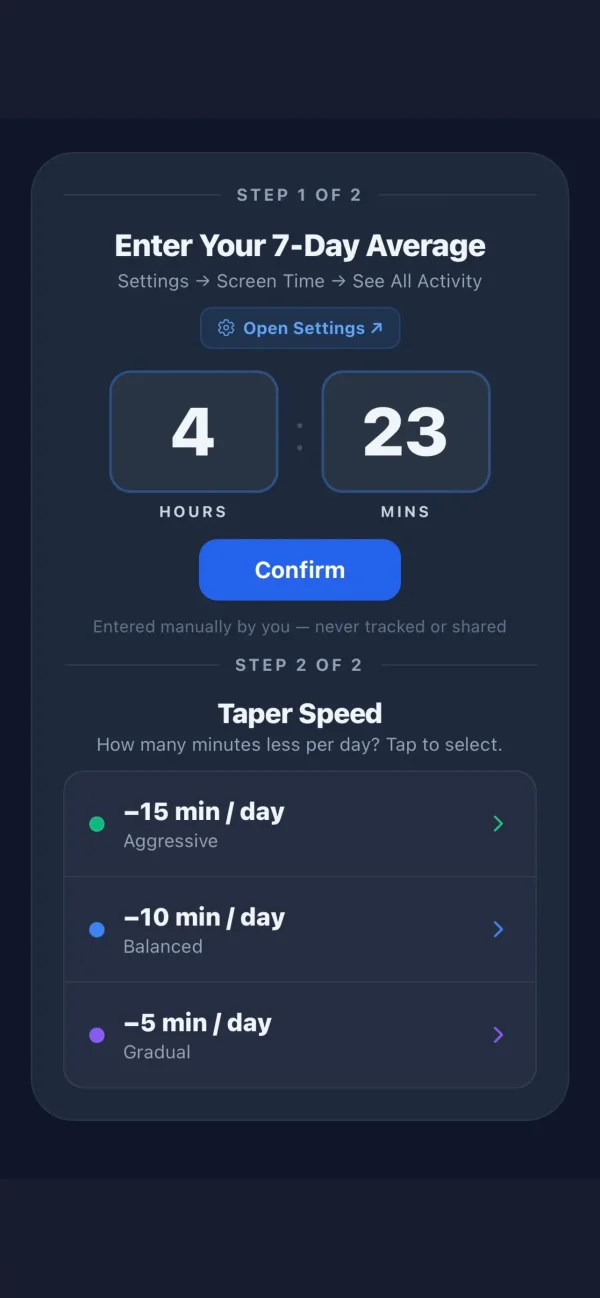
Find your 7-day screen time average in Settings → Screen Time → See All Activity (iPhone). Enter it as your baseline. Choose a taper speed — 5, 10, or 15 fewer minutes per day. Your limit drops automatically every day you succeed. Fail a day and the limit holds — giving you another shot at the same goal before moving on. Reach 30 minutes and the app locks there. Habit built.
That's it. No permissions. No tracking. Just you, your numbers, and a streak worth protecting.
THE HONEST PART
You may notice boredom, restlessness, or the urge to check your phone — especially early on. That's normal. It won't always be easy. You might fail before lasting change sticks. Reset and keep going. The streak is a tool, not a verdict.
FOR FAMILIES
ScreenStreak is built to be used together, not imposed from above. Set the reduction speed collaboratively. Let them own their streak. Tapering works because it's a choice — not a punishment.
FEATURES
-100% manual — you enter your screen time each day. No permissions required. We don't read your data, ever.
-Taper speed: 5, 10, or 15 minutes less per successful day — fail and the limit holds until you succeed
-Streak counter with a 2-day grace window for missed days
-Time Saved — tracks cumulative minutes saved vs your original 7-day average, not just today's goal
-Glitch protection — flag Apple Screen Time miscalculations without breaking your streak
-Smart warnings — the app alerts you when your streak is at risk before it's too late
-Weekly recalibration — only suggested when your usage is consistently above your taper goal, never when you're doing well
-Struggling? After 3 tough days the app suggests a gentler taper speed
-Taper to 30 — one tap to finish the final stretch when you're close to the goal
-Hold at 1 hour level— lock your limit when you're happy with where you are
-Update your baseline anytime — even after hitting 30 minutes, you can reset and start fresh
-Optional 8 PM daily reminder. Screen Streak
What’s new
Version 1.1 · May 13, 2026
Updated design
App privacy
What Daniel Redmond declares on the App Store about how this app handles data.
-
Data not collected
The developer does not collect any data from this app.
Privacy practices may vary, for example with the features you use or your age.
Information
- Seller
- Daniel Redmond
- Category
- Productivity
- Version
- 1.1
- Updated
- May 13, 2026
- Released
- Apr 26, 2026
- Size
- 28.9 MB
- Requires
- iOS 15.1 or later
- Age rating
- 4+
- Price
- Free
- Languages
- English
- Copyright
- © 2026 ScreenStreak
You might also like
-
 The Friendly ReminderRoutine Reminders That Care
-
 Normal: Screen Time ControlOpen-source app blocker
-
 Socialite: Stay ConnectedRelationship Accountability
-
 log off - unrot your brainblock apps, gamified focus
-
 ViewDo - Lock Screen To-DoNotes & Tasks on your screen!
-
 Angel HabsHabit tracker for becoming her
-
 Barrier: Screen Time For FocusBlock apps, limit distractions
-
 Habit Tracker - FlameDaily goals & streak counter
-
 Cluely: AI NotetakerInstant, detailed AI notes
-
 Email Cleaner: Inbox ZapperUnsubscribe, Clean & Stop Spam