VideoHubControl
Control your Videohub
Conçue pour iPhone, iPad, iPod touch
9,99 € · Achats intégrés
- Classification d’âge4+
- CatégorieUtilitaires
- DéveloppeurAlexander Омelchuk
- LanguesAnglais
- Taille1,8 Mo
Renvoie vers la page App Store officielle
Download.org n’héberge aucun fichier de VideoHubControl. Le bouton ouvre la page de l’application sur App Store, où Alexander Омelchuk la publie. Fiche vérifiée pour la dernière fois le 23/11/2026.
Captures d’écran

À propos
Le développeur n’a pas fourni ce texte dans votre langue.
VHC controls Blackmagic Design Videohub and AJA KUMO routers on the local network.
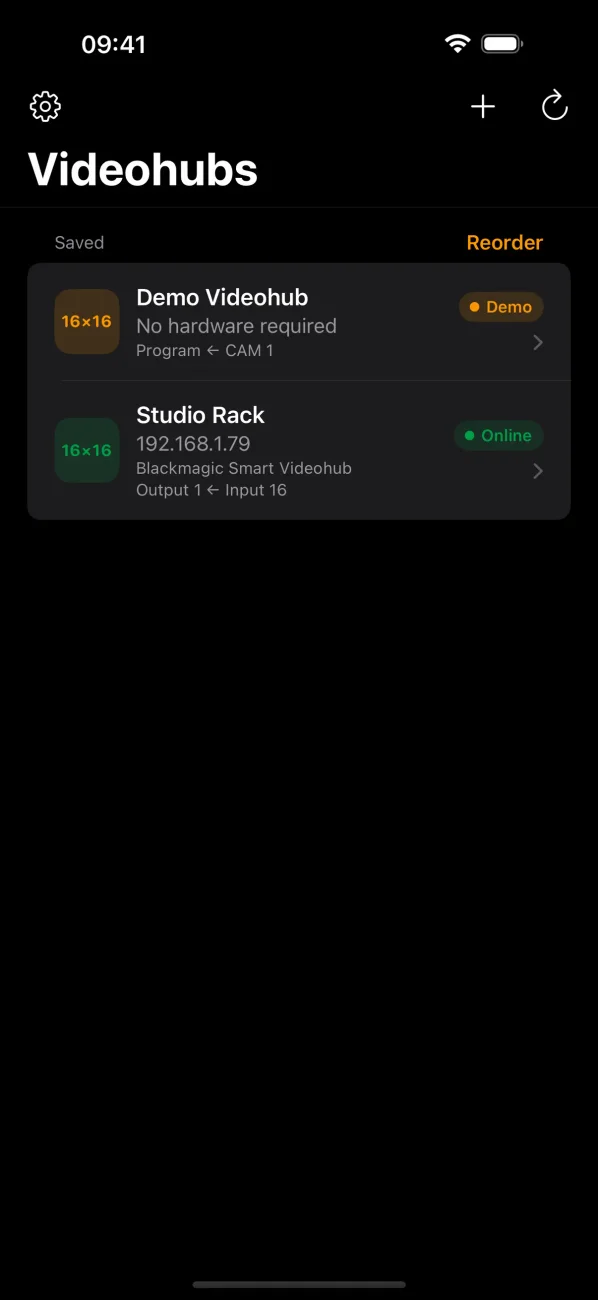
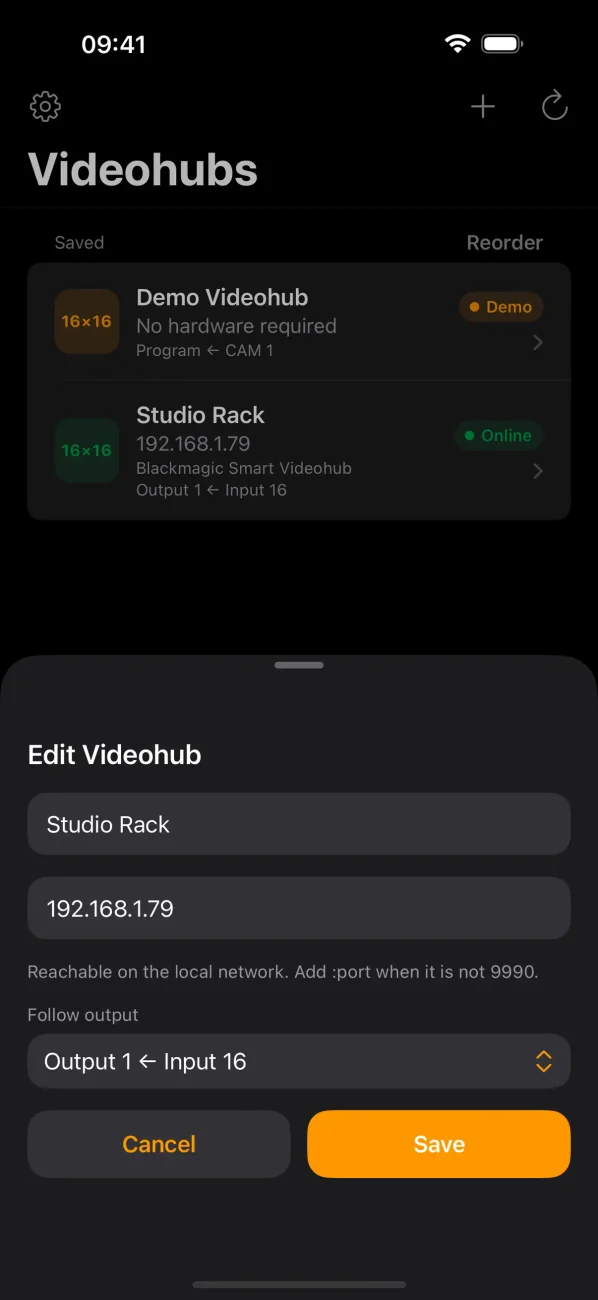
Save the hubs you use. Each row shows whether the matrix is online and where one output is routed right now. Edit the hub to follow a different output. Videohubs are found automatically; add a KUMO by its address.
Open a hub to route: pick the destination, pick the source, and send it with the big button at the bottom of the screen. The line above it shows exactly what will be sent, and “Now” shows what is on air. After a route goes through, Undo puts the previous source back. On large routers, find a port by its number or name instead of spinning the wheel.
Lock an output so nobody else can change it. Save the whole routing table as a preset and recall it later; on Studio Videohub, presets include the monitoring outputs.
The app remembers a hub by its Unique ID, so a DHCP address change updates the saved row instead of adding a duplicate. If the router is not on port 9990, put the port in the address.
On iPad, the list and the routing screen sit side by side. On a wide iPad, a table of every output and its source sits next to the wheels.
A demo router lets you try everything without hardware.
Settings can send a diagnostics log when a router does not behave as expected.
Nouveautés
Version 2.3 · 20/11/2026
A redesigned routing screen. The Routing button sits at the bottom, within thumb reach, and the line above it shows exactly what will be sent. “You sure?” shows how long it waits before resetting.
“Now” always shows what is on air. Undo puts the previous source back for 10 seconds after a route. Find a port by number or name instead of spinning the wheel.
AJA KUMO routers are supported: add one as kumo:// and its address.
Presets work on Studio Videohub, including the monitoring outputs, and open from a button in the toolbar. On a wide iPad, a table of every output sits next to the wheels.
Confidentialité de l’application
Ce que Alexander Омelchuk déclare sur l’App Store au sujet du traitement des données par cette application.
-
Données non collectées
Le développeur ne collecte aucune donnée à partir de cette application.
Les pratiques en matière de confidentialité peuvent varier, notamment en fonction des fonctionnalités que vous utilisez ou de votre âge.
Informations
- Vendeur
- Alexander Омelchuk
- Catégorie
- Utilitaires
- Version
- 2.3
- Mis à jour
- 20/11/2026
- Publié
- 09/10/2018
- Taille
- 1,8 Mo
- Nécessite
- iOS 15.0 ou version ultérieure
- Classification d’âge
- 4+
- Prix
- 9,99 €
- Achats intégrés
- Oui
- Langues
- Anglais
- Copyright
- © "2026 Alexander Omelchuk"
Vous aimerez peut-être aussi
-
 RouteEffect - Video RouterUtilitaires
-
 ProVisionaire PortalUtilitaires
-
 DMXcat®Utilitaires
-
 netool.io Pro2Utilitaires
-
 ProPresenter RemoteUtilitaires
-
 Wireless Workbench MobileContrôle/surveillance sans fil
-
 QLab RemoteUtilitaires
-
 UniFi ConnectUtilitaires
-
 NDI HX Camera - Stream CaptureUtilitaires
-
 glinetUtilitaires