Concentric+
DFAmaya- Rating 3+Batasan usia
- PersonalisasiKategori
- 5/11/2026Diperbarui
- GratisHarga
Tertaut ke halaman resmi com.dfamaya.concentric di Google Play. Terakhir diperiksa pada 17/11/2026.

Tangkapan layar


Tentang aplikasi ini
Terjemahan otomatis oleh Google. Bahasa asli: Inggris (Amerika Serikat).
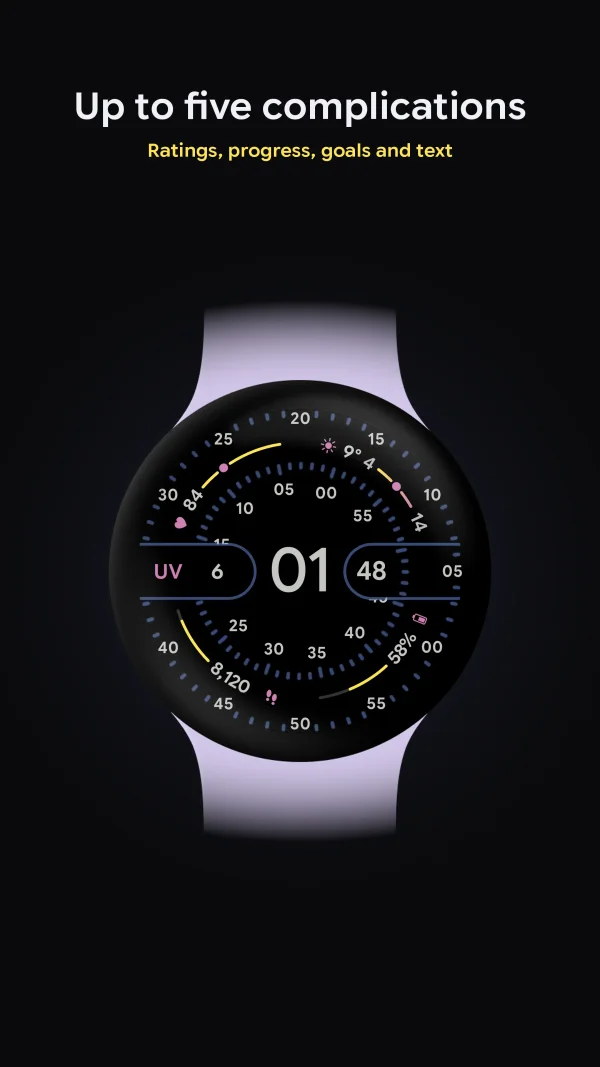
Lingkaran menit dan detik yang berputar, 64 pilihan warna, dan hingga lima komplikasi.
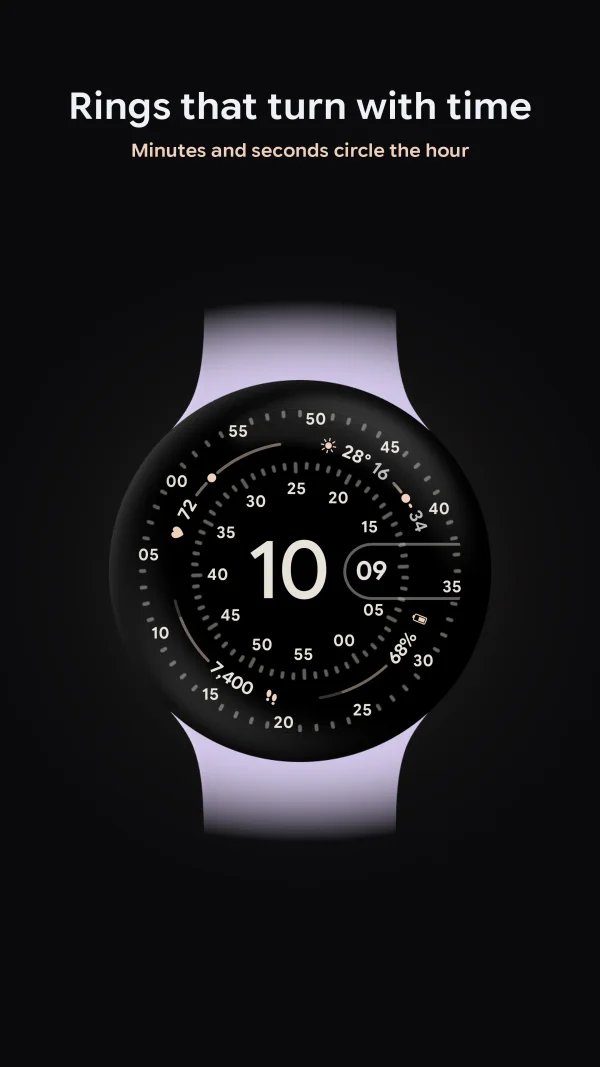
Concentric+ adalah tampilan jam tangan hibrida yang dibangun di sekitar dua cincin yang berputar. Cincin menit dan cincin detik berputar mengelilingi jam, sehingga menit dan detik saat ini selalu sejajar pada titik di sebelah kanan.
Terinspirasi oleh tampilan Concentric pada Google Pixel Watch, dan dibuat ulang sedekat mungkin, dengan beberapa tambahan di atasnya.
TATA LETAK
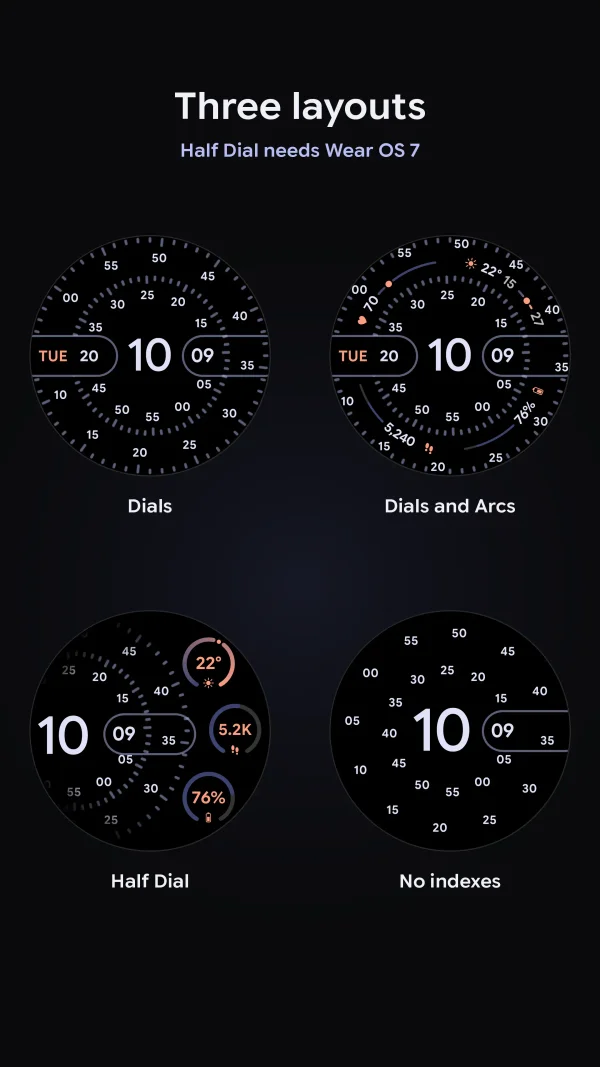
• Dial dan Busur – empat komplikasi busur sudut di sekitar cincin
• Dial – dial bersih dengan tanda detik yang lebih rapat
• Setengah Dial (Wear OS 7) – jam bergeser ke kiri untuk memberi ruang bagi tiga komplikasi bulat
WARNA
• 64 pilihan warna, masing-masing satu set empat warna untuk waktu, cincin, jalur komplikasi, dan ikon
• Preset: Porselen, Gletser, Kerikil, Lendir, Jester, dan pada Wear OS 7 Campari dan Unicorn
KOMPLIKASI
• Hingga lima slot komplikasi: empat busur sudut ditambah pil kiri opsional, atau tiga slot bulat di Setengah Dial
• Nilai rentang, kemajuan tujuan, elemen berbobot, teks pendek, ikon, dan gambar kecil
• Peringkat yang digambar sebagai titik pada jalur penuh, suhu dengan nilai minimum dan maksimumnya, kemajuan dan tujuan sebagai isian
• Warna komplikasi mengikuti pilihan warna Anda
SELALU AKTIF TAMPILAN
• Cincin selalu menyala; pil menutup menjadi cincin di sekitar menit
• Empat gaya selalu menyala
• Opsional, pertahankan teks dan ikon komplikasi dalam mode selalu menyala
PILIHAN
• Tiga gaya tanda centang
• Sembunyikan angka detik
• Jalur di belakang komplikasi teks pendek
Membutuhkan Wear OS 5.1 atau yang lebih baru (Half Dial membutuhkan Wear OS 7). Dibuat dengan Format Tampilan Jam untuk masa pakai baterai yang baik.
Aplikasi telepon opsional membuka halaman Play Store tampilan jam ini di jam tangan Anda yang terhubung, untuk ponsel yang tidak dapat menginstal tampilan jam secara langsung.
Untuk mengaturnya: tekan lama tampilan jam Anda saat ini, geser ke "Tambahkan tampilan jam", dan pilih Concentric+.
Tidak berafiliasi dengan atau didukung oleh Google. Pixel dan Pixel Watch adalah merek dagang Google LLC.
Kredit: berdasarkan tampilan jam Concentric oleh Luka Kilic (Lisensi MIT). Font: Google Sans Flex (Lisensi Font Terbuka SIL 1.1).
Tampilkan teks asli
Concentric+ is a hybrid watch face built around two rotating rings. The minute ring and the second ring sweep around the hour, so the current minute and second always line up at the pill on the right.
Inspired by the Concentric face on Google's Pixel Watch, and recreated as closely as possible, with a few extras on top.
LAYOUTS
• Dials and Arcs – four corner arc complications around the rings
• Dials – a clean dial with denser second ticks
• Half Dial (Wear OS 7) – the clock moves left to make room for three round complications
COLORS
• 64 colorways, each a four-colour set for the time, the rings, the complication tracks and the icons
• Presets: Porcelain, Glacier, Pebble, Ooze, Jester, and on Wear OS 7 Campari and Unicorn
COMPLICATIONS
• Up to five complication slots: four corner arcs plus an optional left pill, or three round slots in Half Dial
• Ranged values, goal progress, weighted elements, short text, icons and small images
• Ratings drawn as a dot on a full track, temperatures with their min and max, progress and goals as fills
• Complication colours follow your colorway
ALWAYS-ON DISPLAY
• Light always-on rings; the pill closes into a ring around the minute
• Four always-on styles
• Optionally keep complication text and icons in always-on
OPTIONS
• Three tick styles
• Hide the second digits
• A track behind short-text complications
Requires Wear OS 5.1 or newer (Half Dial needs Wear OS 7). Built with the Watch Face Format for good battery life.
The optional phone app opens this watch face's Play Store page on your paired watch, for phones that can't install watch faces directly.
To set it: long-press your current watch face, swipe to "Add watch face", and pick Concentric+.
Not affiliated with or endorsed by Google. Pixel and Pixel Watch are trademarks of Google LLC.
Credits: based on the Concentric watch face by Luka Kilic (MIT License). Font: Google Sans Flex (SIL Open Font License 1.1).
Keamanan data
Yang dinyatakan DFAmaya di Google Play tentang data yang dikumpulkan dan dibagikan aplikasi ini.
- Tidak ada data yang dibagikan kepada pihak ketigaPelajari lebih lanjut cara developer menyatakan pembagian data
- Tidak ada data yang dikumpulkanPelajari lebih lanjut cara developer menyatakan pengumpulan data
Yang baru
5/11/2026
Initial production release
Kontak pengembang
- Situs webenriquedfa.github.io
- Emaildeveloperdfa@gmail.com
- Kebijakan Privasienriquedfa.github.io
- AlamatPaseo Damas 239 Paseo Amberes 67130 Guadalupe, N.L. Mexico
Informasi
- Ditawarkan oleh
- DFAmaya
- Kategori
- Personalisasi
- Diperbarui
- 5/11/2026
- Dirilis
- 5/11/2026
- Batasan usia
- Rating 3+
- Harga
- Gratis
- Nama paket
- com.dfamaya.concentric