Concentric+
DFAmaya- 3 歳以上対象年齢
- カスタマイズカテゴリ
- 2026/11/5更新日
- 無料価格
com.dfamaya.concentricのGoogle Play公式ページにリンクしています。最終確認:2026/11/17。

スクリーンショット


このアプリについて
Googleによる英語 (アメリカ合衆国)からの自動翻訳です。
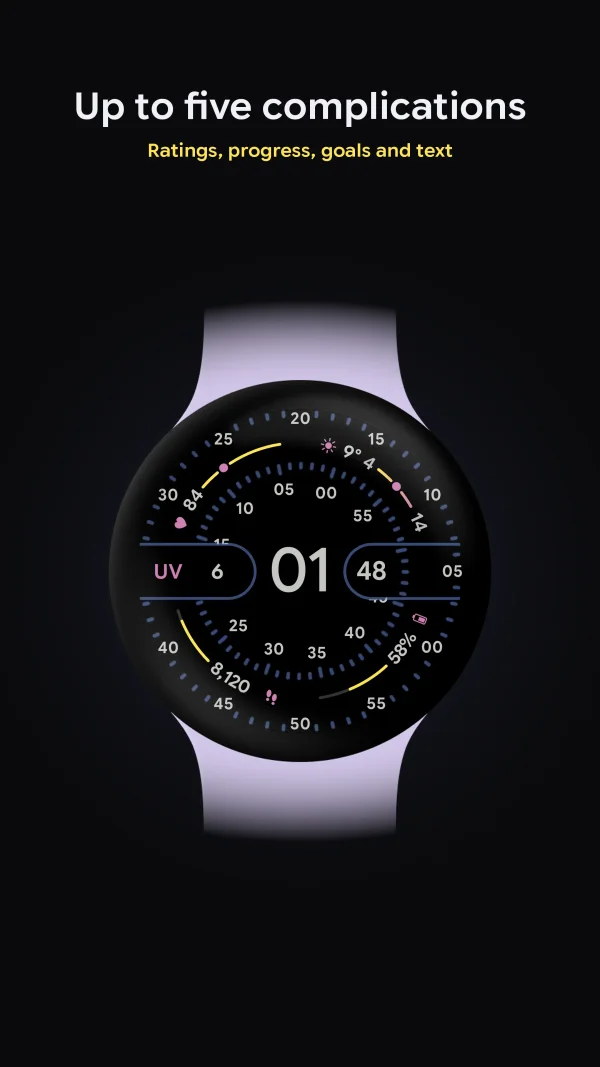
回転式の分針と秒針、64種類のカラーバリエーション、そして最大5つの複雑機構。
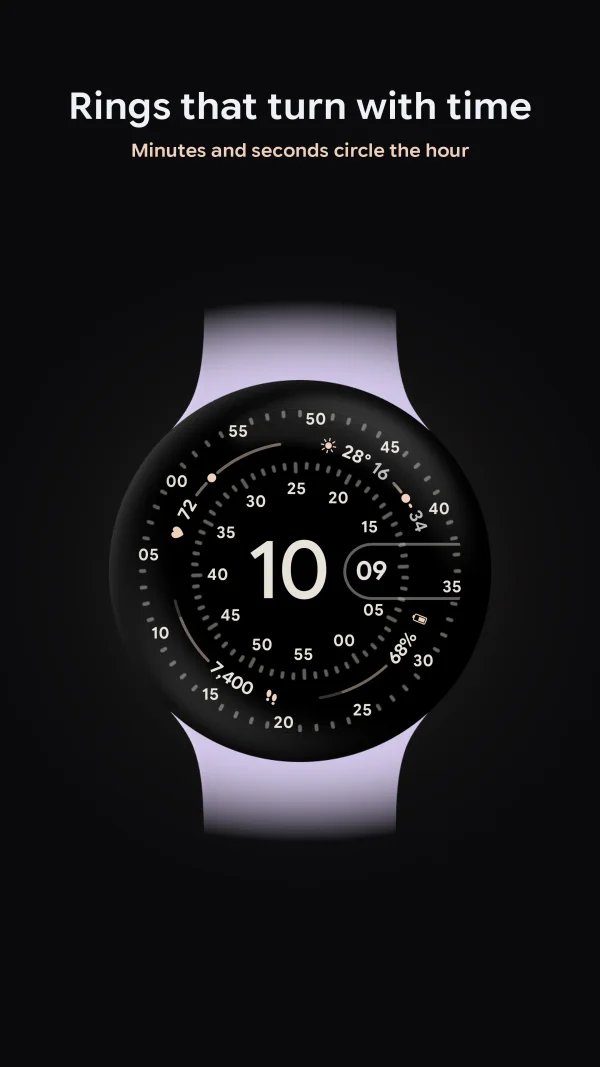
Concentric+は、2つの回転リングを中心としたハイブリッド型のウォッチフェイスです。分リングと秒リングが時を囲むように回転するため、現在の分と秒は常に右側のピルに揃います。
Google Pixel WatchのConcentricフェイスにインスパイアされ、可能な限り忠実に再現しつつ、いくつかの機能を追加しました。
レイアウト
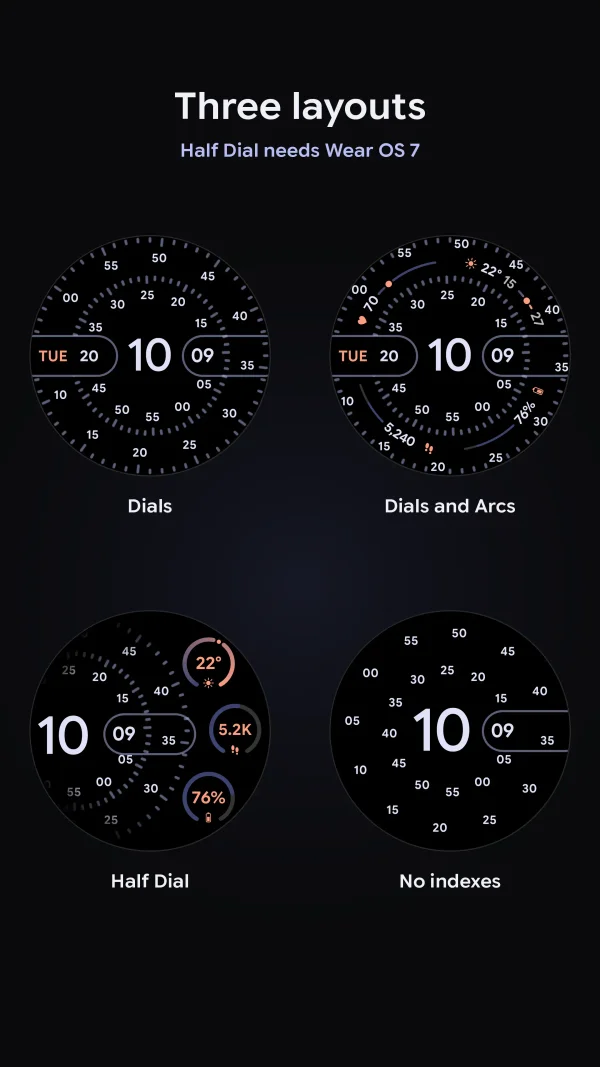
• ダイヤルとアーク – リングの周囲に4つのアークコンプリケーションを配置
• ダイヤル – 秒目盛りが密集したすっきりとしたダイヤル
• ハーフダイヤル(Wear OS 7) – 時計が左に移動し、3つの円形コンプリケーションを配置するスペースを確保
カラー
• 64種類のカラーバリエーション。それぞれ、時刻、リング、コンプリケーショントラック、アイコンに4色セットを使用
• プリセット:ポーセリン、グレイシャー、ペブル、ウーズ、ジェスター、Wear OS 7ではカンパリとユニコーン
コンプリケーション
• 最大5つのコンプリケーションスロット:4つのアークに加え、オプションで左側に1つのピル、またはハーフダイヤルでは3つの円形スロット
• 範囲値、目標達成度、加重要素、短いテキスト、アイコン、小さな画像
• 評価はフルトラック上にドットで表示、気温は最低値と最高値、達成度と目標は塗りつぶしで表示
• コンプリケーションの色は選択したカラーバリエーションに連動
常時表示ディスプレイ
• ライト常時表示リング:分を囲むようにピルが閉じてリング状になります。
• 常時表示スタイル4種類
• 常時表示時にコンプリケーションのテキストとアイコンを表示するオプション
オプション
• チェックマークスタイル3種類
• 秒の数字を非表示
• ショートテキストコンプリケーションの背後にトラックを表示
Wear OS 5.1以降が必要です(ハーフダイアルはWear OS 7以降が必要です)。バッテリー寿命を延ばすため、ウォッチフェイスフォーマットで作成されています。
オプションのスマートフォンアプリを使用すると、ウォッチフェイスを直接インストールできないスマートフォンでも、ペアリングしたウォッチでこのウォッチフェイスのPlayストアページを開くことができます。
設定方法:現在のウォッチフェイスを長押しし、「ウォッチフェイスを追加」までスワイプして、「Concentric+」を選択します。
Googleとは一切関係がなく、Googleによる承認も受けていません。PixelおよびPixel WatchはGoogle LLCの商標です。
クレジット:Luka Kilic氏によるConcentricウォッチフェイス(MITライセンス)をベースにしています。フォント:Google Sans Flex(SIL Open Font License 1.1)。
原文を表示
Concentric+ is a hybrid watch face built around two rotating rings. The minute ring and the second ring sweep around the hour, so the current minute and second always line up at the pill on the right.
Inspired by the Concentric face on Google's Pixel Watch, and recreated as closely as possible, with a few extras on top.
LAYOUTS
• Dials and Arcs – four corner arc complications around the rings
• Dials – a clean dial with denser second ticks
• Half Dial (Wear OS 7) – the clock moves left to make room for three round complications
COLORS
• 64 colorways, each a four-colour set for the time, the rings, the complication tracks and the icons
• Presets: Porcelain, Glacier, Pebble, Ooze, Jester, and on Wear OS 7 Campari and Unicorn
COMPLICATIONS
• Up to five complication slots: four corner arcs plus an optional left pill, or three round slots in Half Dial
• Ranged values, goal progress, weighted elements, short text, icons and small images
• Ratings drawn as a dot on a full track, temperatures with their min and max, progress and goals as fills
• Complication colours follow your colorway
ALWAYS-ON DISPLAY
• Light always-on rings; the pill closes into a ring around the minute
• Four always-on styles
• Optionally keep complication text and icons in always-on
OPTIONS
• Three tick styles
• Hide the second digits
• A track behind short-text complications
Requires Wear OS 5.1 or newer (Half Dial needs Wear OS 7). Built with the Watch Face Format for good battery life.
The optional phone app opens this watch face's Play Store page on your paired watch, for phones that can't install watch faces directly.
To set it: long-press your current watch face, swipe to "Add watch face", and pick Concentric+.
Not affiliated with or endorsed by Google. Pixel and Pixel Watch are trademarks of Google LLC.
Credits: based on the Concentric watch face by Luka Kilic (MIT License). Font: Google Sans Flex (SIL Open Font License 1.1).
データ セーフティ
このアプリが収集・共有するデータについて、DFAmayaがGoogle Playで申告している内容です。
- 第三者と共有されるデータはありません詳しくは、デベロッパーが共有を申告する方法についての説明をご覧ください
- データは収集されません詳しくは、デベロッパーが収集を申告する方法についての説明をご覧ください
新機能
2026/11/5
Initial production release
開発元の連絡先
- ウェブサイトenriquedfa.github.io
- メールdeveloperdfa@gmail.com
- プライバシーポリシーenriquedfa.github.io
- 住所Paseo Damas 239 Paseo Amberes 67130 Guadalupe, N.L. Mexico
情報
- 提供元
- DFAmaya
- カテゴリ
- カスタマイズ
- 更新日
- 2026/11/5
- リリース
- 2026/11/5
- 対象年齢
- 3 歳以上
- 価格
- 無料
- パッケージ名
- com.dfamaya.concentric