Tempus Red Android Watch Face
Rousseau Design Ltd- Rating 3+Batasan usia
- PersonalisasiKategori
- 27/3/2026Diperbarui
- Rp 82.000Harga
Tertaut ke halaman resmi com.benrousseau.tempus_red di Google Play. Terakhir diperiksa pada 13/11/2026.
Tentang aplikasi ini
Terjemahan otomatis oleh Google. Bahasa asli: Inggris (Amerika Serikat).
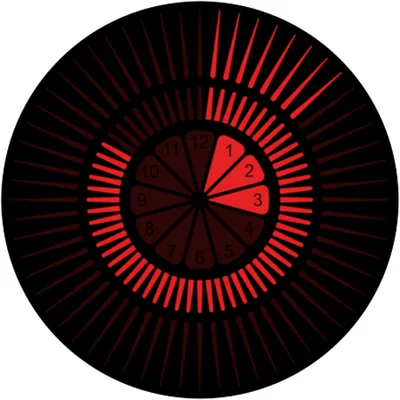
Karya seni jam tangan Tempus Red Smart oleh seniman ringan & desainer Ben Rousseau
"Tampilan jam Android Tempus Red" kami sekarang kompatibel dengan Wear OS by Google, menghadirkan tampilan jam yang bergaya dan fungsional untuk jam tangan pintar Anda. Nikmati pengalaman yang lancar di perangkat Wear OS Anda dengan Tempus Watch.'
Pola lampu penunjuk waktu Tempus yang unik oleh desainer Ben Rousseau. Karya seni jam tangan pintar yang mewakili waktu selama 12 jam secara real time menggunakan pola cahaya yang terus terbentuk dalam 3 pengaturan seragam dengan 12 jam di tengah, 60 menit di lingkar tengah, dan 60 detik di lingkar luar.
Waktu didesain ulang.
Unduh sekarang dan nikmati waktu dengan cara baru.
Dilindungi oleh pendaftaran desain internasional No. DM/222085 Hak Cipta Rousseau Design LTD. Anggota Acid - Anti Copy Dalam Desain.
Tentang: Ben Rousseau adalah seniman dan desainer pencahayaan yang berfokus pada penciptaan kreasi pengalaman indah yang menghadirkan cahaya dan energi positif ke dalam kehidupan dan lingkungan manusia.
www.benrousseau.com
www.tempustime.com
Tautan video tentang cara mengunduh dan memasang tampilan Tempus Watch di jam tangan pintar Anda:
https://youtu.be/O0SVGG0xw8Y?si=30M-HBwpqk9Jhv6L
Panduan Langkah demi Langkah untuk Memasang Tampilan Jam Tempus
Unduh dan Buka Aplikasi Tempus Companion
Telepon: Unduh Aplikasi Tempus Companion dari Play Store.
Tonton: Pastikan jam tangan pintar Anda terhubung ke ponsel Anda dan memiliki koneksi internet.
Aktifkan Bluetooth di Kedua Perangkat
Telepon: Pastikan Bluetooth dihidupkan. Aplikasi ini akan meminta Anda untuk menyalakannya jika belum diaktifkan. Berikan aplikasi semua izin yang diperlukan.
Tonton: Pastikan Bluetooth diaktifkan dan jam tangan pintar Anda dapat ditemukan.
Hubungkan Jam Tangan Pintar Anda ke Aplikasi
Telepon: Buka Aplikasi Tempus Companion. Anda akan melihat tombol: 'Hubungkan'.
Telepon: Ketuk tombol 'Hubungkan'. Aplikasi ini akan mencari perangkat Bluetooth terdekat.
Telepon: Pilih jam tangan pintar Anda dari daftar perangkat yang tersedia. Tunggu hingga koneksi dibuat. Setelah terhubung, tombol 'Instal' akan terlihat.
Memulai Pemasangan Tampilan Jam
Telepon: Ketuk tombol 'Instal'. Ini akan membuka halaman Play Store untuk tampilan jam Tempus di jam tangan pintar Anda.
Tonton: Di jam tangan pintar Anda, Anda akan melihat halaman Play Store tampilan jam Tempus.
Beli dan Unduh Tampilan Jam
Tonton: Klik tombol harga untuk membeli tampilan jam.
Tonton: Ikuti petunjuk untuk menyelesaikan pembelian Anda. Anda mungkin perlu mengonfirmasi pembelian di ponsel Anda dengan mengikuti petunjuk yang diberikan (misalnya, membuka notifikasi dari Google Play Store atau mengunjungi g.co/continue di ponsel atau browser Anda).
Tonton: Setelah pembelian selesai, tampilan jam akan mulai diunduh. Tunggu hingga pengunduhan selesai.
Terapkan Tampilan Jam
Telepon: Buka aplikasi Galaxy Wearable (unduh dari Play Store jika tidak tersedia) dan navigasikan ke 'Tampilan jam'.
Telepon: Gulir ke bawah ke 'Tampilan jam yang diunduh' dan pilih tampilan jam Tempus yang baru saja Anda beli.
Telepon: Bilah kemajuan akan muncul, menunjukkan bahwa tampilan jam sedang diterapkan ke jam tangan pintar Anda. Tunggu hingga prosesnya selesai.
Tonton: Tampilan jam Tempus sekarang akan terlihat dan diterapkan di jam tangan pintar Anda.
Tip Mengatasi Masalah
Masalah Koneksi: Pastikan ponsel dan jam tangan pintar Anda mengaktifkan Bluetooth dan berada dalam jarak dekat.
Masalah Pembayaran: Ikuti instruksi dengan cermat untuk menyelesaikan pembelian. Pastikan Anda masuk ke akun Google yang benar.
Tampilan Jam Tidak Terlihat: Jika tampilan jam tidak langsung muncul, coba mulai ulang jam tangan pintar Anda dan periksa aplikasi Galaxy Wearable untuk tampilan jam yang diunduh.
Tampilkan teks asli
Our "Tempus Red Android watch face" is now compatible with Wear OS by Google, bringing you a stylish and functional watch face for your smartwatch. Enjoy a seamless experience on your Wear OS device with Tempus Watch.'
A unique Tempus timepiece light pattern by designer Ben Rousseau. A smart watch artwork that represents the time over 12 hours in real time using a constantly building pattern of light over 3 uniform arrangements with 12 for hours in centre, 60 for minutes in middle ring and 60 for seconds on outer ring.
Time redesigned.
Download now and experience time in a new light.
Protected by international design registration No. DM/222085 Copyright Rousseau Design LTD. Member of Acid - Anti Copying In Design.
About: Ben Rousseau is a lighting artist and designer focused on creating beautiful experiential creations that bring light and positive energy into people’s lives and environments.
www.benrousseau.com
www.tempustime.com
Video link on how to download and install Tempus Watch face on your smartwatch:
https://youtu.be/O0SVGG0xw8Y?si=30M-HBwpqk9Jhv6L
Step-by-Step Guide to Install the Tempus Watch Face
Download and Open the Tempus Companion App
Phone: Download the Tempus Companion App from the Play Store.
Watch: Ensure your smartwatch is connected to your phone and has an internet connection.
Enable Bluetooth on Both Devices
Phone: Make sure Bluetooth is turned on. The app will prompt you to turn it on if it's not already enabled. Grant the app all required permissions.
Watch: Ensure Bluetooth is enabled and your smartwatch is discoverable.
Connect Your Smartwatch to the App
Phone: Open the Tempus Companion App. You will see a button: 'Connect'.
Phone: Tap on the 'Connect' button. The app will search for nearby Bluetooth devices.
Phone: Select your smartwatch from the list of available devices. Wait for the connection to be established. Once connected, a 'Install' button will become visible.
Initiate the Installation of the Watch Face
Phone: Tap on the 'Install' button. This will open the Play Store page for the Tempus watch face on your smartwatch.
Watch: On your smartwatch, you will see the Tempus watch face Play Store page.
Purchase and Download the Watch Face
Watch: Click on the price button to purchase the watch face.
Watch: Follow the prompts to complete your purchase. You may need to confirm the purchase on your phone by following the instructions provided (e.g., open the notification from Google Play Store or visit g.co/continue on your phone or browser).
Watch: Once the purchase is complete, the watch face will begin downloading. Wait for the download to finish.
Apply the Watch Face
Phone: Open the Galaxy Wearable app (download from the Play Store if not available) and navigate to 'Watch faces'.
Phone: Scroll down to 'Downloaded watch faces' and select the Tempus watch face you just purchased.
Phone: A progress bar will appear, indicating that the watch face is being applied to your smartwatch. Wait for the process to complete.
Watch: The Tempus watch face will now be visible and applied on your smartwatch.
Troubleshooting Tips
Connection Issues: Ensure both your phone and smartwatch have Bluetooth enabled and are in close proximity.
Payment Issues: Follow the instructions carefully for completing the purchase. Ensure you are logged into the correct Google account.
Watch Face Not Visible: If the watch face does not appear immediately, try restarting your smartwatch and checking the Galaxy Wearable app for the downloaded watch face.
Keamanan data
Yang dinyatakan Rousseau Design Ltd di Google Play tentang data yang dikumpulkan dan dibagikan aplikasi ini.
- Tidak ada data yang dibagikan kepada pihak ketigaPelajari lebih lanjut cara developer menyatakan pembagian data
- Tidak ada data yang dikumpulkanPelajari lebih lanjut cara developer menyatakan pengumpulan data
Kontak pengembang
- Situs webbenrousseau.com
- Emailstudio@benrousseau.com
- Kebijakan Privasifreeprivacypolicy.com
- AlamatPlus X Innovation Hub Lewes Road BRIGHTON BN2 4GL United Kingdom
Informasi
- Ditawarkan oleh
- Rousseau Design Ltd
- Kategori
- Personalisasi
- Diperbarui
- 27/3/2026
- Dirilis
- 23/10/2023
- Batasan usia
- Rating 3+
- Harga
- Rp 82.000
- Nama paket
- com.benrousseau.tempus_red