Tempus Red Android Watch Face
Rousseau Design Ltd- 3 歳以上対象年齢
- カスタマイズカテゴリ
- 2026/3/27更新日
- ¥780価格
com.benrousseau.tempus_redのGoogle Play公式ページにリンクしています。最終確認:2026/11/13。
このアプリについて
Googleによる英語 (アメリカ合衆国)からの自動翻訳です。
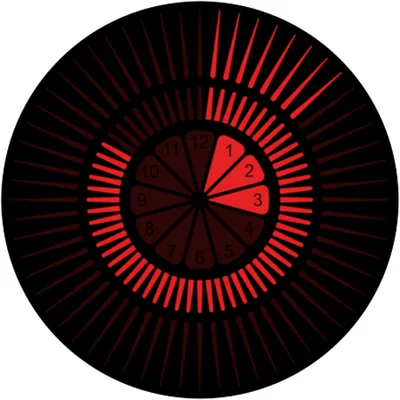
ライトアーティスト兼デザイナーのBen RousseauによるTempus Redスマートウォッチのアートワーク
当社の「Tempus Red Android ウォッチフェイス」は、Wear OS by Google と互換性があり、スマートウォッチにスタイリッシュで機能的なウォッチフェイスを提供します。 Tempus Watch を使用して、Wear OS デバイスでシームレスな体験をお楽しみください。」
デザイナーのベン・ルソーによるユニークなテンパス タイムピースのライト パターン。中央のリングで 12 が時間、60 が中央のリングで 60 が分、外側のリングで 60 が秒という 3 つの均一な配置で継続的に構築される光のパターンを使用して、12 時間にわたる時間をリアルタイムで表すスマート ウォッチのアートワークです。
時間は再設計されました。
今すぐダウンロードして、新たな光の中で時間を体験してください。
国際意匠登録番号 DM/222085 によって保護されています。 Copyright Rousseau Design LTD. Acid のメンバー - デザインにおけるコピー防止。
概要: ベン・ルソーは、人々の生活や環境に光とポジティブなエネルギーをもたらす美しい体験型作品の制作に注力している照明アーティスト兼デザイナーです。
www.benrousseau.com
www.tempustime.com
Tempus Watch faceをスマートウォッチにダウンロードしてインストールする方法に関するビデオリンク:
https://youtu.be/O0SVGG0xw8Y?si=30M-HBwpqk9Jhv6L
Tempus ウォッチフェイスをインストールするためのステップバイステップ ガイド
Tempus コンパニオン アプリをダウンロードして開きます
電話: Play ストアから Tempus コンパニオン アプリをダウンロードします。
時計: スマートウォッチが携帯電話に接続されており、インターネットに接続されていることを確認します。
両方のデバイスで Bluetooth を有効にする
電話: Bluetooth がオンになっていることを確認します。アプリがまだ有効になっていない場合は、有効にするように求められます。アプリに必要なすべての権限を付与します。
時計: Bluetooth が有効になっていて、スマートウォッチが検出可能であることを確認します。
スマートウォッチをアプリに接続する
電話: Tempus コンパニオン アプリを開きます。 「接続」ボタンが表示されます。
電話: 「接続」ボタンをタップします。アプリは近くにある Bluetooth デバイスを検索します。
電話: 利用可能なデバイスのリストからスマートウォッチを選択します。接続が確立されるまで待ちます。接続すると、「インストール」ボタンが表示されます。
ウォッチフェイスのインストールを開始する
電話: 「インストール」ボタンをタップします。これにより、スマートウォッチの Tempus ウォッチフェイスの Play ストア ページが開きます。
ウォッチ: スマートウォッチに、Tempus ウォッチフェイスの Play ストア ページが表示されます。
ウォッチフェイスを購入してダウンロードする
時計: 価格ボタンをクリックして時計の文字盤を購入します。
見る: プロンプトに従って購入を完了します。表示される指示に従って携帯電話で購入を確認する必要がある場合があります (例: Google Play ストアから通知を開くか、携帯電話またはブラウザで g.co/Continue にアクセスします)。
ウォッチ: 購入が完了すると、ウォッチフェイスのダウンロードが開始されます。ダウンロードが完了するまで待ちます。
ウォッチフェイスを適用する
電話: Galaxy Wearable アプリを開き (利用できない場合は Play ストアからダウンロード)、「ウォッチフェイス」に移動します。
電話: [ダウンロードしたウォッチフェイス] まで下にスクロールし、購入したばかりの Tempus ウォッチフェイスを選択します。
電話: 進行状況バーが表示され、ウォッチフェイスがスマートウォッチに適用されていることを示します。プロセスが完了するまで待ちます。
ウォッチ: Tempus ウォッチフェイスが表示され、スマートウォッチに適用されます。
トラブルシューティングのヒント
接続の問題: 携帯電話とスマートウォッチの両方で Bluetooth が有効になっていて、近くにあることを確認してください。
支払いの問題: 購入を完了するには指示に注意深く従ってください。正しい Google アカウントにログインしていることを確認してください。
ウォッチフェイスが表示されない: ウォッチフェイスがすぐに表示されない場合は、スマートウォッチを再起動し、Galaxy Wearable アプリでダウンロードしたウォッチフェイスを確認してください。
原文を表示
Our "Tempus Red Android watch face" is now compatible with Wear OS by Google, bringing you a stylish and functional watch face for your smartwatch. Enjoy a seamless experience on your Wear OS device with Tempus Watch.'
A unique Tempus timepiece light pattern by designer Ben Rousseau. A smart watch artwork that represents the time over 12 hours in real time using a constantly building pattern of light over 3 uniform arrangements with 12 for hours in centre, 60 for minutes in middle ring and 60 for seconds on outer ring.
Time redesigned.
Download now and experience time in a new light.
Protected by international design registration No. DM/222085 Copyright Rousseau Design LTD. Member of Acid - Anti Copying In Design.
About: Ben Rousseau is a lighting artist and designer focused on creating beautiful experiential creations that bring light and positive energy into people’s lives and environments.
www.benrousseau.com
www.tempustime.com
Video link on how to download and install Tempus Watch face on your smartwatch:
https://youtu.be/O0SVGG0xw8Y?si=30M-HBwpqk9Jhv6L
Step-by-Step Guide to Install the Tempus Watch Face
Download and Open the Tempus Companion App
Phone: Download the Tempus Companion App from the Play Store.
Watch: Ensure your smartwatch is connected to your phone and has an internet connection.
Enable Bluetooth on Both Devices
Phone: Make sure Bluetooth is turned on. The app will prompt you to turn it on if it's not already enabled. Grant the app all required permissions.
Watch: Ensure Bluetooth is enabled and your smartwatch is discoverable.
Connect Your Smartwatch to the App
Phone: Open the Tempus Companion App. You will see a button: 'Connect'.
Phone: Tap on the 'Connect' button. The app will search for nearby Bluetooth devices.
Phone: Select your smartwatch from the list of available devices. Wait for the connection to be established. Once connected, a 'Install' button will become visible.
Initiate the Installation of the Watch Face
Phone: Tap on the 'Install' button. This will open the Play Store page for the Tempus watch face on your smartwatch.
Watch: On your smartwatch, you will see the Tempus watch face Play Store page.
Purchase and Download the Watch Face
Watch: Click on the price button to purchase the watch face.
Watch: Follow the prompts to complete your purchase. You may need to confirm the purchase on your phone by following the instructions provided (e.g., open the notification from Google Play Store or visit g.co/continue on your phone or browser).
Watch: Once the purchase is complete, the watch face will begin downloading. Wait for the download to finish.
Apply the Watch Face
Phone: Open the Galaxy Wearable app (download from the Play Store if not available) and navigate to 'Watch faces'.
Phone: Scroll down to 'Downloaded watch faces' and select the Tempus watch face you just purchased.
Phone: A progress bar will appear, indicating that the watch face is being applied to your smartwatch. Wait for the process to complete.
Watch: The Tempus watch face will now be visible and applied on your smartwatch.
Troubleshooting Tips
Connection Issues: Ensure both your phone and smartwatch have Bluetooth enabled and are in close proximity.
Payment Issues: Follow the instructions carefully for completing the purchase. Ensure you are logged into the correct Google account.
Watch Face Not Visible: If the watch face does not appear immediately, try restarting your smartwatch and checking the Galaxy Wearable app for the downloaded watch face.
データ セーフティ
このアプリが収集・共有するデータについて、Rousseau Design LtdがGoogle Playで申告している内容です。
- 第三者と共有されるデータはありません詳しくは、デベロッパーが共有を申告する方法についての説明をご覧ください
- データは収集されません詳しくは、デベロッパーが収集を申告する方法についての説明をご覧ください
開発元の連絡先
- ウェブサイトbenrousseau.com
- メールstudio@benrousseau.com
- プライバシーポリシーfreeprivacypolicy.com
- 住所Plus X Innovation Hub Lewes Road BRIGHTON BN2 4GL United Kingdom
情報
- 提供元
- Rousseau Design Ltd
- カテゴリ
- カスタマイズ
- 更新日
- 2026/3/27
- リリース
- 2023/10/23
- 対象年齢
- 3 歳以上
- 価格
- ¥780
- パッケージ名
- com.benrousseau.tempus_red