- Batasan usia4+
- KategoriGaya Hidup
- PengembangShuji Fukumoto
- BahasaInggris+ 1 lainnya
- Ukuran19,2 MB
Tertaut ke halaman resmi App Store
Download.org tidak menyimpan file Action Logger apa pun. Tombol ini membuka halaman aplikasi di App Store, tempat Shuji Fukumoto menerbitkannya. Halaman terakhir diperiksa pada 14/11/2026.
Tangkapan layar
Tentang
Pengembang belum menyediakan teks ini dalam bahasa Anda.
Action Logger
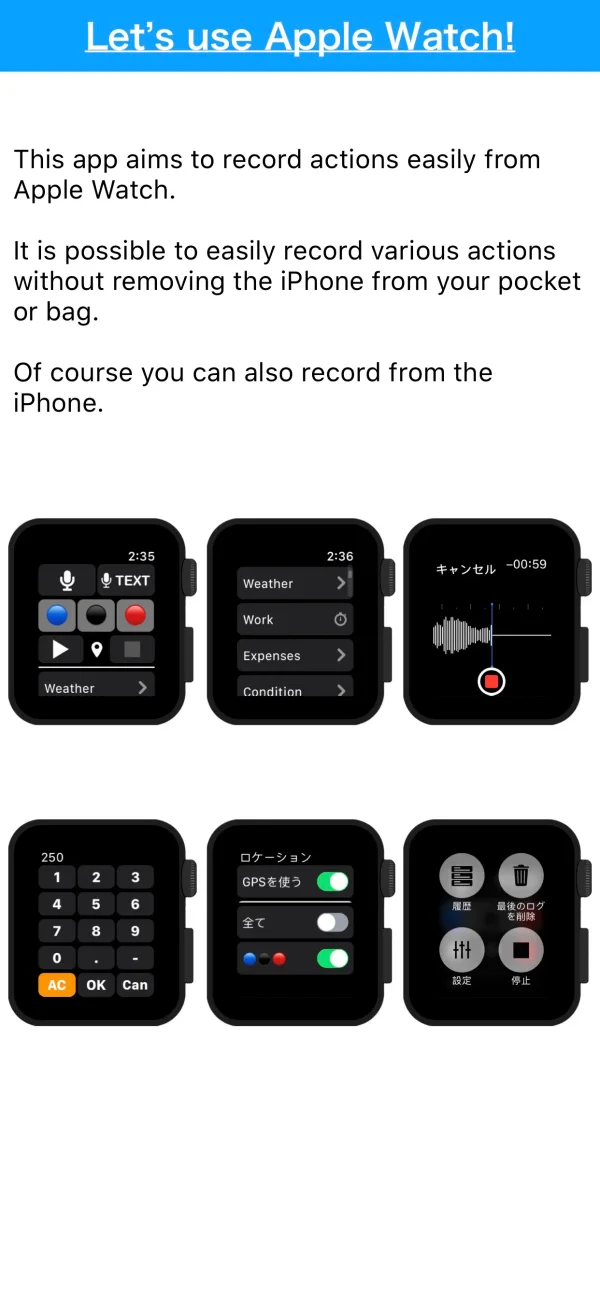
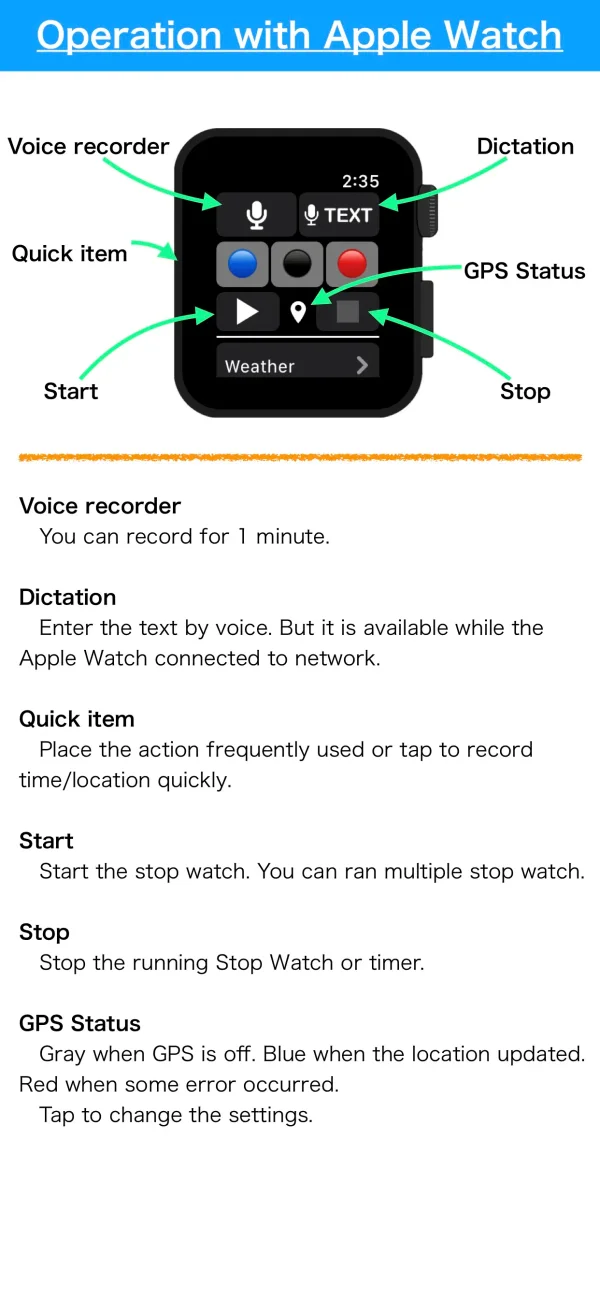
Let’s use Apple Watch !
●Record immediately when you come up with it
You can record “Time” and “Title”. Just tap the title in the list on App Watch, take a log the time and title. You can app the number and location information.
* Just tap the title on the list to record time, title and location(option).
* Record edit points during video recording.
* Voice dictation.
* Voice recorder
●Record the number
* Car mileage
* Transportation expenses
* Income, Spending
* The count of push-ups / sit-ups.
* Weight, Body fat
●Health
These items are related with Health app on iPhone.
* Body temperature
* body weidht
* body fat
●Record the time
* Record edit poins during video recording. “He made a goal!"
* When you have meal.
●Work intensively and take a rest
* Preset timer
Pomodoro: Work 50 minuts and take a rest for 10 minuts. Set upt the Timer action “Work” as 50 minuts timer, and “Rest” for 10 minuts. Tap “Work" when you start woking. When 50 minute later, notification comes to your Apple Watch. Take a rest and start timer “Rest"
Also add 3 minuts, 3- seconds timer as you use frequently.
The difference with other timer, it remains as log. You can total the time at Statistics.
●Habit tracker
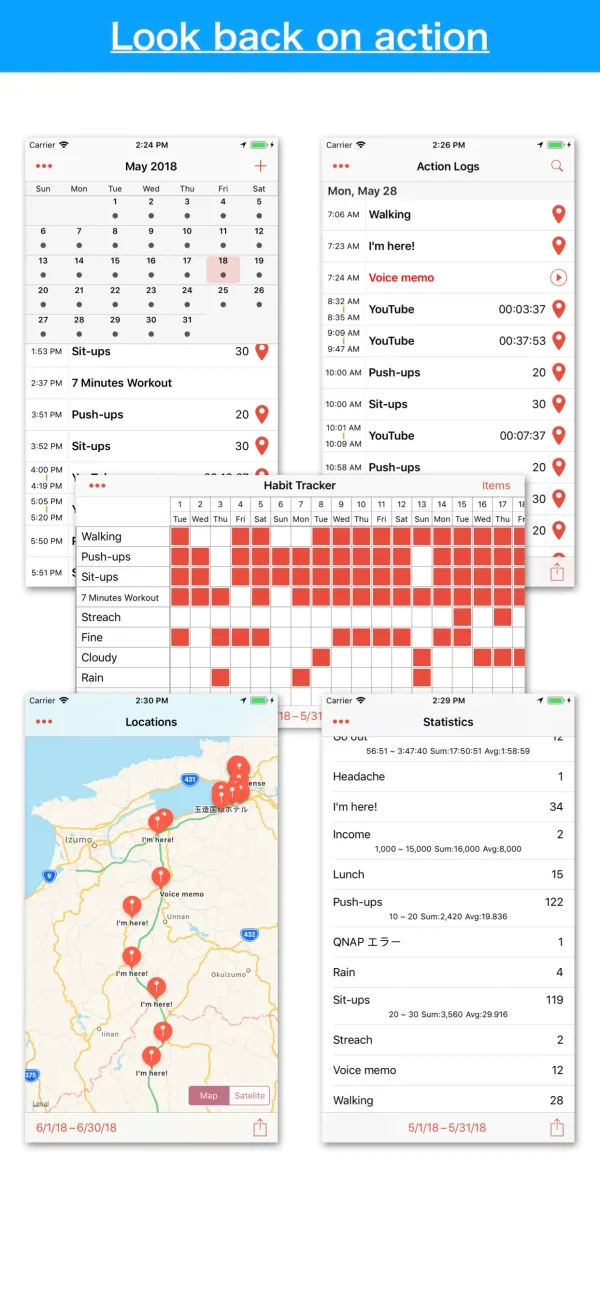
You can summarize the selected items in the specified period. Habit tracker doesn’t total for each action. Just shows “Done” or not. Record when you "Clean up room”. “I have not done it for a while, so I have to do it”.
●Statistics
Count the actions. When you record the action with number, shows the sum, average, min, max for the specified period. You can see: How much did you spend the money? How far did I swim?
●Location
To record the time and location, see them on the map. The place take a photo, the place where beautiful flowers.
When you go on a trip, you can keep track of the trip if you record it in key points.
You can export location data as GPX. Use it with Google Map and so on.
■ Privacy policy
http://umap.net/wp/privacypolicy
Yang baru
Versi 2.6.1 · 17/12/2025
Improvements & Bug Fixes
•You can now tap a summarized item to jump directly to the corresponding date
•Fixed an issue where tapping a search result sometimes did nothing
•Fixed an issue where the map could close immediately after being tapped
In addition, we made various minor bug fixes and performance improvements.
Privasi aplikasi
Yang dinyatakan Shuji Fukumoto di App Store tentang cara aplikasi ini menangani data.
-
Data tidak dikumpulkan
Pengembang tidak mengumpulkan data apa pun dari aplikasi ini.
Praktik privasi dapat bervariasi, misalnya berdasarkan fitur yang Anda gunakan atau usia Anda.
Informasi
- Penjual
- Shuji Fukumoto
- Kategori
- Gaya Hidup
- Versi
- 2.6.1
- Diperbarui
- 17/12/2025
- Dirilis
- 5/8/2018
- Ukuran
- 19,2 MB
- Memerlukan
- iOS 17.5 atau yang lebih baru
- Batasan usia
- 4+
- Harga
- Gratis
- Pembelian dalam aplikasi
- Ya
- Bahasa
- Inggris, Jepang
- Hak cipta
- © 2018 Shuji Fukumoto