
- Age rating4+
- CategoryLifestyle
- DeveloperShuji Fukumoto
- LanguagesEnglish+ 1 more
- Size19.2 MB
Links to the official App Store page
Download.org hosts no file of Action Logger. The button opens its official App Store page, published by Shuji Fukumoto. Listing last checked on Nov 14, 2026.
Screenshots
About
Action Logger
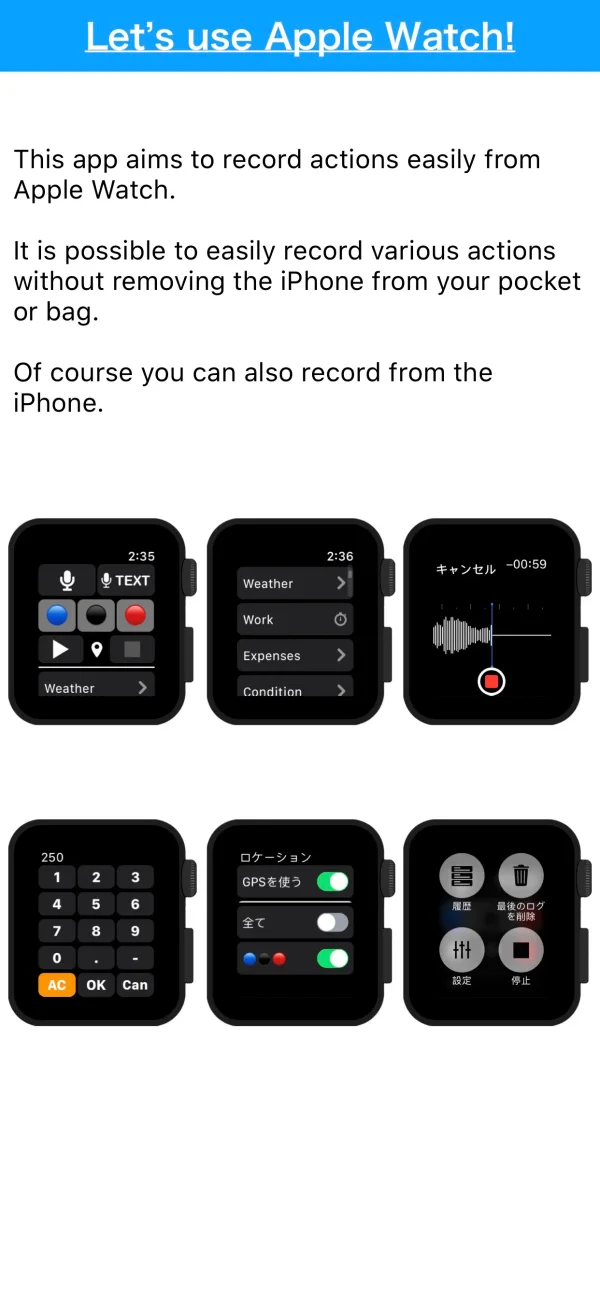
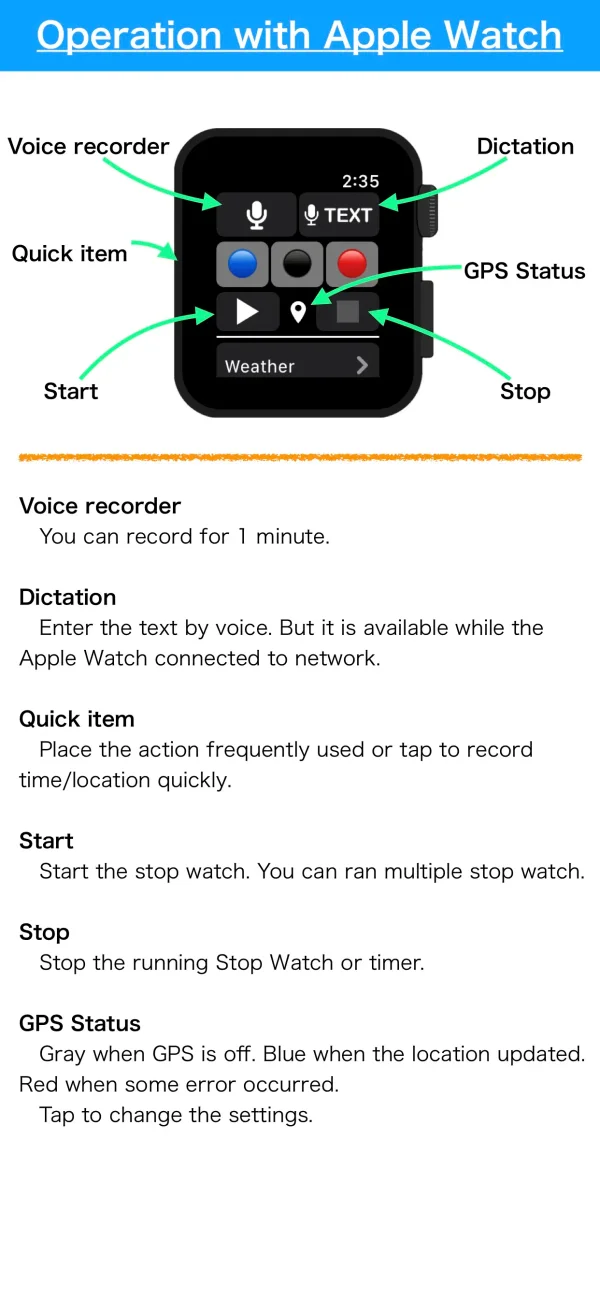
Let’s use Apple Watch !
●Record immediately when you come up with it
You can record “Time” and “Title”. Just tap the title in the list on App Watch, take a log the time and title. You can app the number and location information.
* Just tap the title on the list to record time, title and location(option).
* Record edit points during video recording.
* Voice dictation.
* Voice recorder
●Record the number
* Car mileage
* Transportation expenses
* Income, Spending
* The count of push-ups / sit-ups.
* Weight, Body fat
●Health
These items are related with Health app on iPhone.
* Body temperature
* body weidht
* body fat
●Record the time
* Record edit poins during video recording. “He made a goal!"
* When you have meal.
●Work intensively and take a rest
* Preset timer
Pomodoro: Work 50 minuts and take a rest for 10 minuts. Set upt the Timer action “Work” as 50 minuts timer, and “Rest” for 10 minuts. Tap “Work" when you start woking. When 50 minute later, notification comes to your Apple Watch. Take a rest and start timer “Rest"
Also add 3 minuts, 3- seconds timer as you use frequently.
The difference with other timer, it remains as log. You can total the time at Statistics.
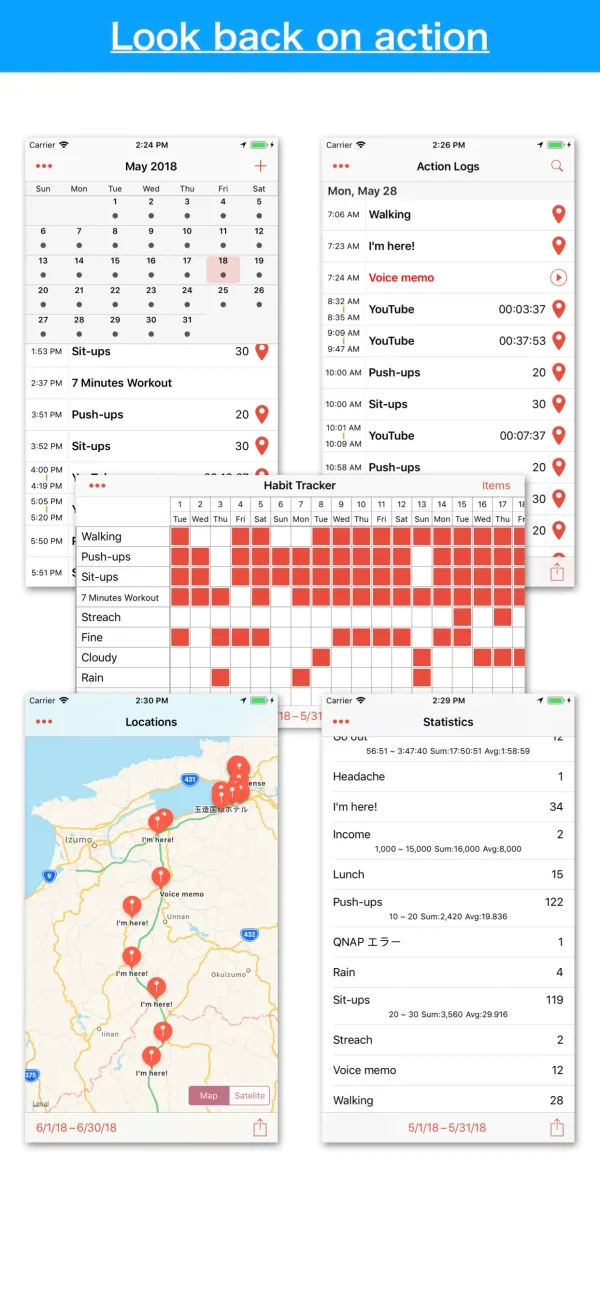
●Habit tracker
You can summarize the selected items in the specified period. Habit tracker doesn’t total for each action. Just shows “Done” or not. Record when you "Clean up room”. “I have not done it for a while, so I have to do it”.
●Statistics
Count the actions. When you record the action with number, shows the sum, average, min, max for the specified period. You can see: How much did you spend the money? How far did I swim?
●Location
To record the time and location, see them on the map. The place take a photo, the place where beautiful flowers.
When you go on a trip, you can keep track of the trip if you record it in key points.
You can export location data as GPX. Use it with Google Map and so on.
■ Privacy policy
http://umap.net/wp/privacypolicy
What’s new
Version 2.6.1 · Dec 17, 2025
Improvements & Bug Fixes
•You can now tap a summarized item to jump directly to the corresponding date
•Fixed an issue where tapping a search result sometimes did nothing
•Fixed an issue where the map could close immediately after being tapped
In addition, we made various minor bug fixes and performance improvements.
App privacy
What Shuji Fukumoto declares on the App Store about how this app handles data.
-
Data not collected
The developer does not collect any data from this app.
Privacy practices may vary, for example with the features you use or your age.
Information
- Seller
- Shuji Fukumoto
- Category
- Lifestyle
- Version
- 2.6.1
- Updated
- Dec 17, 2025
- Released
- Aug 5, 2018
- Size
- 19.2 MB
- Requires
- iOS 17.5 or later
- Age rating
- 4+
- Price
- Free
- In-app purchases
- Yes
- Languages
- English, Japanese
- Copyright
- © 2018 Shuji Fukumoto
You might also like
-
 Location PulseCategorise Your Daily Journey
-
 LIFLOGMy Timeline Journal
-
 あしあとマップ - 散歩ルートと写真を記録Lifestyle
-
 Location Diary - LoglessAutomatic Lifelog & Timeline
-
 家族年表Lifestyle
-
 Habita – Habit TrackerLifestyle
-
 AutoDiary+With whom, when, and where.
-
 azuleLifestyle
-
 Locate~行きたい場所を登録~Lifestyle
-
 Calarm: Event-Based AlarmAlarms linked to your events