
Font Size Decrease for Safari
Decrease the text size on web
Dirancang untuk iPhone, iPad, Mac
Gratis
- Batasan usia17+
- KategoriKegunaan
- PengembangStefan Van Damme
- BahasaInggris+ 22 lainnya
- Ukuran18,9 MB
Tertaut ke halaman resmi App Store
Download.org tidak menyimpan file Font Size Decrease for Safari apa pun. Tombol ini membuka halaman aplikasi di App Store, tempat Stefan Van Damme menerbitkannya. Halaman terakhir diperiksa pada 14/11/2026.
Tangkapan layar
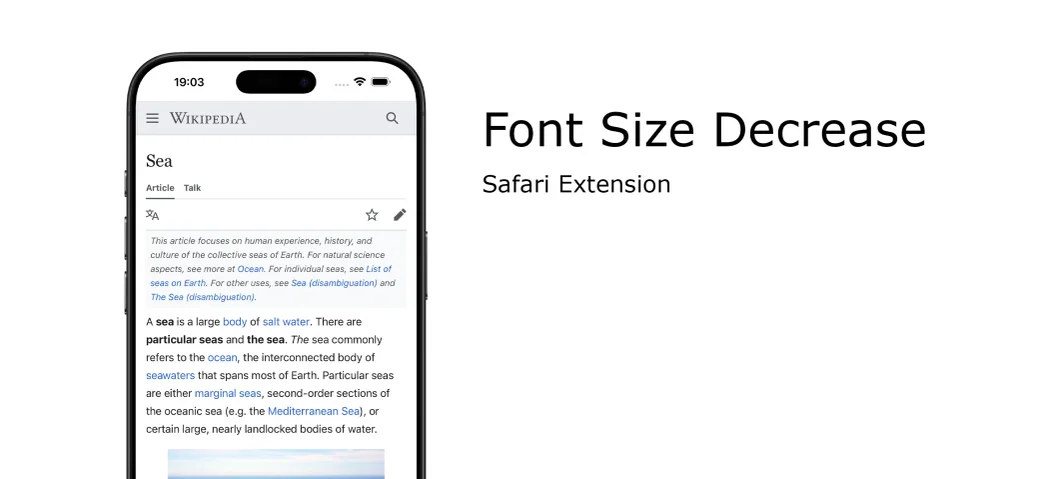

Tentang
Pengembang belum menyediakan teks ini dalam bahasa Anda.
Font Size Decrease is a lightweight and straightforward browser extension that brings a single, essential feature to your browsing experience: a button to decrease the font size on any webpage with one simple click. Whether you are looking to make the text easier to read, reduce eye strain, or enhance accessibility, Font Size Decrease makes it effortless to enlarge text instantly without affecting the page layout or performance. Install today and enjoy larger, more readable fonts with minimal effort.
Font Size Decrease is perfect for users who prefer an easy, no-fuss solution to improve readability, including those with visual impairments or anyone who spends long hours reading online. With just one button to decrease the font size, this extension is designed for simplicity and ease of use.
If you are also looking to decrease font size with a single click, we offer a companion extension, Font Size Increase, for complete control over your text size preferences.
https://chromewebstore.google.com/detail/font-size-increase/ombpcpigmndepfckcifdblemkabaoihk
Browser extension features:
◆ One-Click Font Size Decrease:
Easily enlarge text on any website with a single click.
◆ Dark Mode Support:
Designed to work seamlessly with dark mode, ensuring comfortable use regardless of your browser's theme.
◆ Toolbar Icon Customization:
Choose from 6 custom icons for your toolbar to personalize the look of the extension.
◆ Double-Click Reset:
Enable the option to reset the font size on the current web page by simply double-clicking the button.
◆ Right-Click Menu Integration:
Optionally enable a right-click menu option to incrdecreaseease the font size on the current web page for quick access.
◆ Simple and Lightweight:
No complicated settings—just a single button to decrease font size instantly without slowing down your browsing experience.
◆ Companion Extension Available:
If you want to decrease font size, check out our Font Size Decrease extension for a similarly easy-to-use tool.
Project Information:
https://www.stefanvd.net/project/font-size-decrease/browser-extension
Required Permissions:
◆ "contextMenus": This is to add the "Decrease font size on this page" menu item in the web browser context menu.
◆ "activeTab": Allow the decrease the font size function to be accessible on the currently visible tab page.
◆ "storage": Save settings locally and sync with your web browser account.
Privasi aplikasi
Yang dinyatakan Stefan Van Damme di App Store tentang cara aplikasi ini menangani data.
-
Data tidak dikumpulkan
Pengembang tidak mengumpulkan data apa pun dari aplikasi ini.
Praktik privasi dapat bervariasi, misalnya berdasarkan fitur yang Anda gunakan atau usia Anda.
Informasi
- Penjual
- Stefan Van Damme
- Kategori
- Kegunaan
- Versi
- 1.1.3
- Diperbarui
- 7/12/2025
- Dirilis
- 5/12/2025
- Ukuran
- 18,9 MB
- Memerlukan
- iOS 18.0 atau yang lebih baru
- Batasan usia
- 17+
- Harga
- Gratis
- Bahasa
- Inggris, Cheska (Republik Cheska), Dansk (Denmark), Belanda, Suomi (Finlandia), Prancis, Jerman, Magyar (Hungaria), Bahasa Indonesia, Italia, Jepang, Korea + 11 lainnya
- Hak cipta
- Copyright © 2025 Stefan Van Damme. All rights reserved.
Mungkin Anda juga suka
-
 Super Size TextKegunaan
-
 Darkify for SafariKegunaan
-
 FontFlex: Fonts for SafariKegunaan
-
 Vidimote for SafariKegunaan
-
 Mapper for SafariKegunaan
-
 wBlock: Ad Blocker for SafariKegunaan
-
 Hush Nag BlockerKegunaan
-
 Super Agent for SafariBlokir pop-up cookie
-
 Mode Gelap: Night EyeMode Gelap untuk Safari
-
 Vivaldi Powerful Web BrowserKegunaan