
Font Size Decrease for Safari
Decrease the text size on web
Được thiết kế cho iPhone, iPad, Mac
Miễn phí
- Độ tuổi17+
- Danh mụcTiện Ích
- Nhà phát triểnStefan Van Damme
- Ngôn ngữTiếng Anh+ 22 ngôn ngữ khác
- Kích thước18,9 MB
Liên kết đến trang App Store chính thức
Download.org không lưu trữ tệp nào của Font Size Decrease for Safari. Nút này mở trang ứng dụng trên App Store, nơi Stefan Van Damme phát hành ứng dụng. Trang được kiểm tra lần cuối: 14/11/2026.
Ảnh chụp màn hình

Giới thiệu
Nhà phát triển chưa cung cấp nội dung này bằng ngôn ngữ của bạn.
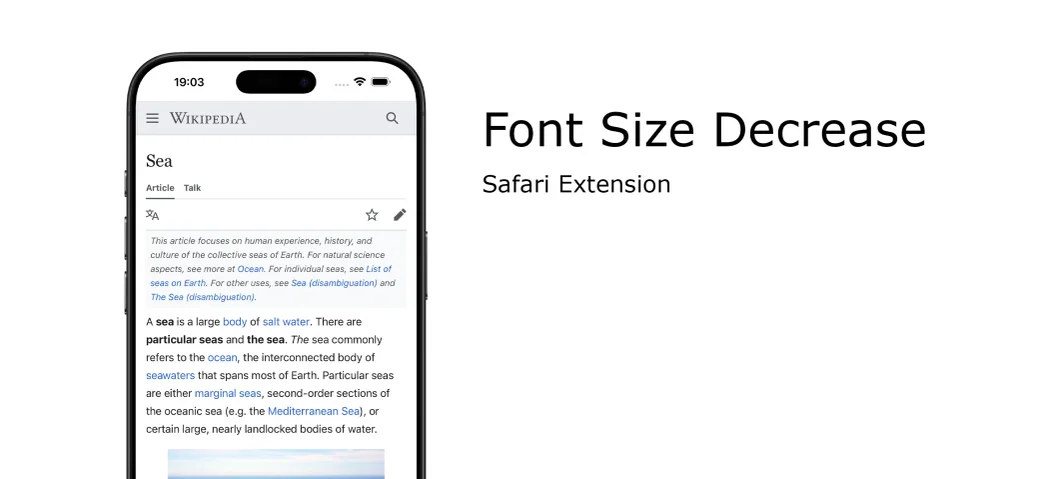
Font Size Decrease is a lightweight and straightforward browser extension that brings a single, essential feature to your browsing experience: a button to decrease the font size on any webpage with one simple click. Whether you are looking to make the text easier to read, reduce eye strain, or enhance accessibility, Font Size Decrease makes it effortless to enlarge text instantly without affecting the page layout or performance. Install today and enjoy larger, more readable fonts with minimal effort.
Font Size Decrease is perfect for users who prefer an easy, no-fuss solution to improve readability, including those with visual impairments or anyone who spends long hours reading online. With just one button to decrease the font size, this extension is designed for simplicity and ease of use.
If you are also looking to decrease font size with a single click, we offer a companion extension, Font Size Increase, for complete control over your text size preferences.
https://chromewebstore.google.com/detail/font-size-increase/ombpcpigmndepfckcifdblemkabaoihk
Browser extension features:
◆ One-Click Font Size Decrease:
Easily enlarge text on any website with a single click.
◆ Dark Mode Support:
Designed to work seamlessly with dark mode, ensuring comfortable use regardless of your browser's theme.
◆ Toolbar Icon Customization:
Choose from 6 custom icons for your toolbar to personalize the look of the extension.
◆ Double-Click Reset:
Enable the option to reset the font size on the current web page by simply double-clicking the button.
◆ Right-Click Menu Integration:
Optionally enable a right-click menu option to incrdecreaseease the font size on the current web page for quick access.
◆ Simple and Lightweight:
No complicated settings—just a single button to decrease font size instantly without slowing down your browsing experience.
◆ Companion Extension Available:
If you want to decrease font size, check out our Font Size Decrease extension for a similarly easy-to-use tool.
Project Information:
https://www.stefanvd.net/project/font-size-decrease/browser-extension
Required Permissions:
◆ "contextMenus": This is to add the "Decrease font size on this page" menu item in the web browser context menu.
◆ "activeTab": Allow the decrease the font size function to be accessible on the currently visible tab page.
◆ "storage": Save settings locally and sync with your web browser account.
Quyền riêng tư của ứng dụng
Những gì Stefan Van Damme khai báo trên App Store về cách ứng dụng này xử lý dữ liệu.
-
Dữ liệu không được thu thập
Nhà phát triển không thu thập bất kỳ dữ liệu nào từ ứng dụng này.
Phương thức đảm bảo quyền riêng tư có thể khác nhau, chẳng hạn như tuỳ theo các tính năng bạn sử dụng hoặc độ tuổi của bạn.
Thông tin
- Người bán
- Stefan Van Damme
- Danh mục
- Tiện Ích
- Phiên bản
- 1.1.3
- Cập nhật
- 07/12/2025
- Phát hành
- 05/12/2025
- Kích thước
- 18,9 MB
- Yêu cầu
- iOS 18.0 trở lên
- Độ tuổi
- 17+
- Giá
- Miễn phí
- Ngôn ngữ
- Tiếng Anh, Tiếng Séc, Tiếng Đan Mạch, Tiếng Hà Lan, Tiếng Phần Lan, Tiếng Pháp, Tiếng Đức, Tiếng Hungary, Tiếng Indonesia, Tiếng Ý, Tiếng Nhật, Tiếng Hàn + 11 ngôn ngữ khác
- Bản quyền
- Copyright © 2025 Stefan Van Damme. All rights reserved.
Có thể bạn cũng thích
-
 Super Size TextTiện Ích
-
 Darkify for SafariTiện Ích
-
 FontFlex: Phông chữ cho SafariTuỳ chỉnh cỡ và màu
-
 Vidimote for SafariTiện Ích
-
 Mapper for SafariTiện Ích
-
 wBlock: Ad Blocker for SafariTiện Ích
-
 Hush Nag BlockerTiện Ích
-
 Super Agent for SafariChặn cửa sổ bật lên cookie
-
 Chế độ tối cho Safari:NightEyeThêm chế độ tối
-
 Vivaldi Powerful Web BrowserTiện Ích