
MDer: Markdown Reader
Beautiful .md reader & editor
Dirancang untuk iPhone, iPad
Gratis
- Batasan usia4+
- KategoriProduktivitas
- Pengembang福恩 毛
- BahasaInggris
- Ukuran8,0 MB
Tertaut ke halaman resmi App Store
Download.org tidak menyimpan file MDer: Markdown Reader apa pun. Tombol ini membuka halaman aplikasi di App Store, tempat 福恩 毛 menerbitkannya. Halaman terakhir diperiksa pada 20/11/2026.
Tangkapan layar


Tentang
Pengembang belum menyediakan teks ini dalam bahasa Anda.
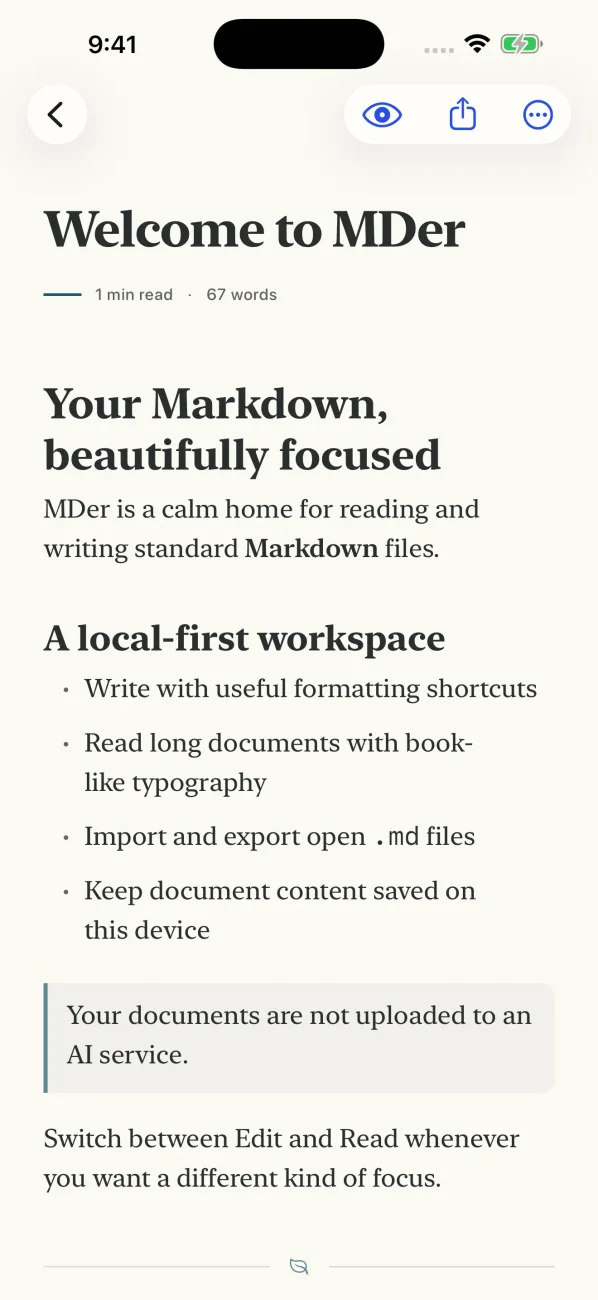
Give your Markdown files a calm, native home on iPhone and iPad. MDer brings together a document library, a focused editor, and a dedicated reading experience.
ORGANIZE YOUR LIBRARY
Search titles and document contents. Sort your library, use collection filters, mark favorites, and pin notes. Start with a template, duplicate a document, or restore a note from Recently Deleted.
WRITE WITH FOCUS
Apply Markdown formatting at the cursor or to selected text. Use native undo and redo, Find, and hardware keyboard shortcuts. Live word and character counts, estimated reading time, and automatic local saving help you keep writing. Clear save status and retry controls let you respond if a save fails.
READ COMFORTABLY
Enjoy serif typography, comfortable line lengths, adjustable text size, and Paper, Sepia, or Night themes. Read headings, nested lists, checklists, tables, quotes, code blocks, and reference links. Navigate with the heading outline and return to your saved reading position. Long code blocks scroll horizontally and can be copied. External images appear as placeholders rather than loading automatically.
OPEN FILES, KEEP CONTROL
• Import Markdown and plain-text files, including multiple files at once
• Open Markdown documents from Files
• Export and share standard Markdown through the iOS share sheet
• Recover notes from Recently Deleted before permanent removal
• Keep document content locally without creating an account
• Use layouts that adapt to iPhone, iPad, larger text, and the software keyboard
PRIVATE DOCUMENTS
MDer does not include an AI service and does not send document titles or content to AI providers. Documents are stored on your device. You choose when to export or share them.
MDer Pro is ad-free. MDer Free displays a Google AdMob banner and hides it while the software keyboard is open. Advertising privacy options are available when required. Advertising data is handled separately from document content; details appear in the App Store privacy label and privacy policy.
Yang baru
Versi 2.0 · 9/9/2026
MDer 2.0 brings a redesigned library, a native editor, and a more capable reader.
• Organize documents with filters, sorting, search, templates, favorites, and pins.
• Format at the cursor or across a selection, with undo, redo, Find, and keyboard shortcuts.
• Read tables, checklists, nested lists, quotes, code, and reference links. Jump through headings and return to your saved reading position.
• Restore notes from Recently Deleted, see and retry save failures, and import or export Markdown more reliably.
• Enjoy responsive document statistics and improved iPhone, iPad, large-text, and keyboard layouts.
• In MDer Free, reopen advertising privacy options when required and keep writing space clear while the keyboard is open.
Privasi aplikasi
Yang dinyatakan 福恩 毛 di App Store tentang cara aplikasi ini menangani data.
-
Data yang digunakan untuk melacak Anda
Dapat digunakan untuk melacak Anda di aplikasi dan situs web milik perusahaan lain.
- Pengenal
-
Data yang ditautkan dengan Anda
Dapat dikumpulkan dan ditautkan dengan identitas Anda.
- Lokasi
- Pengenal
- Data penggunaan
-
Data yang tidak ditautkan dengan Anda
Dapat dikumpulkan, tetapi tidak ditautkan dengan identitas Anda.
- Lokasi
- Data penggunaan
- Diagnostik
Praktik privasi dapat bervariasi, misalnya berdasarkan fitur yang Anda gunakan atau usia Anda.
Informasi
- Penjual
- 福恩 毛
- Kategori
- Produktivitas
- Versi
- 2.0
- Diperbarui
- 9/9/2026
- Dirilis
- 5/8/2026
- Ukuran
- 8,0 MB
- Memerlukan
- iOS 17.0 atau yang lebih baru
- Batasan usia
- 4+
- Harga
- Gratis
- Bahasa
- Inggris
- Hak cipta
- © 2026 1stfancy
Mungkin Anda juga suka
-
 MDina Markdown ViewerProduktivitas
-
 Marginalia: Markdown EditorProduktivitas
-
 PickMD: Markdown ReaderProduktivitas
-
 Document Viewer: PalmoryProduktivitas
-
 Markview: Markdown WorkspaceProduktivitas
-
 Easy MD: Markdown ReaderProduktivitas
-
 MarkCove: Markdown ViewerProduktivitas
-
 Just a Markdown ViewerProduktivitas
-
 OpenPage: Pembaca MarkdownPratinjau HTML & Dibacakan
-
 MarkRead - Pembaca MarkdownBaca per halaman, di mana saja