NetGlance: Network Speed
Live upload & download speed
Dirancang untuk iPhone, iPad
Gratis · Pembelian dalam aplikasi
- Batasan usia4+
- KategoriKegunaan
- PengembangEmin Mammadov
- BahasaInggris
- Ukuran4,4 MB
Tertaut ke halaman resmi App Store
Download.org tidak menyimpan file NetGlance: Network Speed apa pun. Tombol ini membuka halaman aplikasi di App Store, tempat Emin Mammadov menerbitkannya. Halaman terakhir diperiksa pada 14/11/2026.
Tangkapan layar

Tentang
Pengembang belum menyediakan teks ini dalam bahasa Anda.
NetGlance puts your live network speed in the tray, so a glance at the top of your iPhone tells you exactly what your connection is doing — without opening anything.
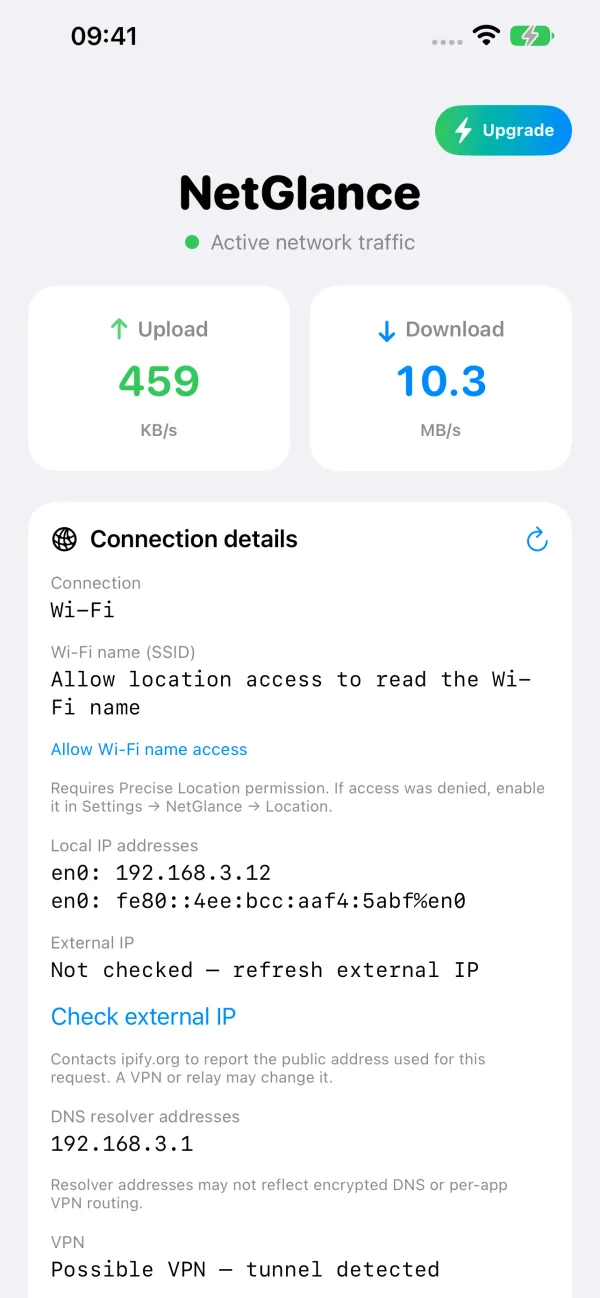
Two arrows, two numbers. The green up arrow sits in the top-left, the blue down arrow in the top-right — upload and download, updated every second in KB/s, MB/s, or GB/s automatically. The direction that's actively moving data lights up, so one glance tells you whether you're uploading, downloading, or idle.
Built to stay out of your way:
• LIVE UP & DOWN — Real-time upload and download rates, smoothed so they're readable instead of jittery.
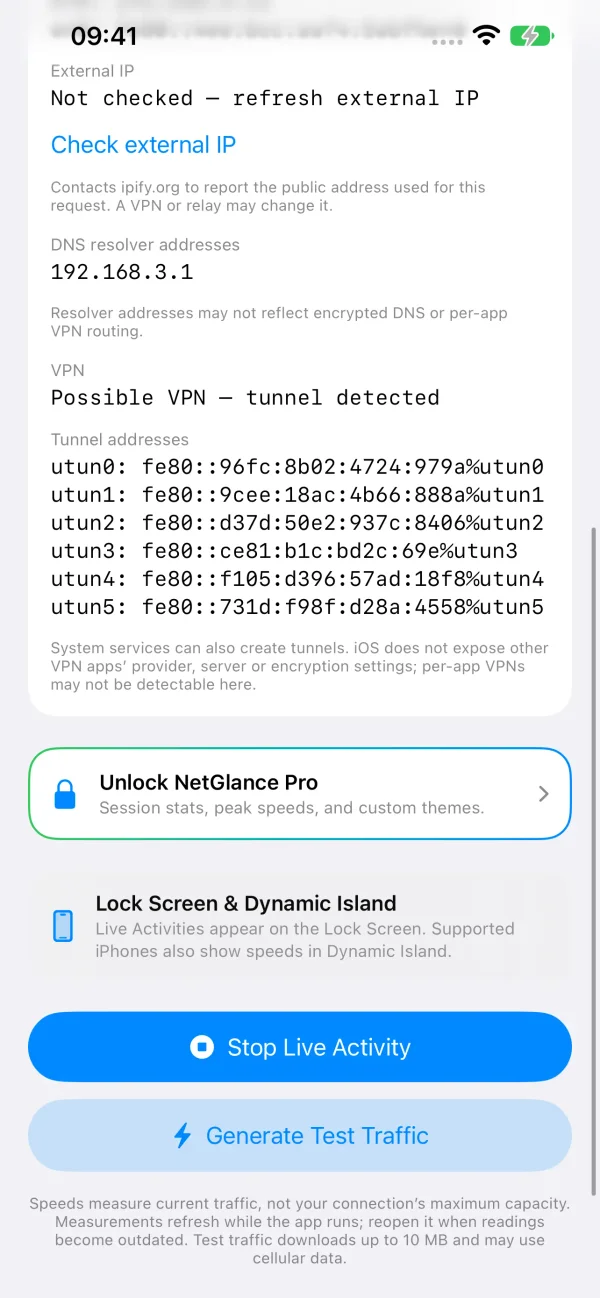
• Runs as a Live Activity. The compact up/down arrows appear in the tray on iPhone 14 Pro and later; on every supported iPhone the same live meter shows on the Lock Screen. Touch and hold for an expanded view with exact speeds.
• SMART UNITS — Switches between KB/s, MB/s, and GB/s on its own.
• BATTERY-FRIENDLY — When your network goes quiet, NetGlance freezes its display and stops working. No busy loops, no wasted CPU.
• A CLEAN APP SCREEN — Open NetGlance for big upload/download cards and connection status.
NetGlance Pro — one-time purchase
Unlock everything with a single purchase. No subscription, ever.
• SESSION & PEAK STATS — Total data moved this session, plus your fastest upload and download speeds.
• CUSTOM THEMES — Recolor the meter with Aqua, Sunset, Grape, or Mono.
• PAY ONCE — Unlock forever, and restore free on your other devices signed in to the same Apple Account.
Private by design: NetGlance reads only your device's own interface counters. It has no accounts and no tracking.
Yang baru
Versi 1.1.2 · 18/9/2026
What’s New
• Added connection details, including Wi-Fi name, local and external IP addresses, DNS resolvers, cellular technology, and detected VPN tunnels.
• Improved upload and download speed accuracy, especially during low traffic.
• Updated Dynamic Island layouts for clearer readings and a better-positioned “Last measured” indicator.
• Preserved the last measured speeds when the app is backgrounded, clearly marked as paused.
• Improved Live Activity startup, stopping, and resuming.
• Fixed connection refresh issues, outdated Wi-Fi information, and external-IP loading states.
• Improved compatibility with iPhone 13 Pro and newer. Dynamic Island features require a supported model.
• General bug fixes and stability improvements.
Privasi aplikasi
Yang dinyatakan Emin Mammadov di App Store tentang cara aplikasi ini menangani data.
-
Data tidak dikumpulkan
Pengembang tidak mengumpulkan data apa pun dari aplikasi ini.
Praktik privasi dapat bervariasi, misalnya berdasarkan fitur yang Anda gunakan atau usia Anda.
Informasi
- Penjual
- Emin Mammadov
- Kategori
- Kegunaan
- Versi
- 1.1.2
- Diperbarui
- 18/9/2026
- Dirilis
- 14/7/2026
- Ukuran
- 4,4 MB
- Memerlukan
- iOS 16.2 atau yang lebih baru
- Batasan usia
- 4+
- Harga
- Gratis
- Pembelian dalam aplikasi
- Ya
- Bahasa
- Inggris
- Hak cipta
- © drmbios
Mungkin Anda juga suka
-
 Wavelet Network MonitorKegunaan
-
 NetFlow XKegunaan
-
 All In One Usage MonitorKegunaan
-
 NetBar: Live Network MeterKegunaan
-
 Internet Speed Meter LiteKegunaan
-
 InternetMeter + Speed WidgetKegunaan
-
 Device Status⁺ Monitor SistemWidget, Live Activity, CPU
-
 Traffic Monitor with WidgetKegunaan
-
 Dynamic X: Dynamic Island ToolKegunaan
-
 Usage Device MonitorKegunaan