NetGlance: Network Speed
Live upload & download speed
iPhone, iPad için tasarlandı
Ücretsiz · Uygulama içi satın alma
- Yaş sınırı4+
- KategoriYardımcılar
- GeliştiriciEmin Mammadov
- Dillerİngilizce
- Boyut4,4 MB
Resmi App Store sayfasına bağlanır
Download.org, NetGlance: Network Speed için hiçbir dosya barındırmaz. Düğme, uygulamanın App Store üzerindeki sayfasını açar; uygulamayı orada Emin Mammadov yayınlar. Sayfanın son kontrolü: 14.11.2026.
Ekran görüntüleri

Hakkında
Geliştirici bu metni dilinizde sunmamış.
NetGlance puts your live network speed in the tray, so a glance at the top of your iPhone tells you exactly what your connection is doing — without opening anything.
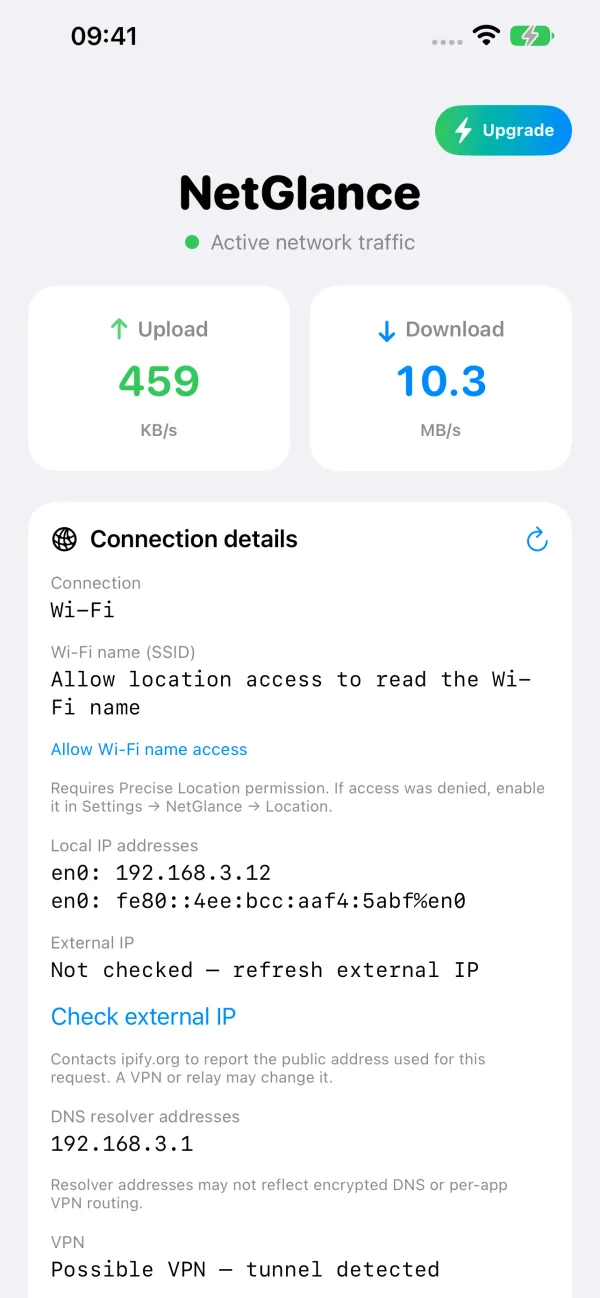
Two arrows, two numbers. The green up arrow sits in the top-left, the blue down arrow in the top-right — upload and download, updated every second in KB/s, MB/s, or GB/s automatically. The direction that's actively moving data lights up, so one glance tells you whether you're uploading, downloading, or idle.
Built to stay out of your way:
• LIVE UP & DOWN — Real-time upload and download rates, smoothed so they're readable instead of jittery.
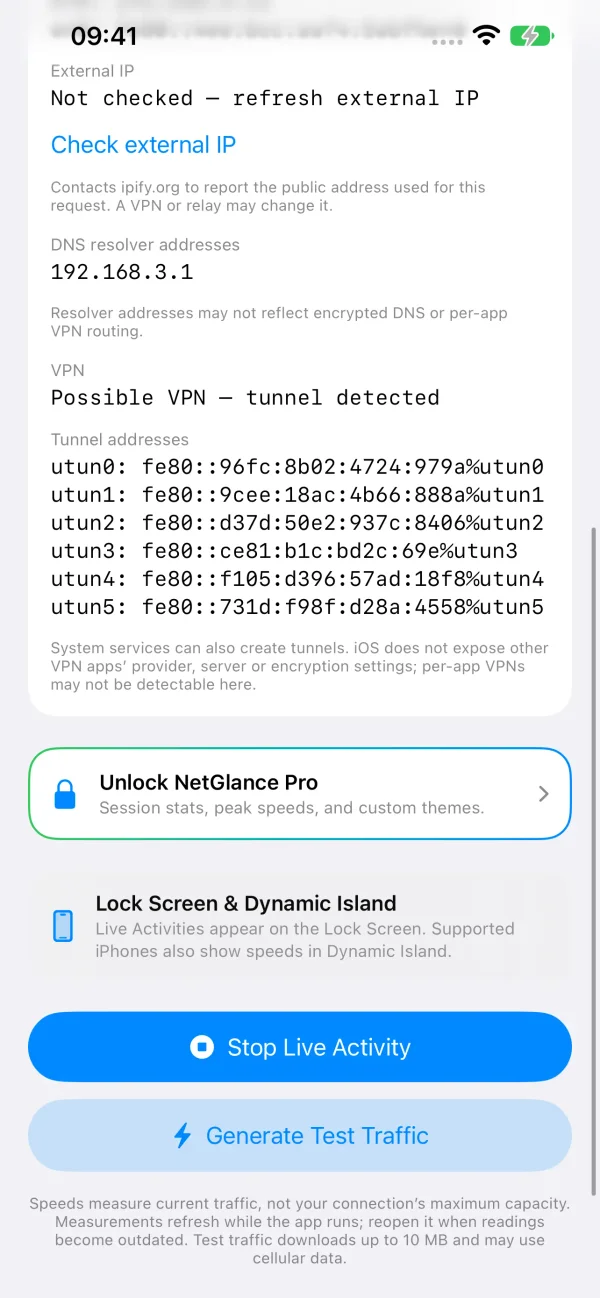
• Runs as a Live Activity. The compact up/down arrows appear in the tray on iPhone 14 Pro and later; on every supported iPhone the same live meter shows on the Lock Screen. Touch and hold for an expanded view with exact speeds.
• SMART UNITS — Switches between KB/s, MB/s, and GB/s on its own.
• BATTERY-FRIENDLY — When your network goes quiet, NetGlance freezes its display and stops working. No busy loops, no wasted CPU.
• A CLEAN APP SCREEN — Open NetGlance for big upload/download cards and connection status.
NetGlance Pro — one-time purchase
Unlock everything with a single purchase. No subscription, ever.
• SESSION & PEAK STATS — Total data moved this session, plus your fastest upload and download speeds.
• CUSTOM THEMES — Recolor the meter with Aqua, Sunset, Grape, or Mono.
• PAY ONCE — Unlock forever, and restore free on your other devices signed in to the same Apple Account.
Private by design: NetGlance reads only your device's own interface counters. It has no accounts and no tracking.
Yenilikler
Sürüm 1.1.2 · 18.09.2026
What’s New
• Added connection details, including Wi-Fi name, local and external IP addresses, DNS resolvers, cellular technology, and detected VPN tunnels.
• Improved upload and download speed accuracy, especially during low traffic.
• Updated Dynamic Island layouts for clearer readings and a better-positioned “Last measured” indicator.
• Preserved the last measured speeds when the app is backgrounded, clearly marked as paused.
• Improved Live Activity startup, stopping, and resuming.
• Fixed connection refresh issues, outdated Wi-Fi information, and external-IP loading states.
• Improved compatibility with iPhone 13 Pro and newer. Dynamic Island features require a supported model.
• General bug fixes and stability improvements.
Uygulama gizliliği
Bu uygulamanın verileri nasıl işlediği hakkında Emin Mammadov tarafından App Store üzerinde yapılan beyan.
-
Veri toplanmıyor
Geliştirici bu uygulamadan hiçbir veri toplamıyor.
Gizlilik uygulamaları, örneğin kullandığınız özelliklere veya yaşınıza göre değişiklik gösterebilir.
Bilgiler
- Satıcı
- Emin Mammadov
- Kategori
- Yardımcılar
- Sürüm
- 1.1.2
- Güncellendi
- 18.09.2026
- Yayın tarihi
- 14.07.2026
- Boyut
- 4,4 MB
- Gereksinim
- iOS 16.2 veya sonrası
- Yaş sınırı
- 4+
- Fiyat
- Ücretsiz
- Uygulama içi satın alma
- Evet
- Diller
- İngilizce
- Telif hakkı
- © drmbios
Bunları da beğenebilirsiniz
-
 Wavelet Network MonitorYardımcılar
-
 NetFlow XYardımcılar
-
 All In One Usage MonitorYardımcılar
-
 NetBar: Live Network MeterYardımcılar
-
 Internet Speed Meter LiteYardımcılar
-
 InternetMeter + Speed WidgetYardımcılar
-
 Device Status⁺ Sistem MonitörWidget, Live Activity & PiP
-
 Traffic Monitor with WidgetYardımcılar
-
 Dynamic X: Dynamic Island ToolYardımcılar
-
 Usage Device MonitorYardımcılar