NetGlance: Network Speed
Live upload & download speed
Designed for iPhone, iPad
Free · In-app purchases
- Age rating4+
- CategoryUtilities
- DeveloperEmin Mammadov
- LanguagesEnglish
- Size4.4 MB
Links to the official App Store page
Download.org hosts no file of NetGlance: Network Speed. The button opens its official App Store page, published by Emin Mammadov. Listing last checked on Nov 14, 2026.
Screenshots

About
NetGlance puts your live network speed in the tray, so a glance at the top of your iPhone tells you exactly what your connection is doing — without opening anything.
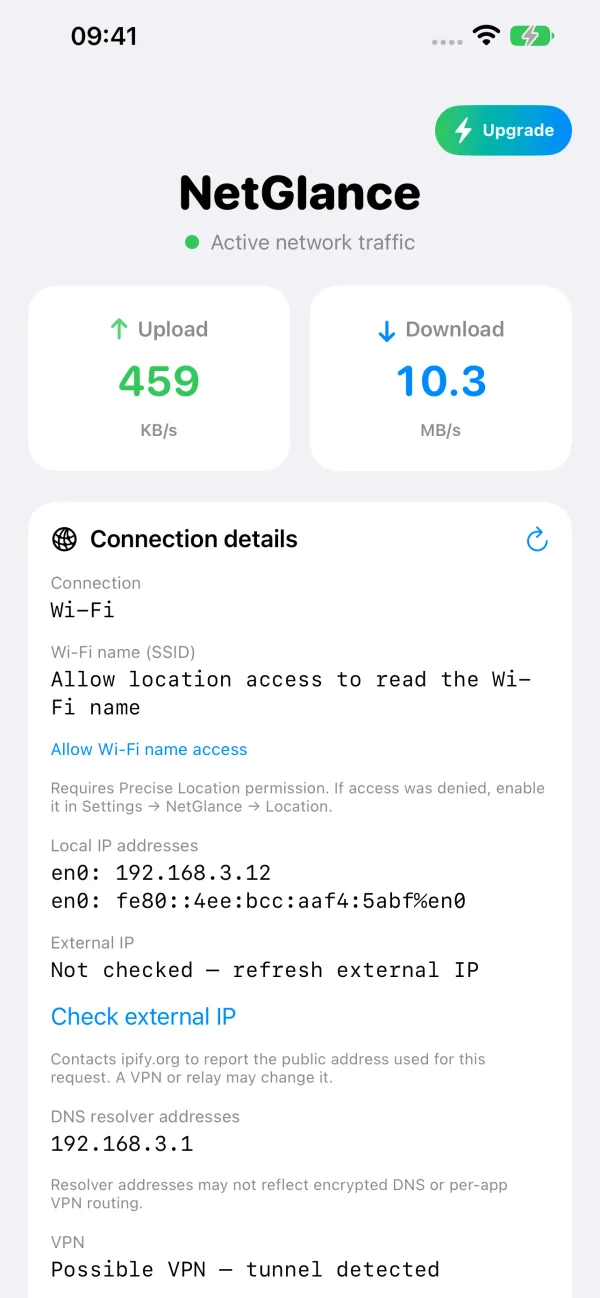
Two arrows, two numbers. The green up arrow sits in the top-left, the blue down arrow in the top-right — upload and download, updated every second in KB/s, MB/s, or GB/s automatically. The direction that's actively moving data lights up, so one glance tells you whether you're uploading, downloading, or idle.
Built to stay out of your way:
• LIVE UP & DOWN — Real-time upload and download rates, smoothed so they're readable instead of jittery.
• Runs as a Live Activity. The compact up/down arrows appear in the tray on iPhone 14 Pro and later; on every supported iPhone the same live meter shows on the Lock Screen. Touch and hold for an expanded view with exact speeds.
• SMART UNITS — Switches between KB/s, MB/s, and GB/s on its own.
• BATTERY-FRIENDLY — When your network goes quiet, NetGlance freezes its display and stops working. No busy loops, no wasted CPU.
• A CLEAN APP SCREEN — Open NetGlance for big upload/download cards and connection status.
NetGlance Pro — one-time purchase
Unlock everything with a single purchase. No subscription, ever.
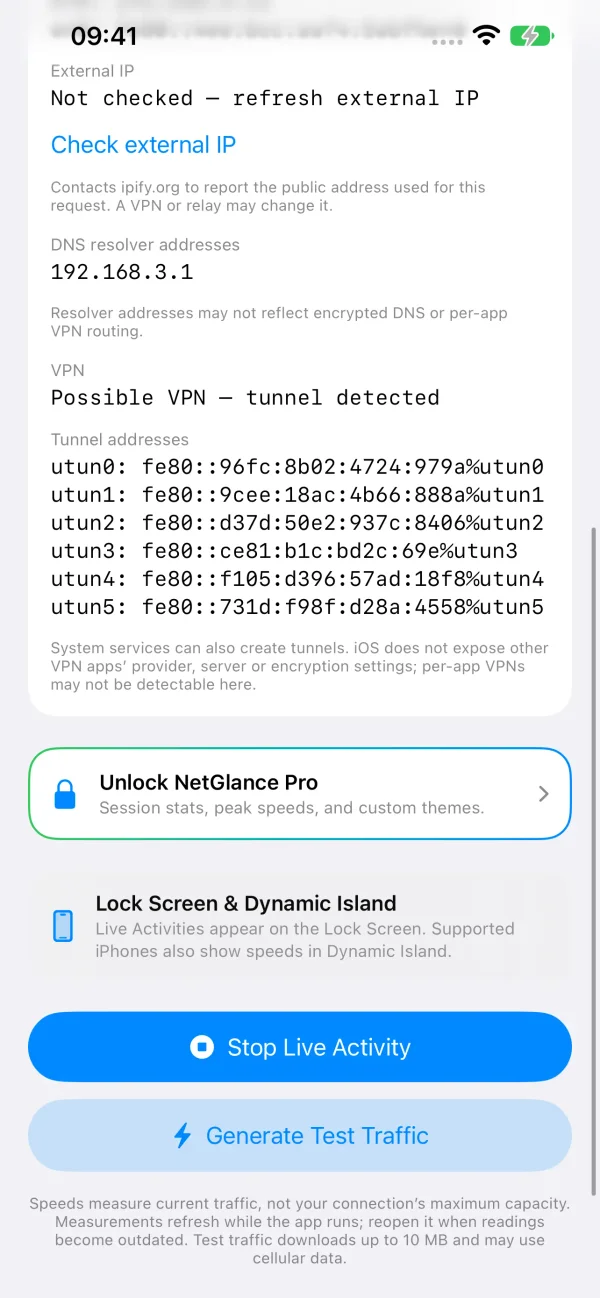
• SESSION & PEAK STATS — Total data moved this session, plus your fastest upload and download speeds.
• CUSTOM THEMES — Recolor the meter with Aqua, Sunset, Grape, or Mono.
• PAY ONCE — Unlock forever, and restore free on your other devices signed in to the same Apple Account.
Private by design: NetGlance reads only your device's own interface counters. It has no accounts and no tracking.
What’s new
Version 1.1.2 · Sep 18, 2026
What’s New
• Added connection details, including Wi-Fi name, local and external IP addresses, DNS resolvers, cellular technology, and detected VPN tunnels.
• Improved upload and download speed accuracy, especially during low traffic.
• Updated Dynamic Island layouts for clearer readings and a better-positioned “Last measured” indicator.
• Preserved the last measured speeds when the app is backgrounded, clearly marked as paused.
• Improved Live Activity startup, stopping, and resuming.
• Fixed connection refresh issues, outdated Wi-Fi information, and external-IP loading states.
• Improved compatibility with iPhone 13 Pro and newer. Dynamic Island features require a supported model.
• General bug fixes and stability improvements.
App privacy
What Emin Mammadov declares on the App Store about how this app handles data.
-
Data not collected
The developer does not collect any data from this app.
Privacy practices may vary, for example with the features you use or your age.
Information
- Seller
- Emin Mammadov
- Category
- Utilities
- Version
- 1.1.2
- Updated
- Sep 18, 2026
- Released
- Jul 14, 2026
- Size
- 4.4 MB
- Requires
- iOS 16.2 or later
- Age rating
- 4+
- Price
- Free
- In-app purchases
- Yes
- Languages
- English
- Copyright
- © drmbios
You might also like
-
 Wavelet Network MonitorSpeed Widget & Usage Tracker
-
 NetFlow XMonitor Device Network Flow
-
 All In One Usage MonitorYour usage all in one place
-
 NetBar: Live Network MeterSpeed tests, ping and usage
-
 Internet Speed Meter LiteInternet Speed Meter
-
 InternetMeter + Speed WidgetRealtime internet speed meter
-
 Device Status⁺ CPU x Monitor zSystem|Widgets|Activity|Memory
-
 Traffic Monitor with WidgetTrack Data Usage & Speed Test
-
 Dynamic X: Dynamic Island ToolLive Activities & System Stats
-
 Usage Device MonitorWidgets for Lock & Home Screen