
SoloMD
Local Markdown notes & editor
Dirancang untuk iPhone, iPad, Mac, iPod touch
Gratis · Pembelian dalam aplikasi
- Batasan usia4+
- KategoriProduktivitas
- Pengembang向东 李
- BahasaInggris+ 13 lainnya
- Ukuran27,4 MB
Tertaut ke halaman resmi App Store
Download.org tidak menyimpan file SoloMD apa pun. Tombol ini membuka halaman aplikasi di App Store, tempat 向东 李 menerbitkannya. Halaman terakhir diperiksa pada 24/11/2026.
Tangkapan layar

Tentang
Pengembang belum menyediakan teks ini dalam bahasa Anda.
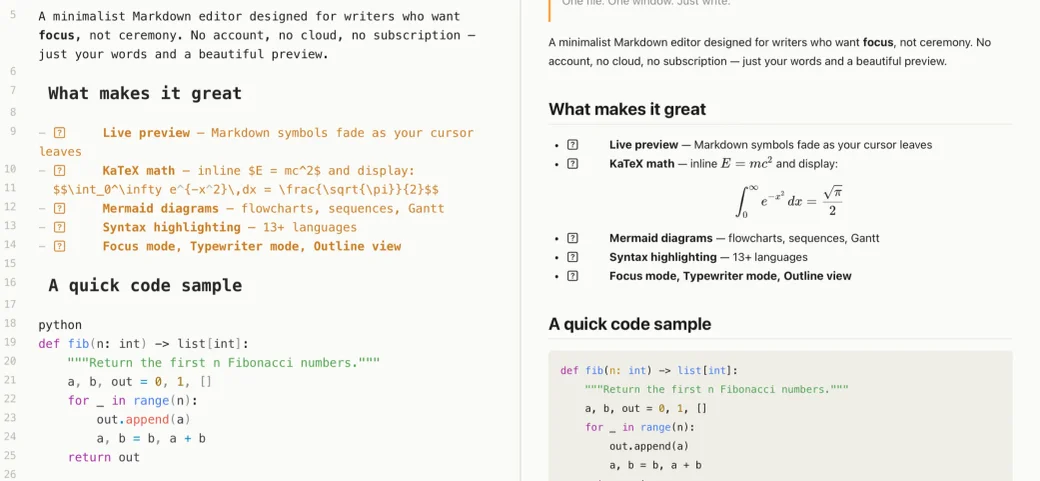
SoloMD is a calm, fast Markdown editor for iPhone and iPad. Open the app and you are writing — no account, no sign-up, no subscription.
Your notes are plain .md and .txt files. Keep them in SoloMD's folder in the Files app, or open a folder you already use, and edit the files right where they are. Any editor on any device can read them, today and in ten years.
WRITING FIRST
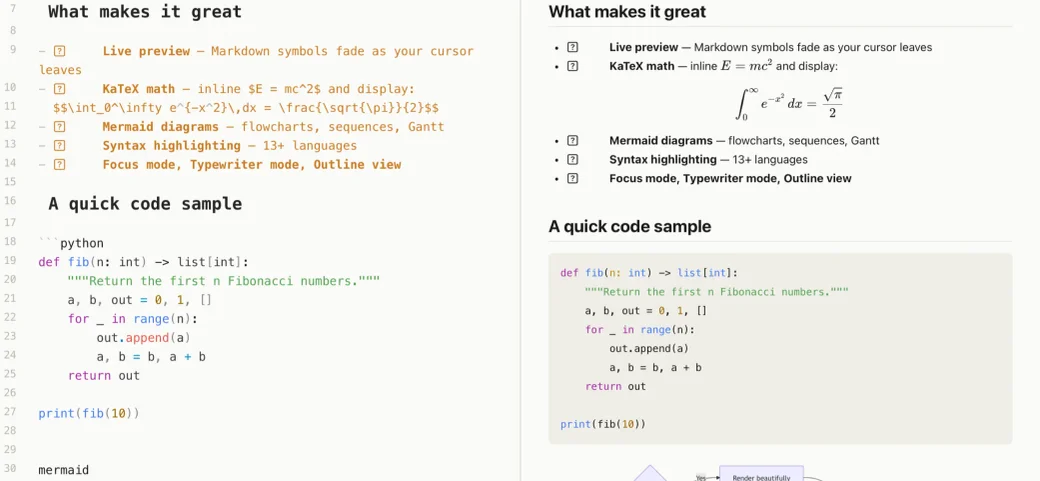
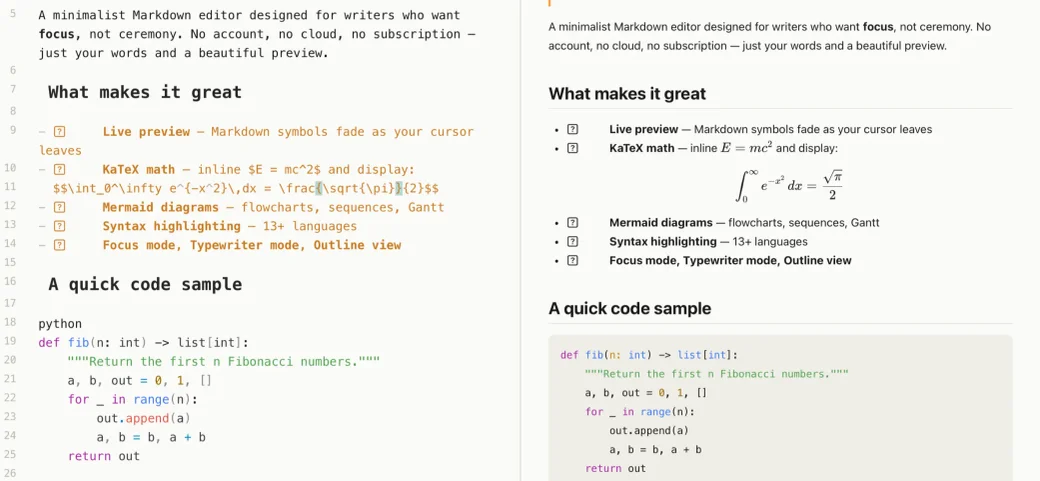
- Live editing: Markdown marks step aside once the cursor leaves the line, so you see the document, not the syntax.
- Real typography: big headings, true bold, monospaced code, comfortable line length.
- Focus mode dims everything but the paragraph you are in; typewriter mode keeps your line at eye level.
- A formatting bubble appears over selected text; a keyboard bar puts headings, lists, links and code one tap away.
- Find and replace with match case, whole word and regular expressions.
- Light and dark themes that follow the system.
ON IPHONE
- A notes home screen, search and a new-note button within thumb's reach.
- Full-screen editor with a simple navigation bar.
ON IPAD
- Sidebar with your folders and notes, tabs, and an outline of the current document.
- Split view and Slide Over friendly; works with hardware keyboards and ⌘ shortcuts.
MARKDOWN THAT GOES FURTHER
- KaTeX math, inline and display.
- Mermaid flowcharts, sequence diagrams and Gantt charts.
- Tables, task lists with tappable checkboxes, footnotes, front matter, highlights.
- Syntax highlighting for 13+ languages.
- Tap an image or diagram to view it full screen with pinch-zoom.
- Fold headings to see the shape of a long document.
FOR CHINESE WRITERS
- Simplified ↔ Traditional conversion, pinyin, and CJK-aware word counts.
- Chinese proofreading for half-width punctuation and common slips.
- Opens UTF-8, UTF-16, GBK and Big5 files correctly.
EXPORT AND SHARE
- PDF with math and diagrams rendered.
- Word (.docx) with tables kept.
- HTML, or copy as HTML, plain text or Markdown.
PRIVATE BY DESIGN
SoloMD collects no data. No account, no analytics, no ads, no tracking. Your notes stay in files you own.
SoloMD is open source under the MIT license: github.com/zhitongblog/solomd
100% FREE FOREVER & SUPPORTER BADGE
Every feature in SoloMD is 100% free forever — no paywalls, no subscriptions, and no locked features. Optional one-time In-App Purchases (Buy a Coffee / Buy a Lunch / Generous Support) are purely voluntary tips to support independent open-source development, and permanently unlock the exclusive "Supporter" badge in Settings and About.
Yang baru
Versi 5.3.4 · 23/11/2026
• Vertical multi-tab Right Sidebar: a slim vertical icon rail gives each panel (Outline, Tasks, Tags, History, Agent, etc.) full height, with one-click toggle back to stacked mode.
• Daily Sync Log Files (30-day retention) plus Help → Open Log Directory and Export Logs to Desktop (.zip).
• Sync Conflict & Snapshot Manager: inspect working copy vs. conflict copy with line-level diff, jump to snapshot folder, and keep local, apply conflict copy, or manually merge.
• Fixed YAML Frontmatter tags not appearing in #tag / tag: global search, plus support for singular tag: keys.
• Fixed CodeMirror live-mode syntax colors for ahk, awk, bash, and lua code blocks.
• Fixed nested list bullet-to-text spacing, improved visual nesting indent, and cycled per-level bullets (• / ◦ / ▪).
• Tasks panel now preserves document & file-tree order with an inline filter box; fixed Git quick add/push, AI Rewrite prompt history dropdown, and Toolbar customization modal.
Privasi aplikasi
Yang dinyatakan 向东 李 di App Store tentang cara aplikasi ini menangani data.
-
Data tidak dikumpulkan
Pengembang tidak mengumpulkan data apa pun dari aplikasi ini.
Praktik privasi dapat bervariasi, misalnya berdasarkan fitur yang Anda gunakan atau usia Anda.
Informasi
- Penjual
- 向东 李
- Kategori
- Produktivitas
- Versi
- 5.3.4
- Diperbarui
- 23/11/2026
- Dirilis
- 20/4/2026
- Ukuran
- 27,4 MB
- Memerlukan
- iOS 15.0 atau yang lebih baru
- Batasan usia
- 4+
- Harga
- Gratis
- Pembelian dalam aplikasi
- Ya
- Bahasa
- Inggris, Belanda, Prancis, Jerman, Italia, Jepang, Korea, Polski (Polandia), Portugis, Tionghoa Sederhana, Spanyol, Swensk (Swedia) + 2 lainnya
- Hak cipta
- © 2026 xiangdong li
Mungkin Anda juga suka
-
 Marked — Markdown EditorProduktivitas
-
 Quick Markdown ViewerProduktivitas
-
 Notelane - Markdown EditorProduktivitas
-
 PureMarkdownProduktivitas
-
 Markdown.md - Baca & EditBaca & edit Markdown offline
-
 md.tooProduktivitas
-
 Markflow — Markdown ReaderProduktivitas
-
 Inkiostro: Markdown EditorProduktivitas
-
 Markdown Reader & Editor - MDDiagram Mermaid & Ekspor PDF
-
 MDash: Buku Catatan & MenulisEditor teks & pembaca Markdown