
- Age rating4+
- CategoryMusic
- DeveloperLUIGI DI MAURO
- LanguagesEnglish+ 5 more
- Size11.9 MB
Links to the official App Store page
Download.org hosts no file of AurisPEQ. The button opens its official App Store page, published by LUIGI DI MAURO. Listing last checked on Nov 23, 2026.
Screenshots

About
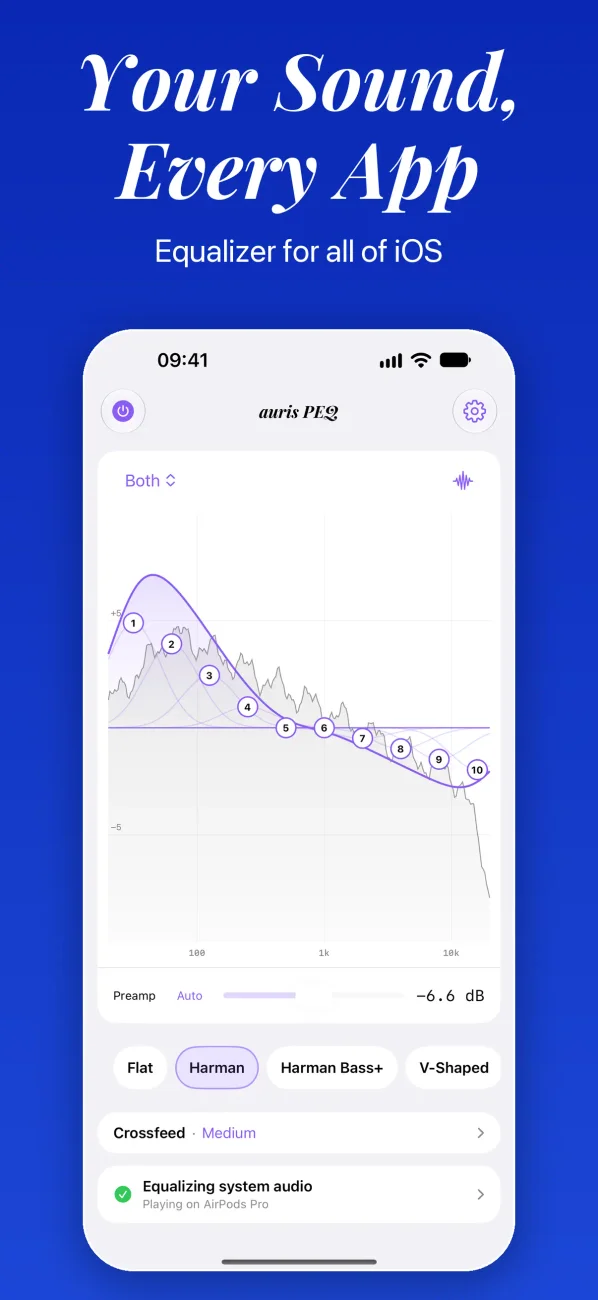
AurisPEQ is a system-wide equalizer for iPhone. It shows up in Control Center as an audio output, like a speaker. Pick it there, and the audio of your apps goes through your EQ before it reaches the headphones or speaker you were using before.
What you can do
• Shape the sound with 5 to 15 parametric bands per channel: frequency, gain and Q for each one, edited by dragging the curve or typing the values.
• Set each ear on its own: Both, Left or Right, plus a Balance control.
• See the music spectrum behind the curve, with a before and after view to compare.
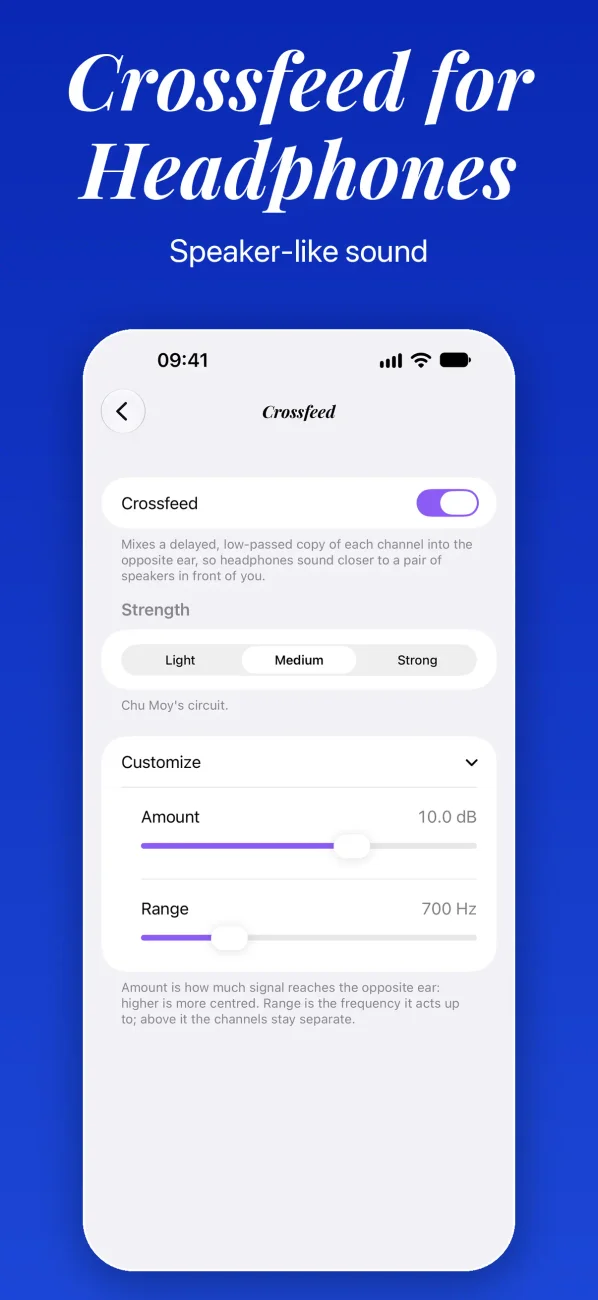
• Use crossfeed with headphones: it mixes a little of each channel into the other ear, so they sound closer to speakers in front of you. It pauses on its own when you play through speakers.
• Import your headphone correction from AutoEQ, Equalizer APO, Peace, squig.link and GraphicEQ files. Export your EQ as an Equalizer APO text file.
• Keep presets: built-in ones, your own and imported ones. Your own presets can sync across your devices with iCloud, if you turn it on.
• Each output remembers its own preset and crossfeed setting.
• Bypass the EQ and crossfeed with one tap, in the app or from Control Center. The audio keeps playing.
• A Home Screen widget switches presets without opening the app.
How it works
Keep AurisPEQ open or in the app switcher. If you swipe it away, the audio is not equalized until you open the app and pick AurisPEQ again. When you turn the equalizer off, the app stops processing and iOS can suspend it, so it uses no battery.
Good to know
• Requires iOS 27 or later.
• Some apps that play video can make iOS drop the connection, for example Spotify with Canvas on, or a YouTube video. In Spotify, turn Canvas off in the settings if this happens.
• AurisPEQ does not work through CarPlay yet.
AurisPEQ is free. Tips are optional, one-time, and unlock nothing: every feature is already yours. It is made by one person.
What’s new
Version 1.0.3 · Nov 19, 2026
• New small Home Screen widget: step to the next preset with a tap.
• Small interface improvements.
Thanks for using AurisPEQ!
App privacy
What LUIGI DI MAURO declares on the App Store about how this app handles data.
-
Data not collected
The developer does not collect any data from this app.
Privacy practices may vary, for example with the features you use or your age.
Information
- Seller
- LUIGI DI MAURO
- Category
- Music
- Version
- 1.0.3
- Updated
- Nov 19, 2026
- Released
- Nov 11, 2026
- Size
- 11.9 MB
- Requires
- iOS 27.0 or later
- Age rating
- 4+
- Price
- Free
- In-app purchases
- Yes
- Languages
- English, French, German, Italian, Japanese, Spanish
- Copyright
- © 2026 Luigi Di Mauro
You might also like
-
 EffectDeck100+ Effects for any player!
-
 HiByMusicMusic
-
 Equalizer & Bass Booster FXEQ, Volume Boost and louder
-
 Boom: Bass Booster & EqualizerOffline Music, Radio & Tidal
-
 PlexampFall in love with your music!
-
 Flacbox: Hi-Res Music PlayerEqualizer FX, Lossless Audio
-
 Volume Booster & EQ: BASSYBass Boost & Music Equalizer
-
 WiiM HomeMusic
-
 Equalizer - Volume Booster EQAmplify the sound! Music FX
-
 Bass Booster EQ + Volume BoostMusic Equalizer Audio Player